Look up specific Sheet in a Worksheet
Status: Closed · Asked by hone on · 0 views
I can't seem to find this. In Zapier I could find a Sheet in a Google Worksheet by using an event called 'Find Worksheet'. This gave me a specific Sheet ID that I could use for further updates e.g. Update row if row exists in SheetID 42432334.
To further illustrate if I have a main Worksheet file with different Sheets called Dogs, Cats, Birds and I have data I specifically want to look for in Cats.
I could say: "find Sheet ID for any sheet matching the text 'Cats'" - this would return the SheetID#, e.g 124323432
Does this make sense? Then I could say update a row in [SheetID: 124323432] which has the following value '[Date]' or similar.
I have the text value of the Sheet to search with but not the Google SheetID.
Hey @hone
To further illustrate if I have a main Worksheet file with different Sheets called Dogs, Cats, Birds and I have data I specifically want to look for in Cats.
I could say: "find Sheet ID for any sheet matching the text 'Cats'" - this would return the SheetID#, e.g 124323432
Regarding your concern to process the specific SpreadSheets' sheet, you can try the following workaround. which will only pass the data in the desired or selected Sheets.
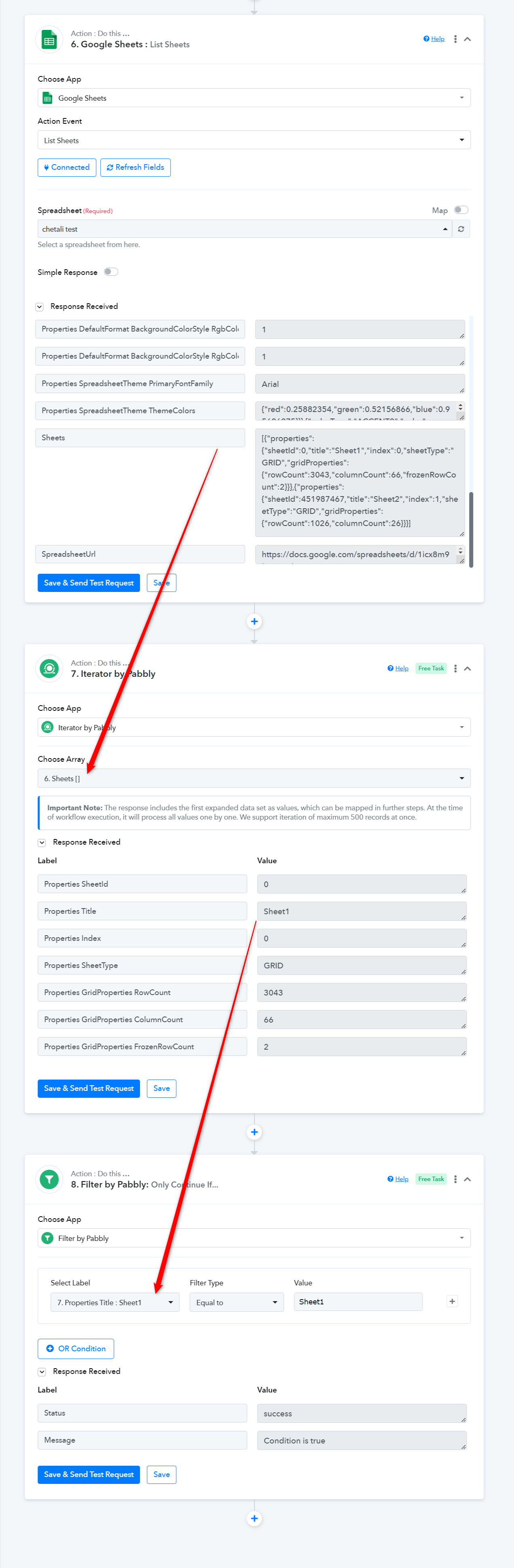
Thanks. There is no Sheets[] array in List Sheets result?
https://connect.pabbly.com/workflow/mapping/IjU3NjUwNTZjMDYzMzA0Mzc1MjZkNTUzYzUxMzMi_pc
Thanks. There is no Sheets[] array in List Sheets result?
Because you haven't captured the API response in advance format by toggling the Simple Resonse button.

Then try the given workaround accordingly.