MainWP API not getting JSON
Status: Open · Asked by FilioTech on · 0 views
Hi all,
Recently, I was trying to connect to MainWP Dashboard via API https://mainwp.dev/rest-api/ but for some reason Pabbly is not detecting output as JSON. Doesn't mater if de-select Simple Response, it always showing them as fields. I also tried adding header Content-Type: JSON but nothing.
However, after speaking with Fagun, who kindly asked me to check and was trying to help, I tested with postman.com and output as as JSON so it works okay.
There was similar questions asked on Facebook https://www.facebook.com/groups/193632914749672/search/?q=mainwp but without any answers.
I tried with Manoj Lk Private App but also setup my own API connection to check. And it doesn't matter what I do or click, it never outputs as JSON.
The reason for JSON output is as we want to grab all of the sites, and add them into another system.
Any help is much appreciated.
Hey @FilioTech
Seems like the API response that you are getting might not be in the key-value pair and because of that, the action step is not taking the response in advance format.
Further, the MainWP application wasn't integrated by the Pabbly team, so kindly contact the user who has shared the application with you.
Hi, sorry for the delay! For some reason, not getting email notification upon reply!
This has nothing to do with person creating private integration with MainWP on Pabbly
What I don't understand is, when you follow the exact steps on postman, connection, etc. I am getting JSON output, but with Pabbly output is row based. I've tested as well with my own API setup, always row based.
What you could suggest I should try?
Hey @FilioTech
If you want to capture the API response in the advanced format in JSON array, you need to toggle the "Simple Response" button and then press the "Save & Send Test Request" or "Re-Capture Webhook Response" from the action step & trigger event accordingly.

Hey @FilioTechIf you want to capture the API response in the advanced format in JSON array, you need to toggle the "Simple Response" button and then press the "Save & Send Test Request" or "Re-Capture Webhook Response" from the action step & trigger event accordingly.
Supreme,
I mention this earlier, this button doesn't make any difference to the output at all.
Hey @FilioTech
We only capture the response as the API sends the data in their format. If they pass the data in JSON format we would have captured it in the array format.
Any other reason why it would not be captured in array format? Somehow postman receive data in JSON but cannot get this in Pabbly?
Our tech team is checking on it and shall notify you with an update soon.
@FilioTech shared the solution with me. I am adding the same here for someone else facing the same issue.
By default, MainWP does not send the Array in the JSON so the users cannot use Iterator on the items.
Instead, if you do the full call with format=array and full_data=true. The array will be maintained and the iterator can be run on the incoming data which will be an array.
The full API request would look like this yourdashboard.com/wp-json/mainwp/v1/sites/all-sites?consumer_key=ck_xxxxxxxxxxxxxxxxxxxxxxxxxxxxxxxxxxxx&consumer_secret=cs_xxxxxxxxxxxxxxxxxxxxxxxxxxxxxxxxxxxx&format=array&full_data=true
Please my save and send test button isnt working, help
Attachments
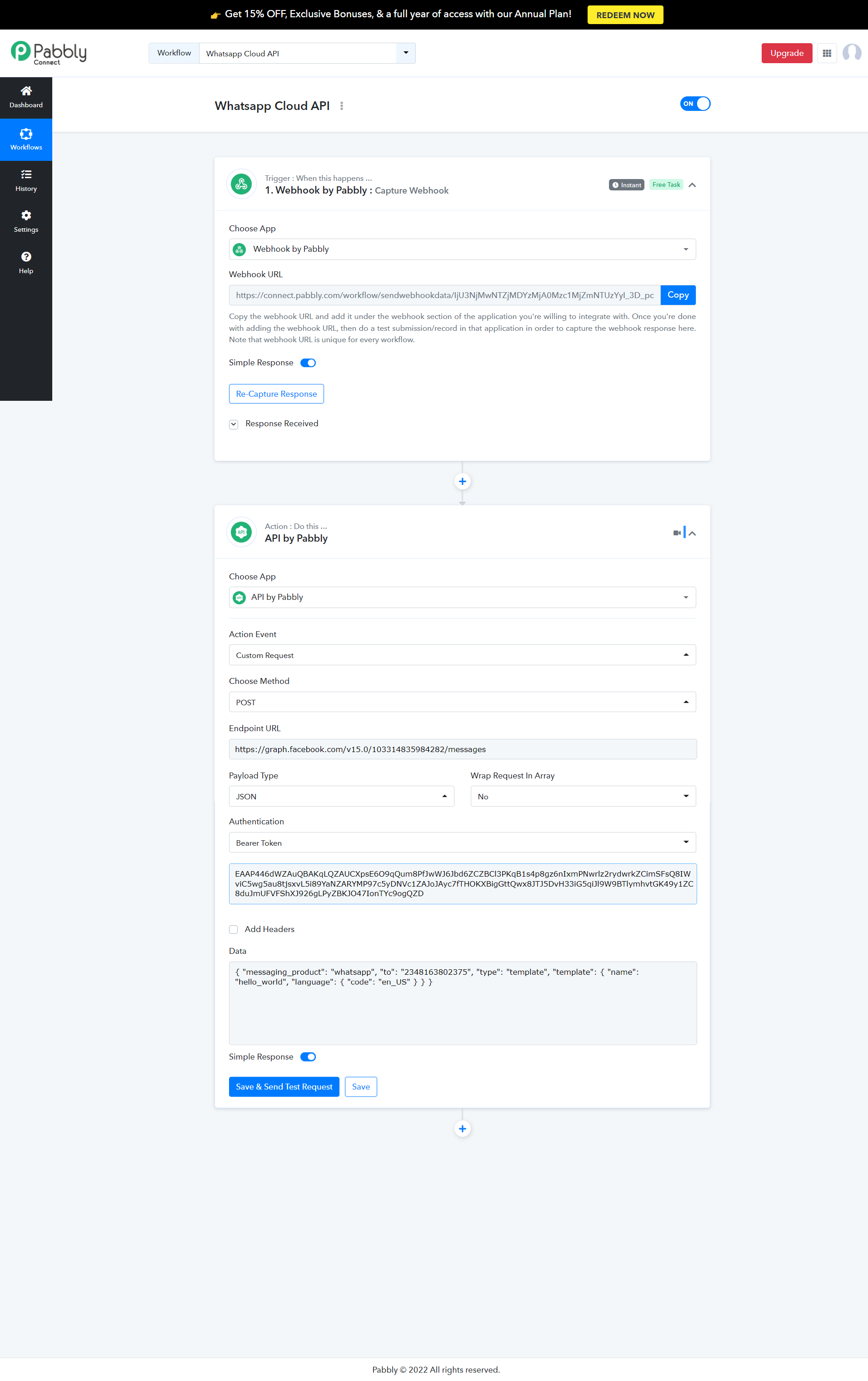
Hey @Salem
Could you please share your workflow with us in which you are facing the issue so that we can look into it and can guide you accordingly?
Hey @SalemCould you please share your workflow with us in which you are facing the issue so that we can look into it and can guide you accordingly?
https://connect.pabbly.com/workflow/share/AEhYalYBB2RfFQZsAEsBJlxIUlYIUQRnV04AEgQLBX1bFghjDUxcNglFAiBePwFgVRwJYwVZBjtdSQAEAFYJelxRBSpTTABdVGdRFAdYWnAAYg##
Thank you very much
I could send a video also if needed
Hey @Salem
Could you please try clearing your browser's cache memory once and then try again?
As we couldn't find any issue while using the "Save & Send Test Request" button.
Please kindly go through this video, thank you and Happy New Year
Please kindly go through this video, thank you and Happy New Year
Hey @SalemCould you please try clearing your browser's cache memory once and then try again?
As we couldn't find any issue while using the "Save & Send Test Request" button.
Hey @SalemCould you please try clearing your browser's cache memory once and then try again?
As we couldn't find any issue while using the "Save & Send Test Request" button.
https://www.loom.com/share/e9e48fc0fa814ccb973c26cc56bc2ed2
Hey @Salem
We couldn't see your video URLs in your reply. Since its length is way too long and it's not even opening.