Mapped Check Boxes Not Going Through
Status: Open · Asked by JasonTell7 on · 0 views
I have everything connected in my form, everything is mapping correctly, but when I have a box check in the form, that "check" is not transferring over to the CRM, even though it's mapping it.
Troubleshooting Workflow Integration Issues with Cognito Forms and Agent CRM ? - Watch Video
Hi @JasonTell7,
Please allow us some time to look into this concern. We will get back to you with an update soon.
us some time to look into this concern. We will get back to you with an update soon.
Thanks! :)
Hey @JasonTell7 !
Can you provide us with the screenshot of all the check fields you have which you want to use?
So we can check for a workaround and let you know about it.
Hey @JasonTell7 !Can you provide us with the screenshot of all the check fields you have which you want to use?
So we can check for a workaround and let you know about it.
https://www.cognitoforms.com/HealthMarkets1/HealthMarketsInitialInfo
There is a link to the form. I intend to add more check boxes on other forms, so if this is something you figure out, please let me know :-) Thanks! Let me know if there is anything else you need.

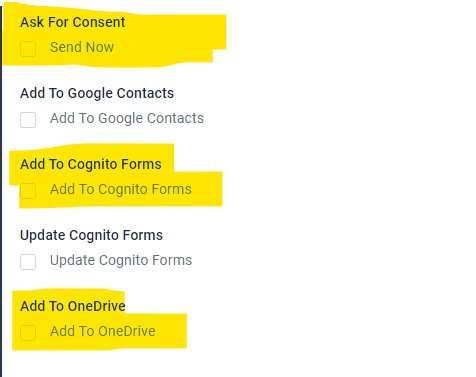
Hey @JasonTell7 !
If you map on the button, you will find that each check box has its own id-

You need to pass either the ID or {{pc_skip_field}} in it, in order to make it tick or not.
Here, as a workaround, you can try using the Lookup table or "Code by Pabbly" to add data inside the step by ON the map button and map the response to it.
You can check below on how Lookup tables work-
youtube.com/watch?v=0umsoycOlfo
Below you can check out how "Code by Pabbly" works-
youtube.com/watch?v=iNVjyBfwqno
You can use ChatGPT in case you need to get the codes.
Hope, this works for you.
Hey @JasonTell7 !If you map on the button, you will find that each check box has its own id-
You need to pass either the ID or {{pc_skip_field}} in it, in order to make it tick or not.
Here, as a workaround, you can try using the Lookup table or "Code by Pabbly" to add data inside the step by ON the map button and map the response to it.
You can check below on how Lookup tables work-
youtube.com/watch?v=0umsoycOlfo
Below you can check out how "Code by Pabbly" works-
youtube.com/watch?v=iNVjyBfwqno
You can use ChatGPT in case you need to get the codes.
Hope, this works for you.
Isn't there just a way to have a simple check box? I feel like it shouldn't be too hard to have a radio button, or check box mapped over. Isn't this something is done all the time?
Hey @JasonTell7 !
We are sorry, but no workaround on this except the one we have provided above.