Message Image via 360Dialog
Status: Closed · Asked by ojomenezes on · 0 views
I'm having problems with a message flow using BSP 360Dialog.
When I send only TEXT the message arrives correctly.
When I send a TEXT and IMAGE message, the message does not arrive at its destination.
I've already opened a call on 360dialog and they said the problem is in the webhook.. but I can't identify it.
Could you help me?
Osvaldo Menezes, Brazil
Hi @ojomenezes
Could you please let us know the exact workflow name to check the issue? Also when I checked your dashboard and found that you have consumed all your tasks. Kindly upgrade to Pabbly connect and enjoy the benefits.
Hello Kunal
Worflow is "SendWPPPhotos".
As for purchasing your product, I first need to be sure to operate the system correctly, knowing that it works.
After these tests, I will be able to hire the services.
Payment OK 1 month.. for test
Kunal
In tests with text.. to send and receive message are working correctly..
But the problem is just pictures.
In tests via Postman, I ran the command below and see the return.. Apparently it is connecting.
GET https://waba.360dialog.io/v1/configs/webhook
Result
"url": "https://connect.pabbly.com/workflow/sendwebhookdata/IjU3NjAwNTY0MDYzNDA0MzY1MjY0NTUzYyI_3D_pc"
}
Hi @ojomenezes
We have checked the workflow and found that before sending any image or text message you have to use "Send Template Message" action
, if the end user did not initiate the converstation with your whatsapp.
Once, the user started conversation with your WhatsApp then, only you can use this action step. This is already mentioned in the Important section below in workflow.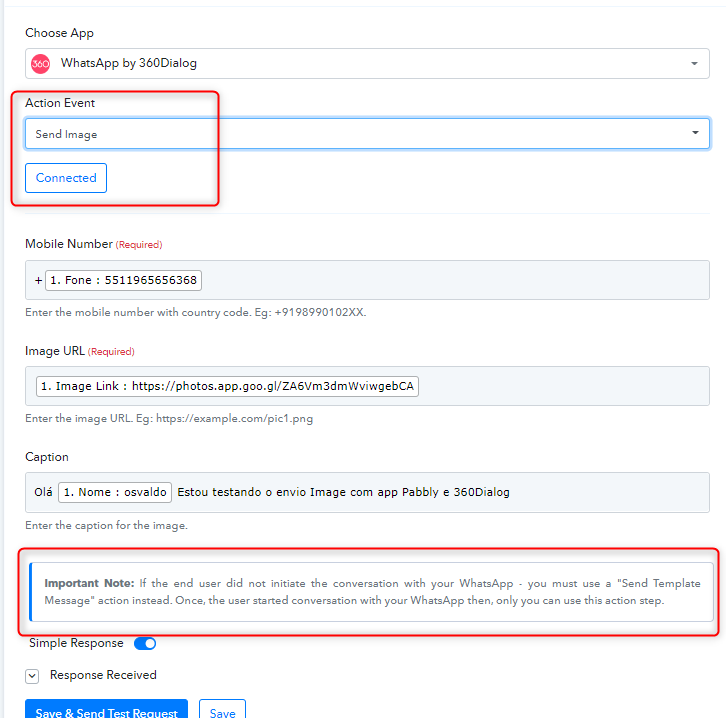
Thanks
Kunal.
the problem I'm having is sending with image / video (I haven't tested it yet)..
I saw that they replied that we have to use the 360Dialog template. But when I went to create the template I couldn't.. and I opened a ticket in 360dialog. see the image below, which I sent them.
Sending image by whatsapp with BSP 360Dialog
How I solved.
1) you must create a template with image type.
The "tip" is that the image link has to end with the name of the JPG or PNG file.. (see this video made available by 360Dialog staff - https://streamable.com/d22i07 )
2) when creating the workflow, always remember that the image link to be added to the flow must obey option 1 above
3) if you are the one initiating the conversation, you always have to use a template (text or image), never send conversation (text or image) if you have not started the conversation that whatsapp does not allow.
Case solved.
tks
Osvaldo Menezes, Brazil