Modify a date after Date/Time Formatter
Status: Closed · Asked by Quentin GRUN Prostart on · 0 views
Hello,
When I am receiving an order through my Woocommerce account, I am sending a Trello list to prepare the material automatically.
About the due date, I would have liked to get the order date and adding 2 days.
So by example : The created order is dated of the 8th of June 2023.
I would have liked to have a due date of the 8th of June 2023 + 2 days. So 10th of June 2023 at the end.
Today everything works great but I can only put the due date = order date (I am using Date/Time Formatter) so I can modify and respect what Trello needs.
For your information, Trello needs MM-DD-YYYY format and not MM/DD/YYYY as you put in commentary
If you can help me to find a way to do that it could be great !
Talk soon. Regards,
Quentin GRUN
Hey @koentinProstart,
You can get the desired result using a Text Formatter and a Date/Time Formatter. 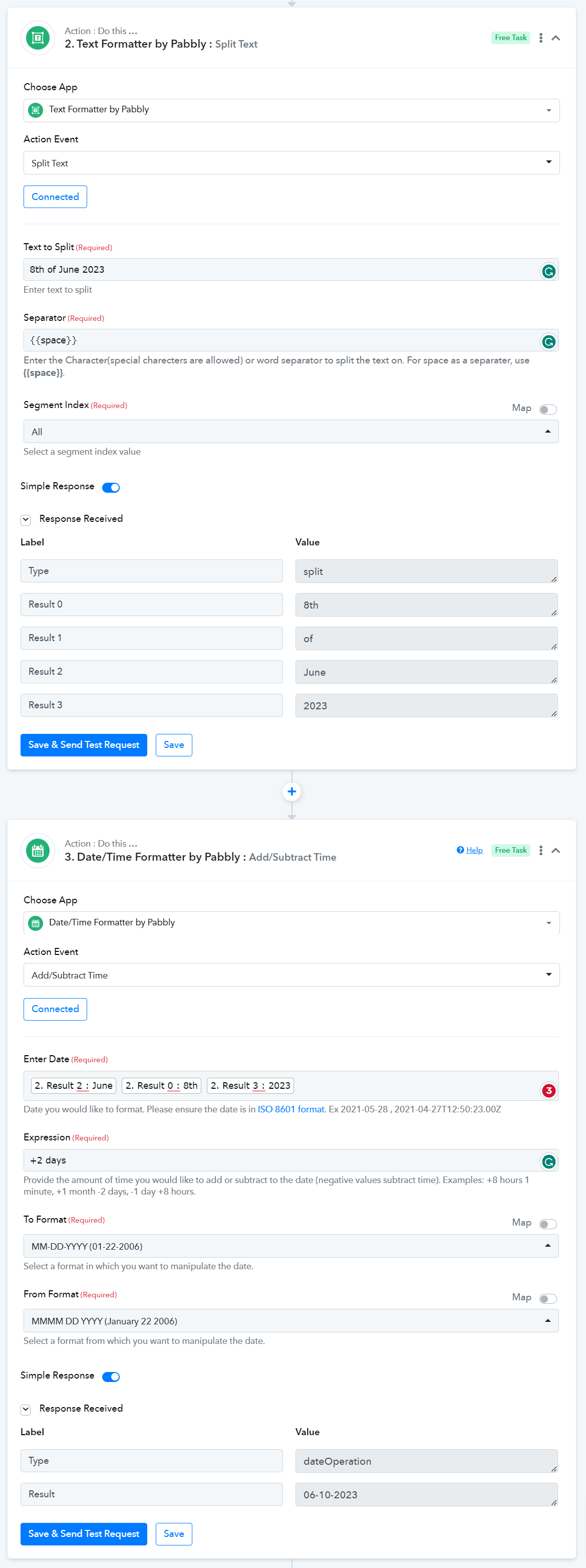
Hello ! I found my way to solve this little issue :)
I used DateTime Formatter / Modify Current Date
it works perfectly ! Thank you for your help !