My workflow doesn't run
Status: Closed · Asked by LP1607 on · 0 views
Hello,
Yesterday, I activated my workflow and I sent a form to check if it was working or not. In the morning, it was the case. However, when I tried several times during afternoon, it wasn't working and I don't understand why. I checked and each step works also alone.
Is it possible to help me getting through this problem ? Thanks in advance
Hey @LP1607
Can you please try capturing the webhook response again from your respective form and try the automation?
I hope this might help you out.
(You may watch the first part of the video to recapture the webhook response)
Hi sir , i started work floow but at the end this is result.What could be the problem?kindly help to solve
Label Value
Error Code 404
Error Message Not Found
Error Errors 0 Message Not Found
Error Errors 0 Domain global
Error Errors 0 Reason notFound
I want to work on auto bloging
Regards
Save & Send Test Request
Hi sir , i started work floow but at the end this is result.What could be the problem?kindly help to solveLabel Value
Error Code 404
Error Message Not Found
Error Errors 0 Message Not Found
Error Errors 0 Domain global
Error Errors 0 Reason notFoundI want to work on auto bloging
RegardsSave & Send Test Request
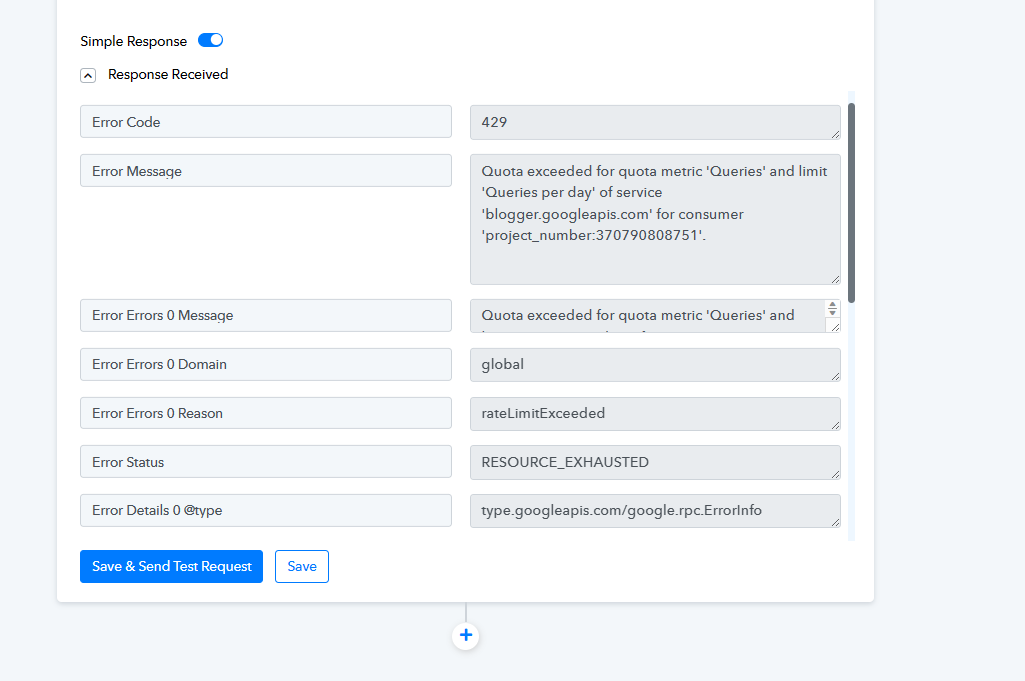
The error message you received indicates that you have exceeded the daily quota for API queries on your Blogger account, associated with the consumer 'project_number:3707908xxxxx.' To resolve this issue, you can consider the following steps:
1. Review your API usage: Assess the frequency and volume of API queries you are making. Ensure that your application is optimized to make efficient requests.
2. Upgrade your quota: If your current usage surpasses the allocated quota, you may need to consider increasing your API quota limits. You can do this through the Google Cloud Console or by contacting Google Support.
If you need further assistance or have any questions about these steps, please feel free to reach out.
This response conveys understanding, provides guidance, and offers support for addressing the quota exceeded issue.
https://support.google.com/blogger/?hl=en#topic=3339243