Need help in Clickbank==>>Aweber workflows
Status: Closed · Asked by guyo3008 on · 0 views
Hi,
I created two workflows for 2 Clickbank products. Each new sale on each should send the new subscriber details to a a specific Aweber list.
The problem is that I'm doing a test purchase on Clickbank but my email is not added to the relevant Aweber list. I tried this for both products.
Can anyone show me what I did wrong or missed in my workflow settings?
Thank you.
Why do you close this when no one has yet to reply?
Don't you guys have a chat
Hey @guyo3008
I created two workflows for 2 Clickbank products. Each new sale on each should send the new subscriber details to a a specific Aweber list.The problem is that I'm doing a test purchase on Clickbank but my email is not added to the relevant Aweber list. I tried this for both products.
Can anyone show me what I did wrong or missed in my workflow settings?
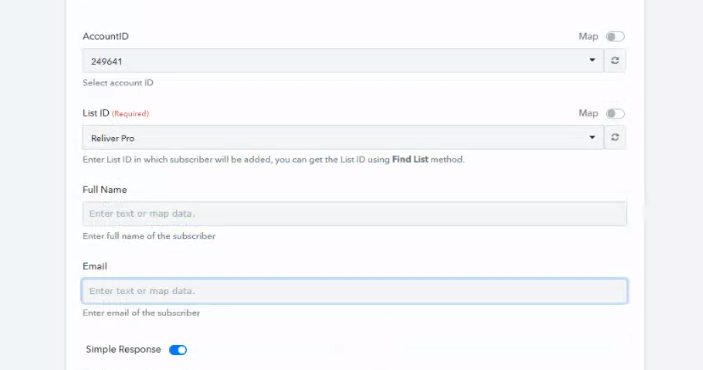
In the Aweber action step, you need to map the email address at least to make this step work.
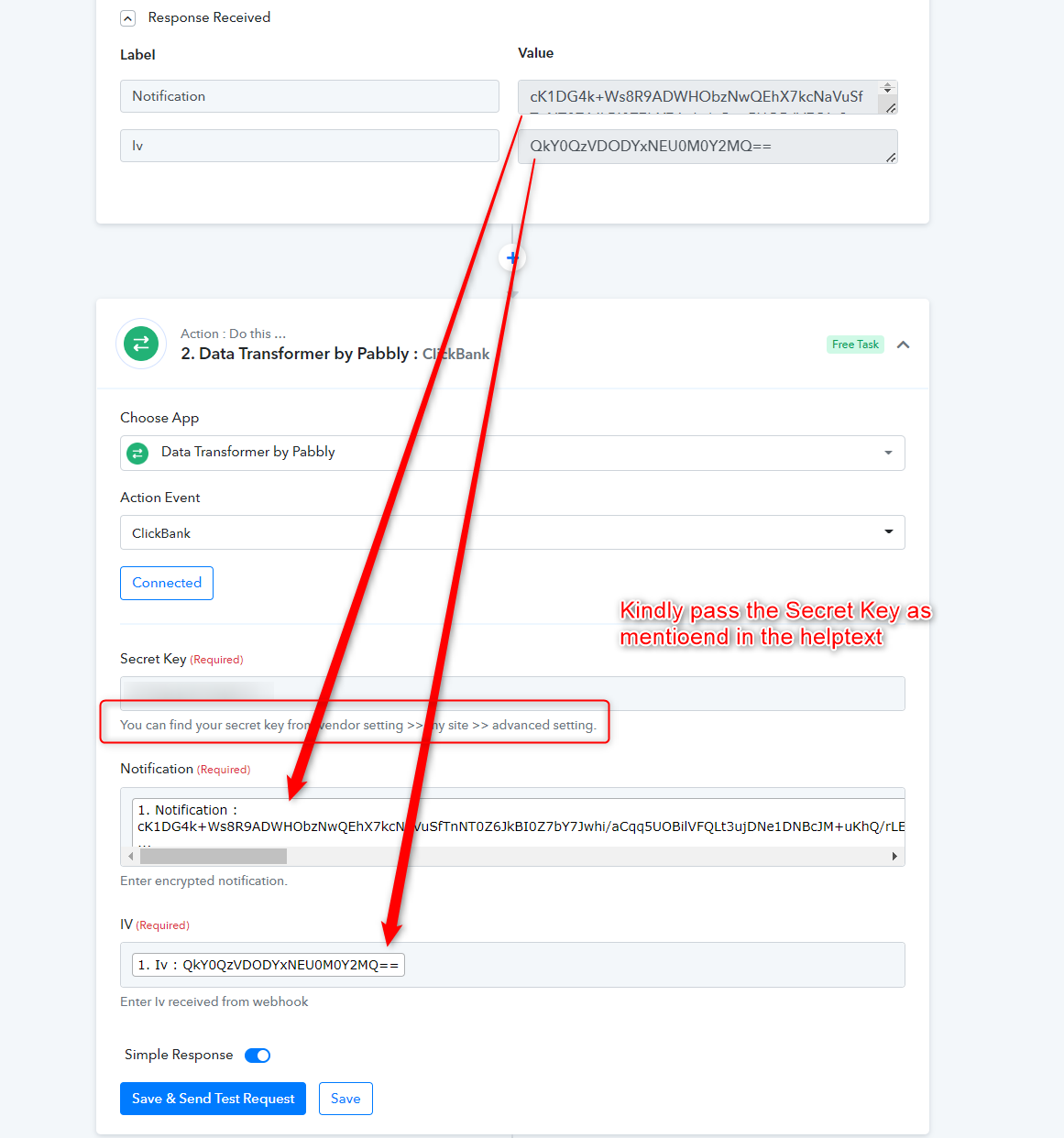
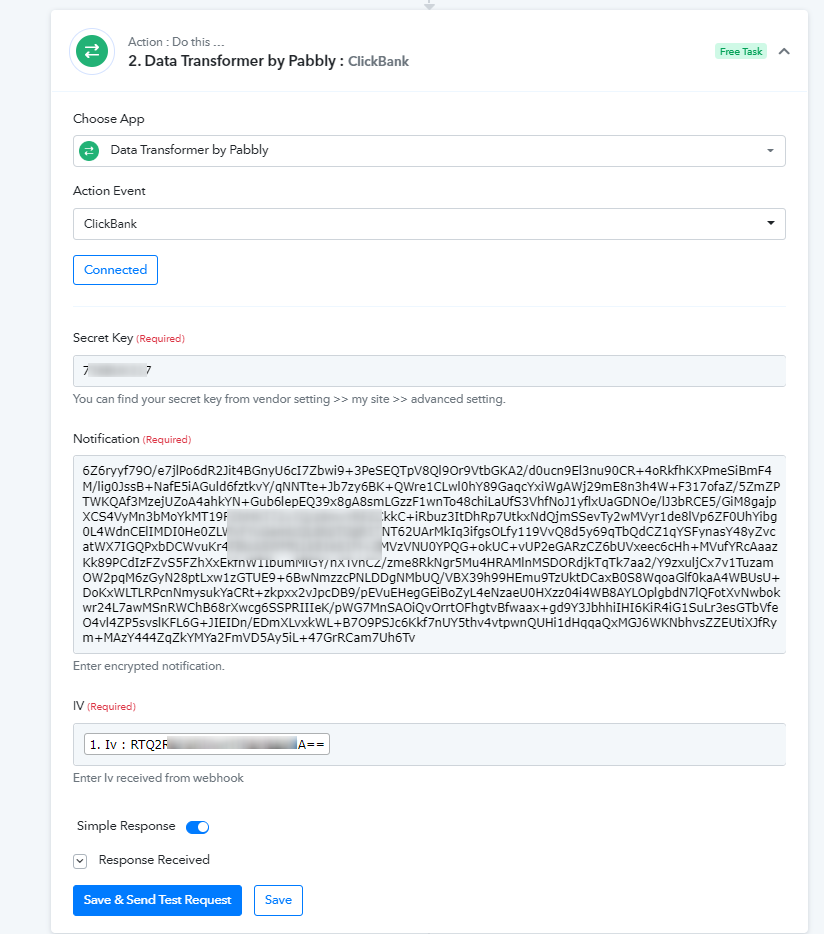
Further, the email address and other details you will get from the ClickBank: New Sales trigger response whereas its response can be further processed with the help of the Data Transformer by Pabbly: ClickBank action step.
Hi,
Why do I need to enter the email address if I want that information to be taken from the Clickbank order form once someone has purchased...
I'm not sure I understand.
Thank you for your help.
Hey @guyo3008
By getting an email address, I mean to retrieve the data from the CliclBanks trigger response, you have to perform a certain action step.
Since click bank only sends the relative data in such a manner only.
Please follow the action step as mentioned in the trigger event or from our previous message.
OK thank you. I did that and it said "success". Still don't get any email added to Aweber. Can you check my workflows please again?
Thanks!
Hey @guyo3008
Kindly give your workflow a try and let us know if that works for you.
Hi,
Thank you. Still no subscribers added to the relevant Aweber lists. Can you please go over the workflows to see whether I did anything wrong?
Hey @guyo3008
To add the subscriber in Aweber, you need to map the Full name and/or Email address in the action step.
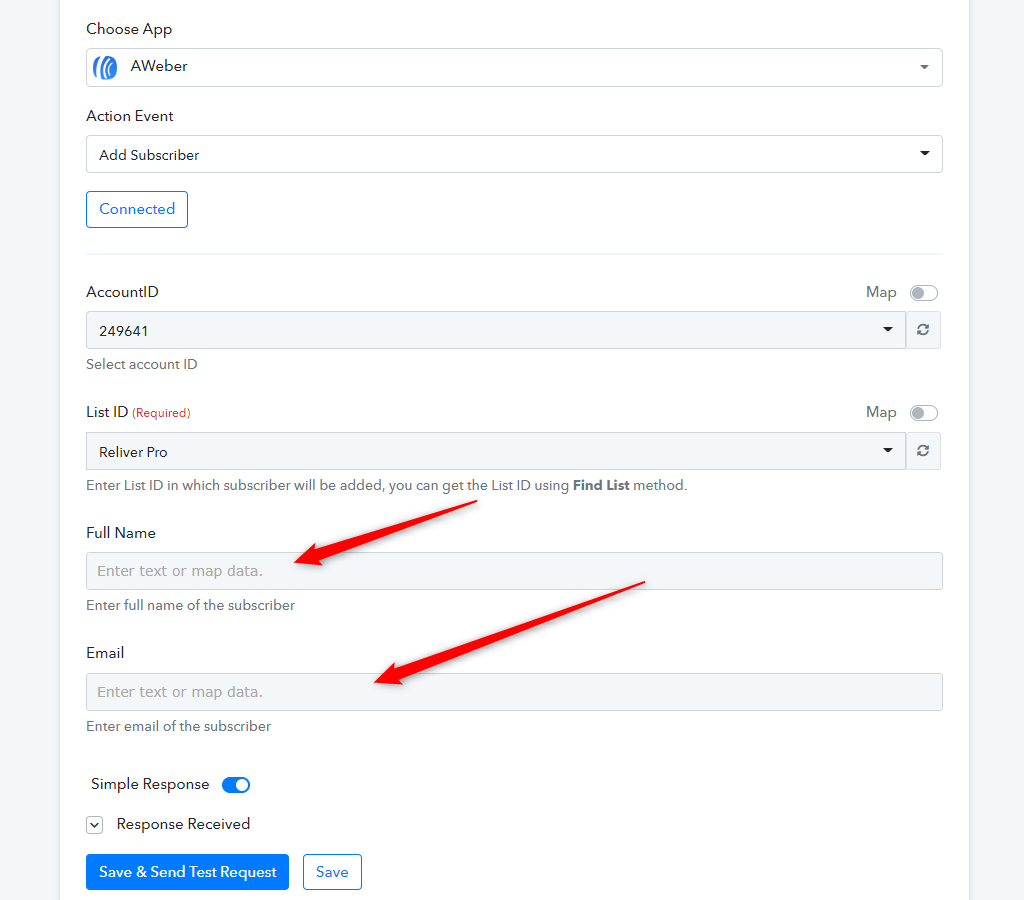
I'm not sure I understand: leave the full name and email boxes empty in the Aweber settings? Isn't this info supposed to be taken directly from the Clickbank order page?
Thank you.
Hey @guyo3008
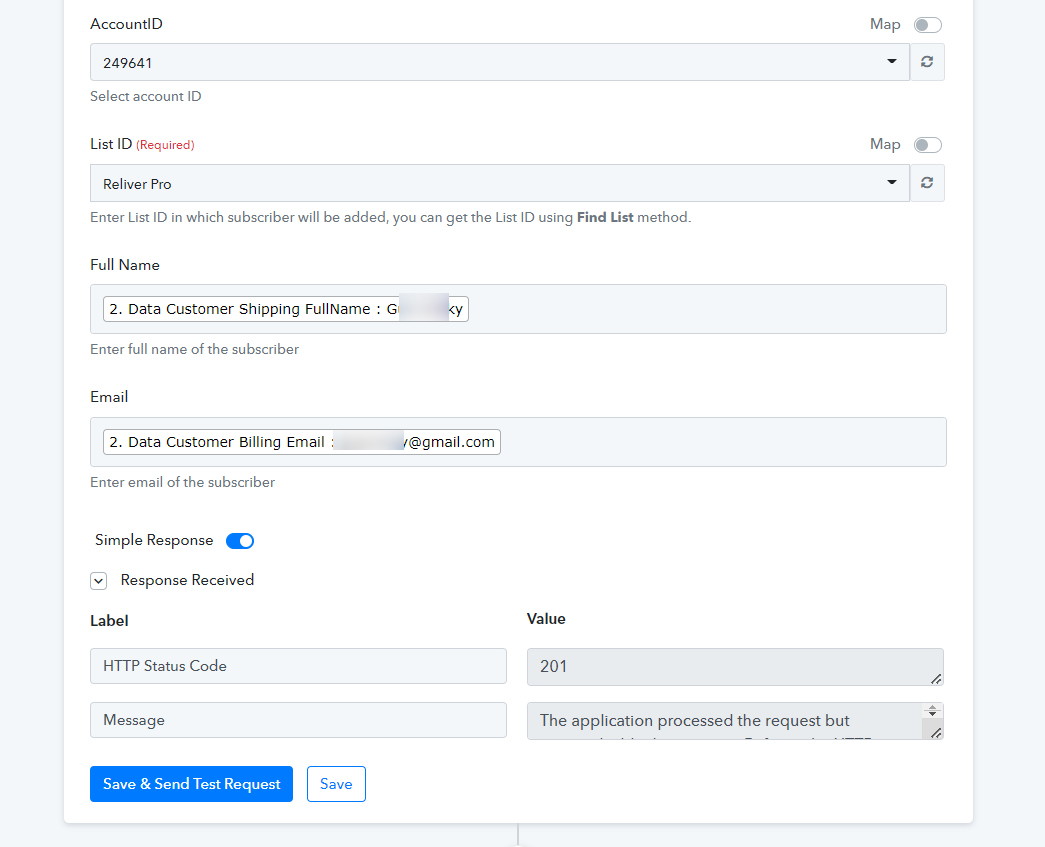
We have already mapped the data in the Aweber action step and it shall work accordingly.
Please give it a try and let us know if that works for you.
HI, I tried to purchase Reliver Pro and that was not added to the list. I received the following message:
[JUSTIFY]Hello Guy Last Name,
This email is to notify you that for the workflow "reliver pro" , a recent task was not executed due to following error -[/JUSTIFY]
Task History ID: IjIwMTAxNjQzOSI_3D
Step Name: AWeber > Add Subscriber
Task Error Detail:
{
"error > status": 400,
"error > message": "Invalid email address.",
"error > type": "BadRequestError",
"error > documentation_url": "https://labs.aweber.com/docs/troubleshooting#badrequest"
}
Please help.
Thank you.
Hey @guyo3008
[JUSTIFY]Hello Guy Last Name,This email is to notify you that for the workflow "reliver pro" , a recent task was not executed due to following error -[/JUSTIFY]
Task History ID: IjIwMTAxNjQzOSI_3D
Step Name: AWeber > Add Subscriber
Task Error Detail:{
"error > status": 400,
"error > message": "Invalid email address.",
"error > type": "BadRequestError",
"error > documentation_url": "https://labs.aweber.com/docs/troubleshooting#badrequest"
}
We have already mapped the data in the Aweber action step and it shall work accordingly.
Please give it a try and let us know if that works for you.
Hi,
Thank you for your help.
Now I made a new workflow called Acne No More. Can you please mapped the data in the Aweber action step so it can work properly like the other two?
Thanks!
Hey @guyo3008
Now I made a new workflow called Acne No More. Can you please mapped the data in the Aweber action step so it can work properly like the other two?
As we can see from your workflow you have already mapped the desired field correctly, kindly give it a try and let us know if that works for you.
Hi,
I tried again and I'm not seeing my email added to the list. Can you please go over the workflow 'acne no more' and see what is missing ?
Thanks!
And this the error I received:
Task Error Detail:
{
"error > status": 400,
"error > message": "Invalid email address.",
"error > type": "BadRequestError",
"error > documentation_url": "https://labs.aweber.com/docs/troubleshooting#badrequest"
Hey @guyo3008
Seems like you might be statically passing the Id in the action step and because of that, you were getting the BadRequrestError.
Though we have corrected it again and it is working fine now.
Hi,
I have now checked purchase with 2 different emails again. Both are added to the Aweber list but as 'unsubscribed' ??? This is quite weird. Can you check why this happens?
Thanks!
Hey @guyo3008
We have tested the same at our end and the contacts are getting added to the list with the Default status of "Pending".
Perhaps the changes could have been done from your end only.
Kindly cross-check again and try the complete automation.
Hi,
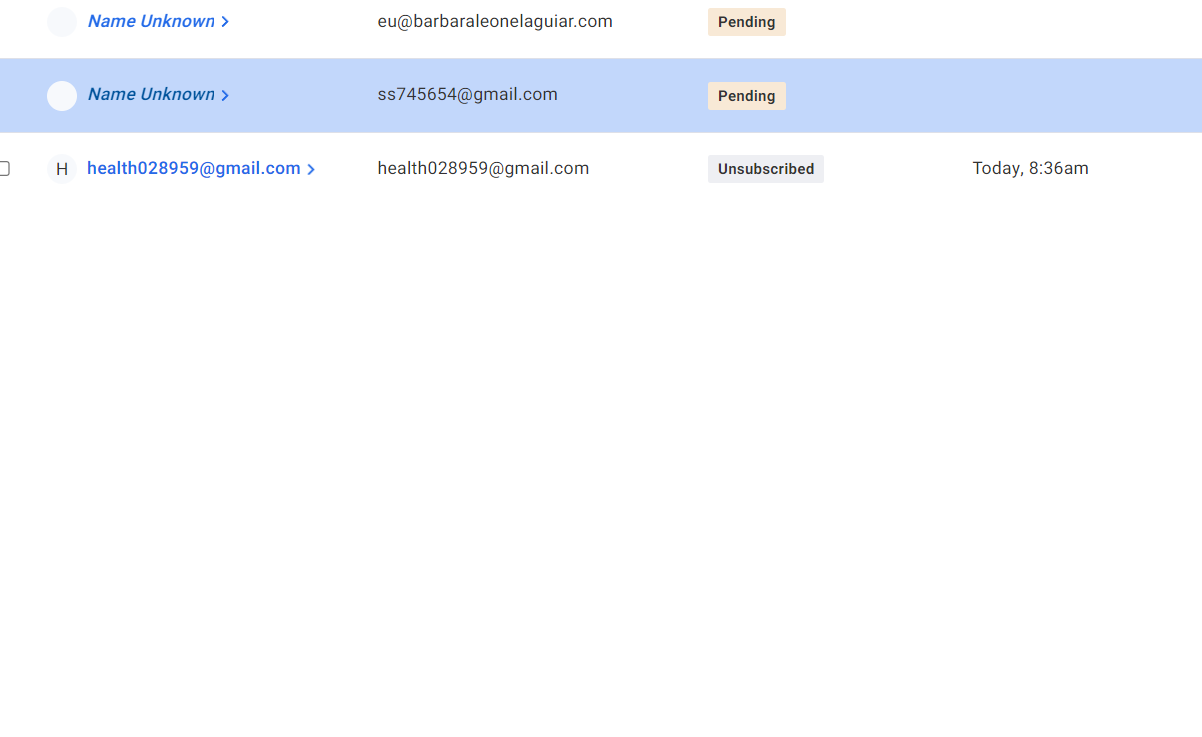
I tried again with another email address ([email hidden]) and I was added automatically as Unsubscribed(attached screenshot). I didn't receive any subscribe message to my email. I wonder what causes it to become unsubscribed right from the start?
Thank you for you support!
Attachments
Hey @guyo3008
We have tested the same at our end and the contacts are getting added to the list with the Default status of "Pending".
If the user whom you have added doesn't accept the request at their end then it will automatically be considered by Aweber as "Unsubscribed".
Kindly cross-check again and try the complete automation by accepting the summy subscriber's request.
OK, I deleted the workflow and recreated one again.
Then tried logging in with my email: [email hidden]
I am not seeing myself in aweber and I got this message in my email:
[JUSTIFY]Hello Guy Last Name,
This email is to notify you that for the workflow "Acne No More" , a recent task was not executed due to following error -[/JUSTIFY]
Task History ID: IjIxMTc0ODc0NyI_3D
Step Name: AWeber > Add Subscriber
Task Error Detail:
{
"error > status": 400,
"error > message": "Invalid email address.",
"error > type": "BadRequestError",
"error > documentation_url": "https://labs.aweber.com/docs/troubleshooting#badrequest"
}
Can you tell me what's wrong with my email? Maybe you need to remap this workflow again?
Thank you for your continued support.
Hey @guyo3008
As we can see from your respective workflow, you haven't mapped the notification from the above trigger step.
And because of that, you get the error in execution. Kindly correctly map the Notification from the Clickbank trigger step.
Thanks so much. It works now!