simcalister
Member
- Your Workflow URL
- https://connect.pabbly.com/workflow/share/C0NQYl8IUjECSAdtBlkGIQkdV1MEXgI-XEUGFFFeXSUGSwhNBURYMgxAB21RHlU0VB0DaQ5SVG4AFAcDBFIFdlZMAT0GBVIoBktVLgFIDT4LVVB4Xz4#
- Consent to Access & Modify
- I authorize Pabbly Support to log in to my account and make changes to the specified workflow for troubleshooting.
Hello,
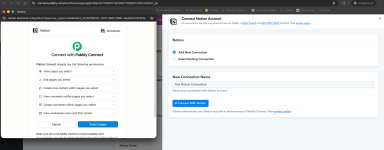
I want to set a new Notion connection, but do not get prompted to enter the Token. Has something changed on how connections are made?
I seem to have a tangled mess of Notion connections and keep getting 401 errors on workflows. I attempted to create new connections (one for each database), but they all end up connecting together anyway.
The workflow URL below should only be connected to the Deep Work database. Whenever I update the connection on any other workflow, that database connection carries over.
I want to set a new Notion connection, but do not get prompted to enter the Token. Has something changed on how connections are made?
I seem to have a tangled mess of Notion connections and keep getting 401 errors on workflows. I attempted to create new connections (one for each database), but they all end up connecting together anyway.
The workflow URL below should only be connected to the Deep Work database. Whenever I update the connection on any other workflow, that database connection carries over.