Not Able To Format Currency Using number Formatter
Status: Closed · Asked by ANONARAY on · 0 views
Hey Team Pabbly, this issue is regarding my Workflow "RazorPay To Convertkit - Live Masterclass Registrant"
I am capturing payment with GST
So the total payment is INR 588.82
I am not able to format the currency to this format
I am getting dots and commas in the wrong places
Need your assistance
Hey @ANONARAY
Could you please share the respective workflow with us in which you are having such an issue?
Hello @Supreme
Here is the workflow https://connect.pabbly.com/workflow/share/WhIFN1EaUjIETVUvBkFWNwgfBwRUHlQCAWYIGg##
You can try this -
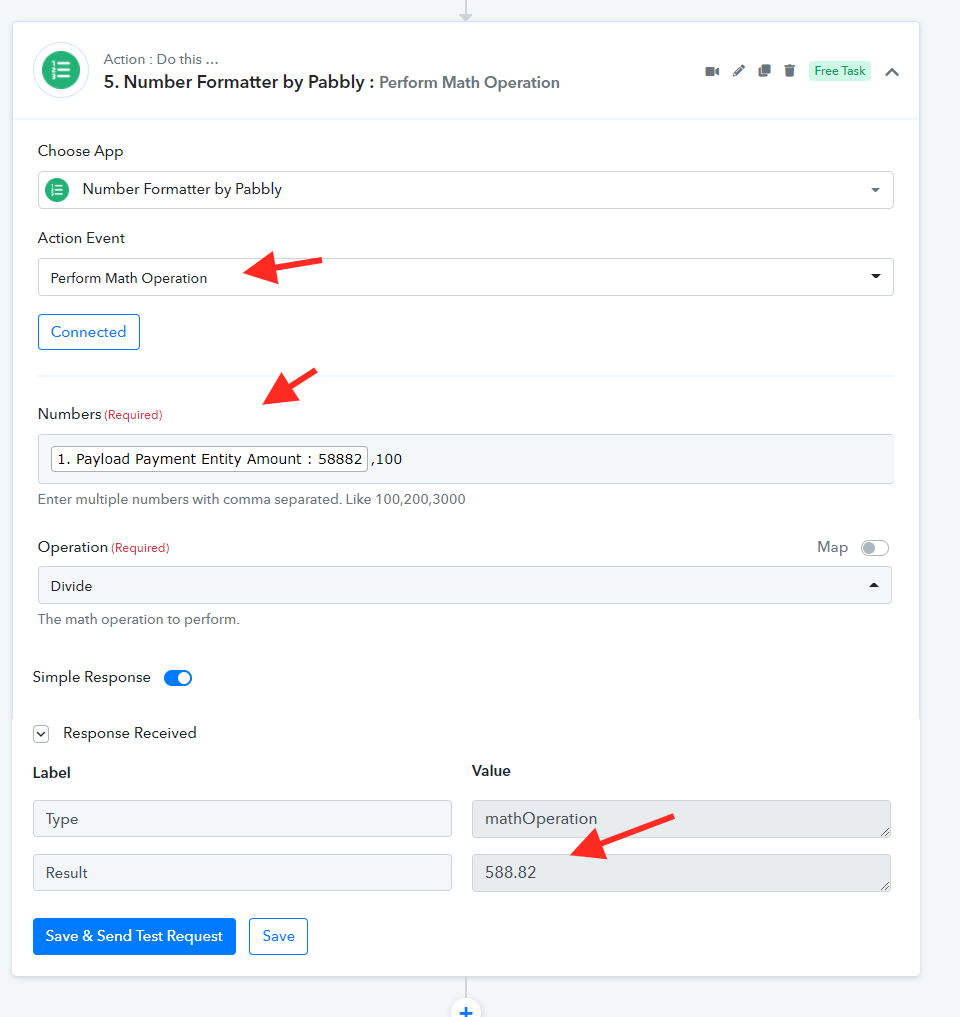
Thank you so much @Supreme
It was indeed helpful
I would also like to ask another question here
How could I split the country code from the phone number
For example +919012345678 to '91' and '9012345678'
How could I split the country code from the phone number
For example +919012345678 to '91' and '9012345678'
Check this thread which help you for sure - https://forum.pabbly.com/threads/how-to-extract-phone-number-from-the-user-submitted-numbers.38/
Check this thread which help you for sure - https://forum.pabbly.com/threads/how-to-extract-phone-number-from-the-user-submitted-numbers.38/
Thank you so much @Pabbly
Though it took some trial and error
But finally, I was able to create a Number Formatter