Arjun Sharma
Member
- Your Workflow URL
- https://connect.pabbly.com/workflow/mapping/IjU3NjcwNTZkMDYzNDA0MzY1MjZlNTUzMzUxM2Ei_pc
- Your Task History ID
- https://connect.pabbly.com/workflow/mapping/IjU3NjcwNTZkMDYzNDA0MzY1MjZlNTUzMzUxM2Ei_pc
- Consent to Access & Modify
- I authorize Pabbly Support to log in to my account and make changes to the specified workflow for troubleshooting.
Hi Team,
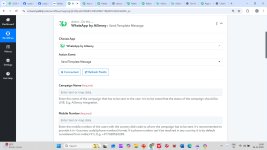
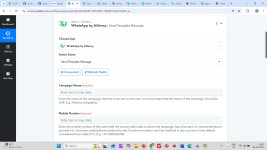
I am using AiSensy, but in Pabbly Connect I can only see the old connector “WhatsApp by AiSensy”.
I need the NEW “AiSensy” connector which supports WhatsApp Template Message sending and shows the Template dropdown.
Please enable the new AiSensy integration for my Pabbly Connect account.
Thanks!
I am using AiSensy, but in Pabbly Connect I can only see the old connector “WhatsApp by AiSensy”.
I need the NEW “AiSensy” connector which supports WhatsApp Template Message sending and shows the Template dropdown.
Please enable the new AiSensy integration for my Pabbly Connect account.
Thanks!