Pabbly Automation - Gmail Integration Issue: Emails Not Showing in Inbox
Status: Open · Asked by harsh40413 on · 0 views
Hey everyone,
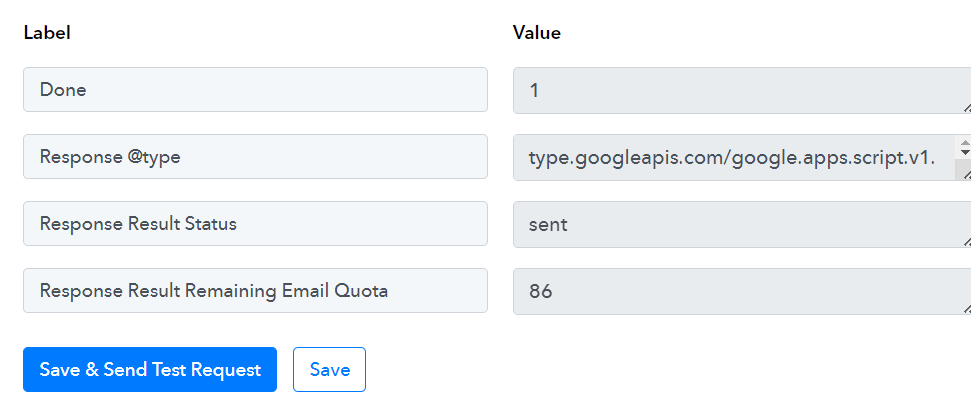
I recently integrated Gmail with Pabbly automation, and it seems to be functioning correctly. I'm getting success messages stating "message sent successful" and it shows I have emails remaining for the day. Additionally, Gmail's "sent" folder confirms the emails were sent. However, these emails are nowhere to be found in my recipient's inbox.
Is there a potential issue here, or am I missing something?
Here's what I've observed:
- Pabbly: Success message ("message sent successful") with remaining email quota.
- Gmail: Emails appear in the "Sent" folder.
- Recipient Inbox: Emails are missing.
Any insights or troubleshooting tips would be greatly appreciated!

Hi @harsh40413,
Please check the SPAM folder of your recipient email address; it's possible that emails are being delivered to the SPAM folder.
Hi @harsh40413,Please check the SPAM folder of your recipient email address; it's possible that emails are being delivered to the SPAM folder.
Already checked everywhere, but it's still not there.
Could you please share the Workflow URL in which you have this concern?
Could you please share the Workflow URL in which you have this concern?
this is my workflow share url - https://connect.pabbly.com/workflow/share/CEBWZANUA2BTGVI4D1wAJwAUCg4HXghoUktSQAMMUysATglcVxYAaglFAmhXBFIzXxZXPVINA2ZYTAIGVwEAc1JcVUcDAFwmVxpSKQBNCzgIVlZ-A2I#
this link i am using to open the workflow in my browser - https://connect.pabbly.com/workflow/mapping/IjU3NjUwNTY5MDYzZjA0MzU1MjZmNTUzNDUxM2Ei_pc
this email i used to send email throuth gmail app - [email hidden] and this email i tried to recive emails [email hidden] also i have tried diffrent email but it is same issue i am not able to get any emails on my side not even in spam folder
This is my last
Task History ID -
IjU3NjMwNTY1MDYzNTA0M2Q1MjZlNTUzMDUxMzc1MTY0NTQzNCI_3D_pc
Executed at
Mar 23, 2024 05:50:09, (UTC+00:00) America/Danmarkshavn
Please allow us some time to look into this concern. We will get back to you with an update soon.
Please allow us some time to look into this concern. We will get back to you with an update soon.
Any Update?
To ensure you receive all important communications from us, we have taken the following steps:
- Sender Authentication: We have verified that the email is being sent from a verified email address associated with our Google Workspace account. This ensures that the sender's identity is legitimate.
- Content Filtering: We have reviewed the email content to ensure it does not trigger any spam filters or content filters. Our aim is to provide you with valuable and relevant information without any disruptions.
- IP Reputation: We have checked our IP address against various blacklists using tools like MX Toolbox to ensure that it is not listed. This helps prevent any potential blocks by recipient email services.
- Sender Reputation: We have confirmed that our email reputation is clean by checking our domain on SenderScore.org. This ensures that our sending practices are trustworthy and reliable.
- SMTP Configuration: We have double-checked our SMTP settings to ensure that all parameters, including hostname, port, encryption method, and login credentials, are correctly configured.
Despite these efforts, if you continue to experience any issues receiving emails, please contact the Google Workspace team.