

Pabbly Connect Not Working - Facebook to Beehiiv

Your Task History ID
IjU3NjUwNTZkMDYzMjA0M2M1MjZkNTUzNjUxM2I1MTZiNTQzMDBmMzYi_pc
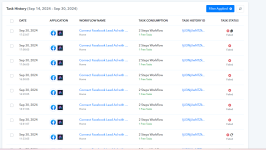
Can you please help. I have a leads ad campaign out there on Facebook but I can't get this connection to Beehiiv to work. I had it in place for several months but then suddenly I started having problems and nothing was working. Please advise.

There is more than one Task History ID but I referenced one below. Thanks
 

Attachments

  • Screenshot 2024-09-30 194502.png
    Screenshot 2024-09-30 194502.png
    112.9 KB · Views: 94

Preeti Paryani

Well-known member
Staff member
Hello @gsanders7136

We’ve reviewed your workflow, and based on the error message: 'Error validating access token: The session has been invalidated because the user changed their password or Facebook has changed the session for security reasons,' it appears that your connection with Facebook has expired. As a result, the Beehive action step is not receiving the mapped field, which is causing the error.

Please make a new connection with Facebook and try executing the workflow again using the new connection and let us know if it works for you.
 

ArshilAhmad

Well-known member
Staff member
It seems you are still using the old connection. Please select the latest connection, then 'Save' it, click on 'Save & Send Test Request', and wait for a new lead to be captured. This should fix the issue you are encountering.
1727814513952.png


1727814628597.png
 
Top