Pabbly Connect Task Clarification
Status: Closed · Asked by archit on · 0 views
Hi,
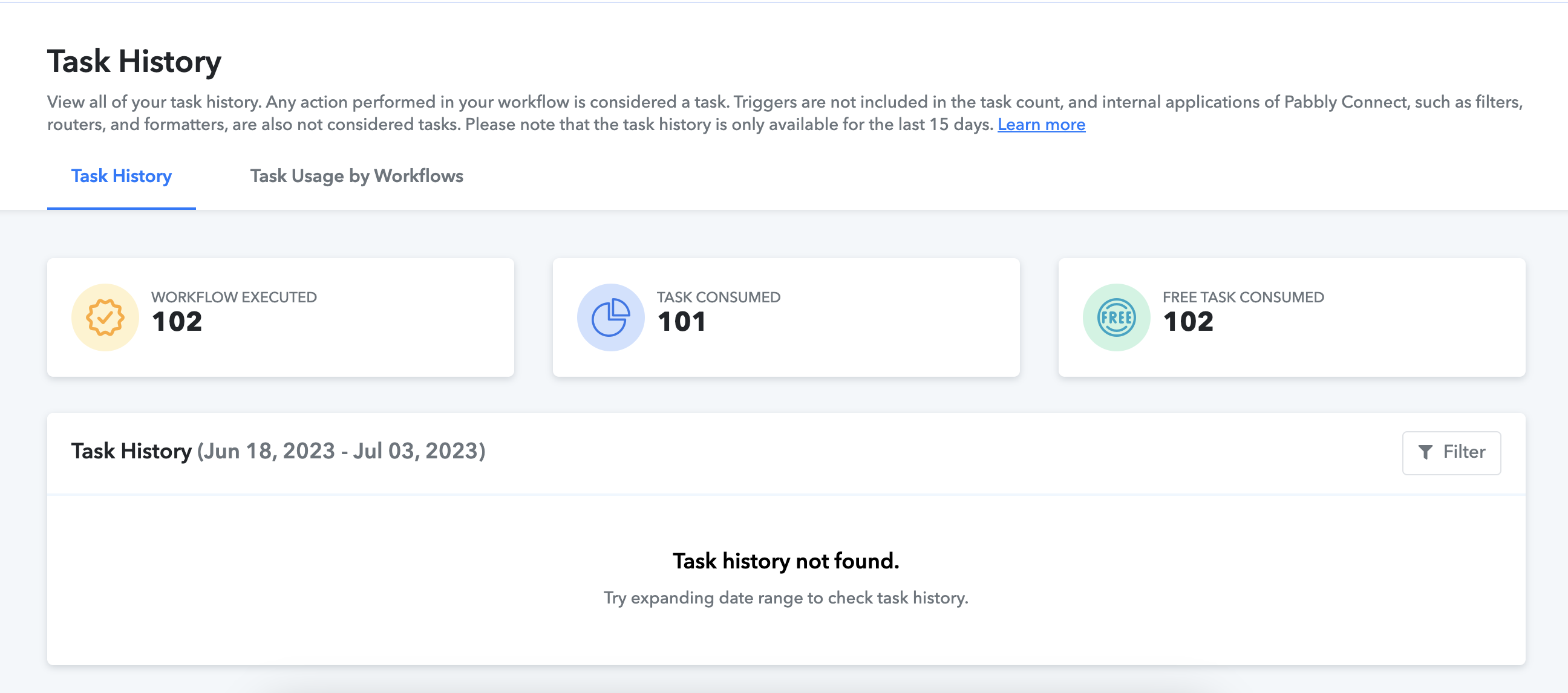
I just wanted to understand what is a "Task" and How is it being calculated? Because currently I have just built a flow and it shows me that I have used more than the allotted tasks.
Additionally, it shows no history.
Attachments
Hello @archit
Here's the definition of the task -
Any action being performed inside your workflow is considered a task. Triggers are not calculated in the tasks. Only the action steps are calculated in the task counts. Additionally, internal tasks of the Pabbly Connect such as Filter, Router, Formatter, etc are not counted as a task.
Like if you send one lead from Facebook Lead Ad to MailChimp, it will be counted as a single task. If you have a multi-step automation workflow, it will be counted depending upon the number of action steps. For example: If you send one lead from Facebook Lead Ad to MailChimp and then send the same lead to Google Sheets. It will be counted as 2 tasks -
youtube.com/watch?v=YxK95UMwTD8
It would be great if could take some time and watch the three videos for the Pabbly Connect overview. They will clear all your doubts about how Pabbly Connect works -
Check all demos here - https://www.youtube.com/channel/UCVA5GKy8qpDxQR5xSt_zcJg
Hi Arshita,
Why is it that my task credits are all used? and it shows no history? Is it some glitch?
Please try performing a hard refresh of your page or clearing your browser's cache and cookies. After doing so, please check if you are still facing the issue.