Pabbly Connect webhook to GHL & ClickUp connection only works once...
Status: Closed · Asked by robertkennedy3 on · 0 views
Hi...
I have an automation setup so that when I create a task in GHL, it creates a new task in a specific list in ClickUp!
My issue is that once I create a task in a contact in GHL, the automation won't send another task for that contact to ClickUp. If I create a new task for a new contact, it works fine. But, it won't create more than one task for a contact.
Ultimately, I want to create am automation that works in the opposite direction as well (I click complete in ClickUp and it auto-completes in GHL.
Any help?
Hey @robertkennedy3
In the Foder field of the Task Updated trigger event, if you do not want to select folder name or list name then turn ON the Map button corresponding to the field and provide this value with quotes in the respective fields "{{pc_skip_field}}", as we can see you have skipped passing the double quotes.
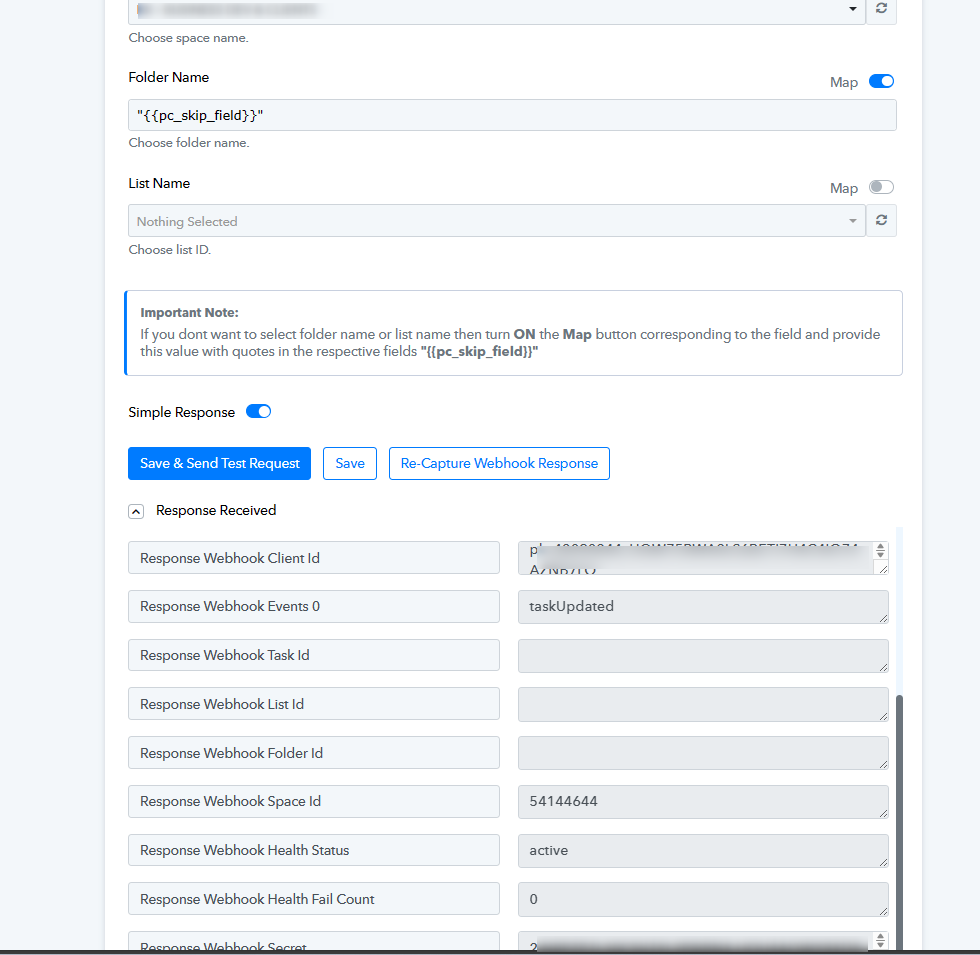
Hey @robertkennedy3In the Foder field of the Task Updated trigger event, if you do not want to select folder name or list name then turn ON the Map button corresponding to the field and provide this value with quotes in the respective fields "{{pc_skip_field}}", as we can see you have skipped passing the double quotes.
Hi...this looks like you are addressing the issue of sending the completing back to GHL from ClickUp!
But, this doesn't address the issue of only being able to create ONE task per contact.
How can I pass through multiple tasks for each contact?
RK3
My issue is that once I create a task in a contact in GHL, the automation won't send another task for that contact to ClickUp. If I create a new task for a new contact, it works fine. But, it won't create more than one task for a contact.
Can you please share the workflow URL once in which you have tried so that we can look into it?
Can you please share the workflow URL once in which you have tried so that we can look into it?
https://connect.pabbly.com/workflow/share/WxMHNQNUAGMASlI4UwBTdF9LUlZXDgBhUUgCEF1SVi5RHwNGVxYPZQ5CAyEHXARlA0pXPQBfVDUOGgIGCF4FdlZMCQtRUgF7VRgEfwFIW2hbBQcvA2I#
That's what I'm using
My issue is that once I create a task in a contact in GHL, the automation won't send another task for that contact to ClickUp. If I create a new task for a new contact, it works fine. But, it won't create more than one task for a contact.
Regarding your concern, we recommend checking the automation logic in LeadConnector from where the webhook response originates.
The trigger event in LeadConnector is based on a webhook response, which captures data only once it is sent by the application.
Regarding your concern, we recommend checking the automation logic in LeadConnector from where the webhook response originates.The trigger event in LeadConnector is based on a webhook response, which captures data only once it is sent by the application.
Ok. Not sure what I should be looking for. Can you explain further?
If my understanding is correct, you'll need to enable "Allow re-entry" in the workflow settings.
If my understanding is correct, you'll need to enable "Allow re-entry" in the workflow settings.
Sweet! Got it fixed. Now to figure out the other direction.
Want to complete the task in ClickUp and have it update in GHL.
Hey @robertkennedy3
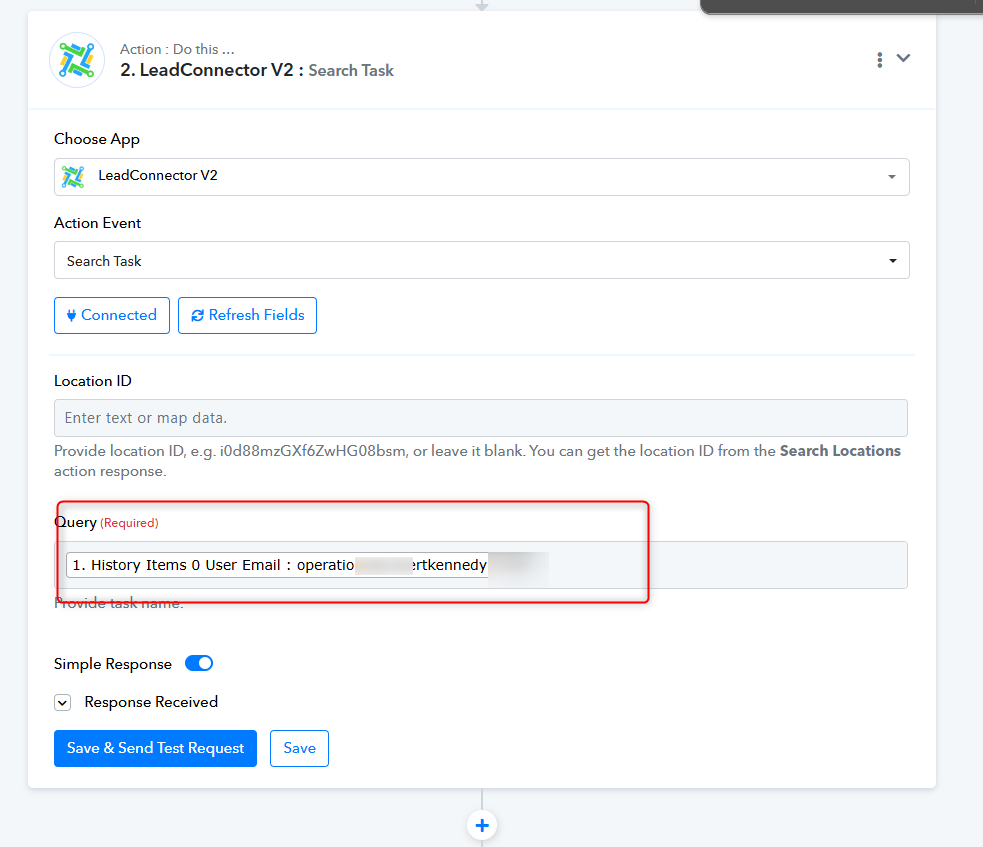
To update tasks in GHL, you must first locate the task using the contact's ID through a Custom API request. Once you have obtained the Task ID, you can proceed with the "Update Task" action, which will update the task using both the Contact ID and Task ID.
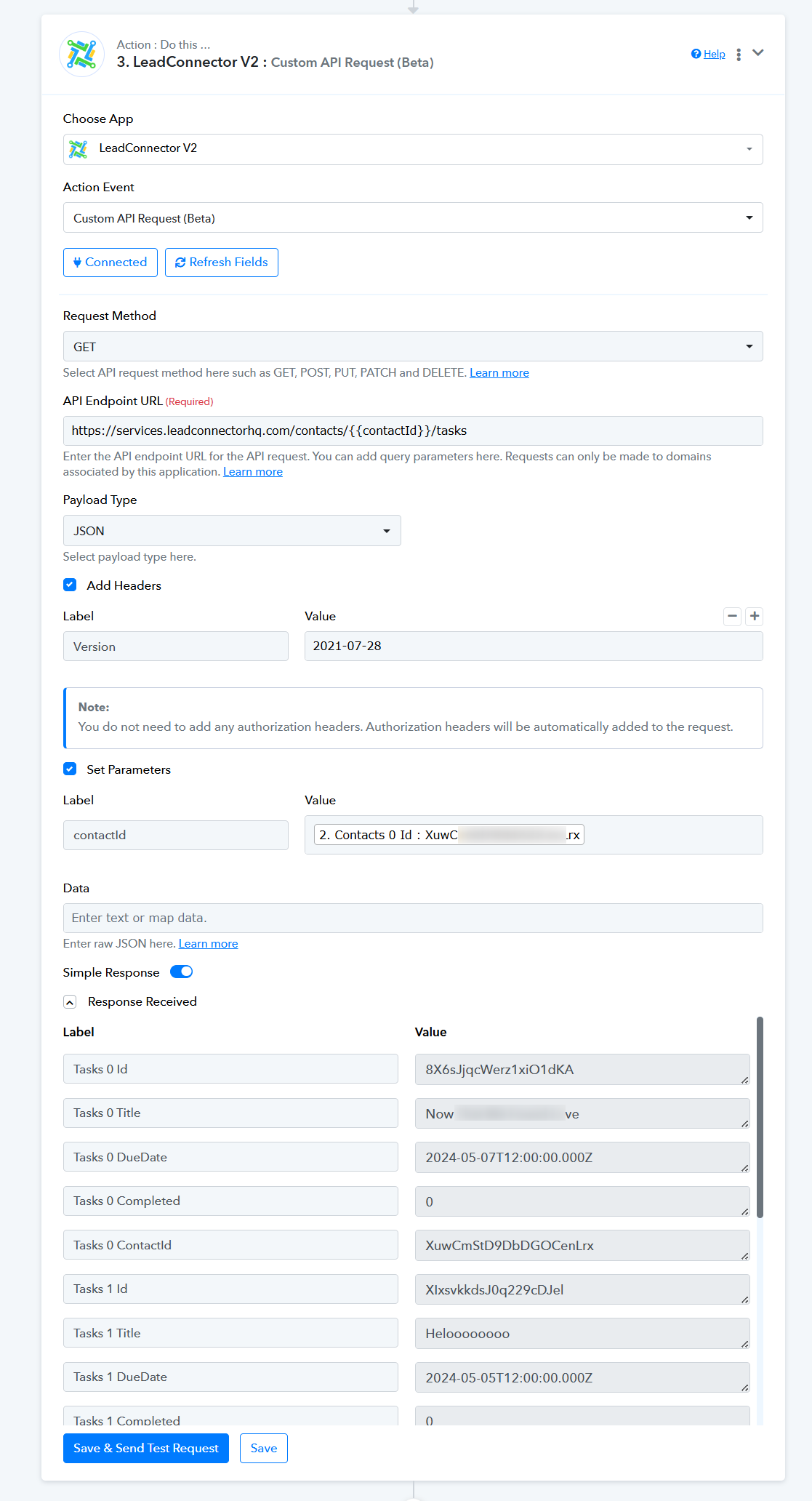
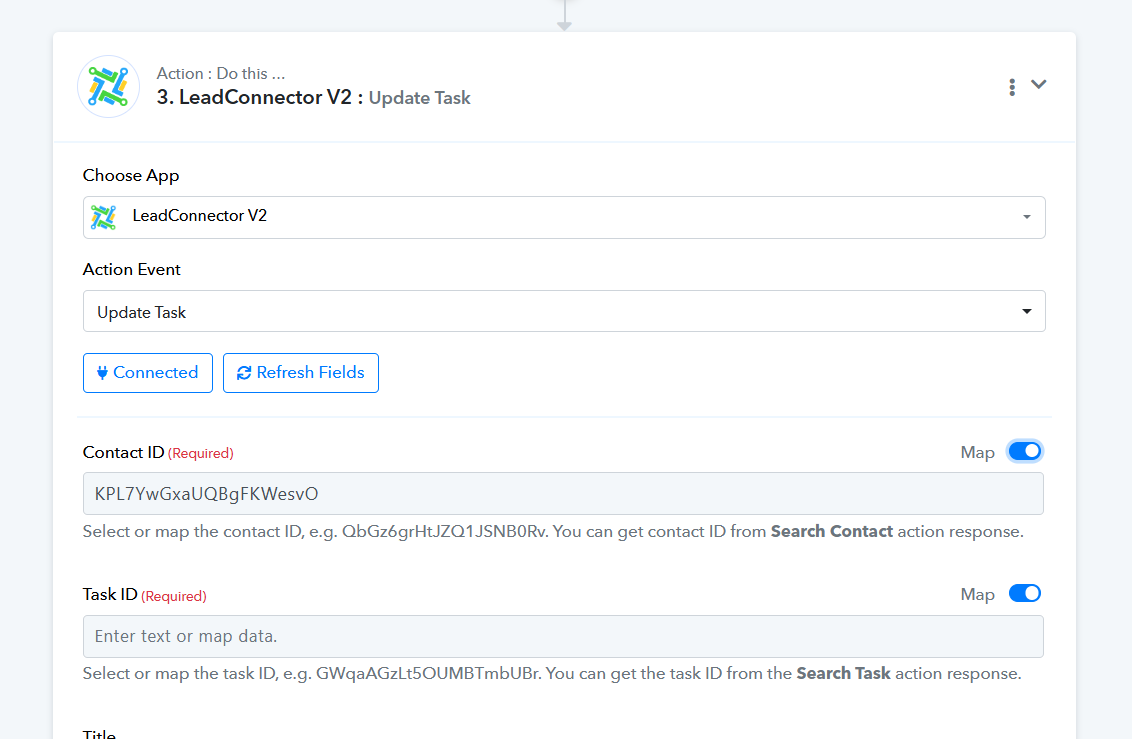
Hey @robertkennedy3To update tasks in GHL, you must first locate the task using the contact's ID through a Custom API request. Once you have obtained the Task ID, you can proceed with the "Update Task" action, which will update the task using both the Contact ID and Task ID.
Having some trouble here! I'm either not sure about how to work this or it's not working for me.
Can you please record a short video on your concern, so that we can look into it?
Can you please record a short video on your concern, so that we can look into it?
Hi....here is the video: https://www.loom.com/share/322e5587c1f942b885095c980e30dad9?sid=1cbc778c-00f3-488e-ad6f-c5401bc97d63
Hey @robertkennedy3
Thank you for the information. We have tested a new workflow according to your requirements and confirmed that it is performing as expected. Please give it a try, and remember not to press "Save & Send Test Request" multiple times. The ClickUp Trigger event can only be configured once, so always try to recapture the webhook response.
Hi...This is what is happening for me: https://www.loom.com/share/3d4c34cb8d064d5ebe9710e1fc5fdfaa?sid=ff7a9fe6-4229-42dc-8963-e10708e891b2
Not sure what I am doing incorrectly.
Hey @robertkennedy3
We have created a clone of your workflow and request that you configure the trigger event once to capture the response with the status "Complete." Based on this value, we can then design your subsequent action steps accordingly.
https://connect.pabbly.com/workflow/mapping/IjU3NjUwNTY1MDYzNjA0MzE1MjY0NTUzNTUxMzUi_pc
Hey @robertkennedy3We have created a clone of your workflow and request that you configure the trigger event once to capture the response with the status "Complete." Based on this value, we can then design your subsequent action steps accordingly.
https://connect.pabbly.com/workflow/mapping/IjU3NjUwNTY1MDYzNjA0MzE1MjY0NTUzNTUxMzUi_pc
OK. I have triggered a complete on one of the tasks. THen I hit Save and Send Test Request to update the data in the cloned workflow. What do I need to do next?
I have triggered a complete on one of the tasks. THen I hit Save and Send Test Request to update the data in the cloned workflow. What do I need to do next?
Capture the response with the status "Complete." Based on this value, subsequent action steps so can be designed further action step accordingly.
Capture the response with the status "Complete." Based on this value, subsequent action steps so can be designed further action step accordingly.
Ok. I may need some help with this. I’m not 100% sure I’m getting you. Is there someone I can speak with for 10 minutes to complete this?
Certainly, we can assist you, but first, please recapture the webhook response for the tasks that have "After Status" marked as Complete. Then we can proceed to set the next action steps accordingly.
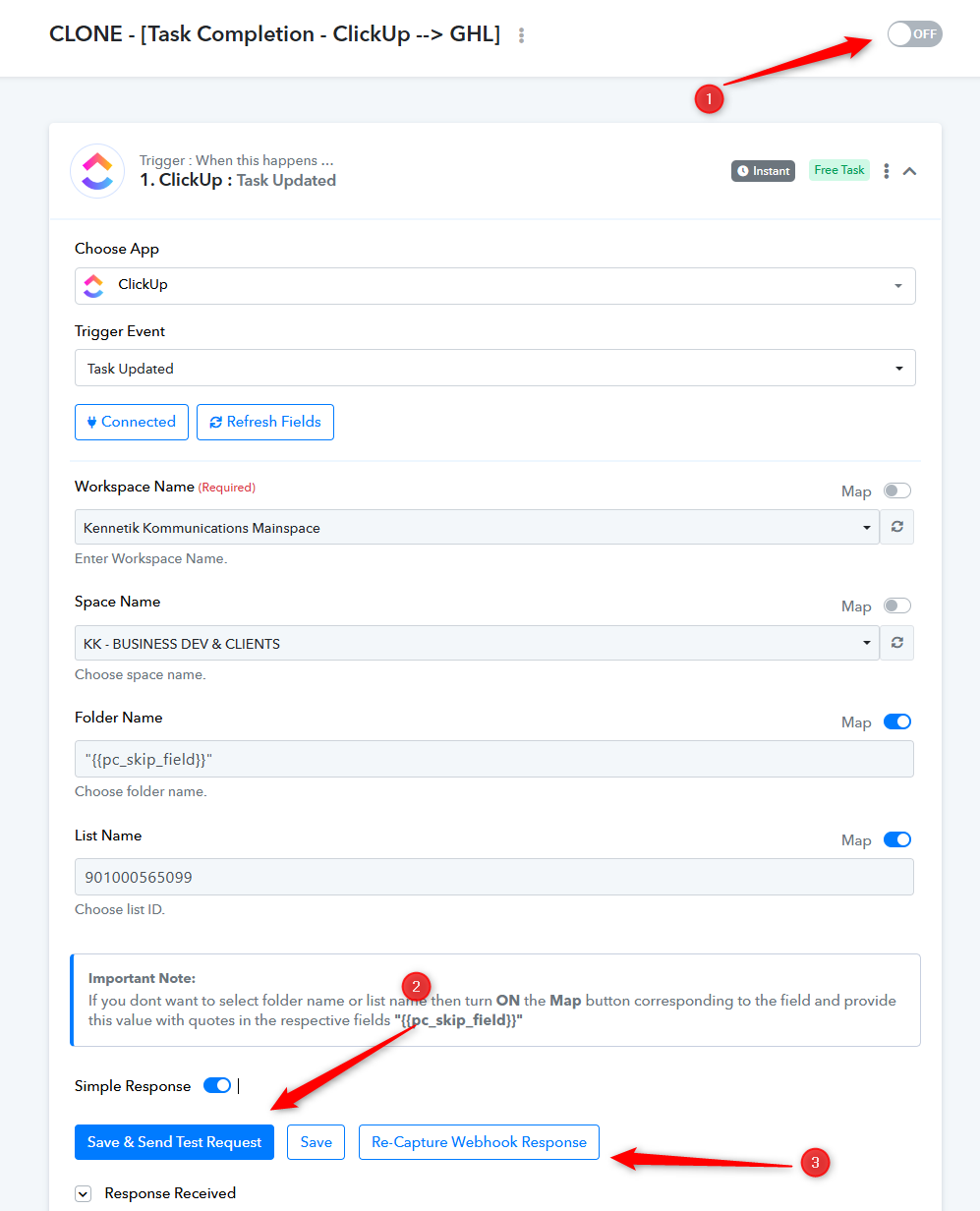
Certainly, we can assist you, but first, please recapture the webhook response for the tasks that have "After Status" marked as Complete. Then we can proceed to set the next action steps accordingly.
OK. This is done!
Certainly, we can assist you, but first, please recapture the webhook response for the tasks that have "After Status" marked as Complete. Then we can proceed to set the next action steps accordingly.
OK. I've done this!!
Please check your LeadConnector account to see if there is a lead or task associated with this email address.