Pabbly Connect with LearnDash and Stripe for Enrolling Students After Stripe Payment
Status: Closed · Asked by Steve Gilbert on · 0 views
While connecting Pabbly Connect with my LearnDash site I ran into an issue. There were no Payments links in Stripe associated with the LearnDash course we sell. Also, in Stripe I would like to add a First Name and Last Name field and couldn't find where to do that. Stripe is integrated through Stripe Connect on the LearnDash site. I followed the YouTube video for this integration. Thanks for helping with a solution. I appreciate it.
Hey @MediaArtsAcademy
For the links to show up inside Stripe, as mentioned in the video, you will have to create the payments links for your course first.
Kindly refer to this video for setting up payment links in Stripe.
After you have successfully created the links, Please refer to the video below for further instructions. Feel free to let us know if you get stuck or face any issues at any step.
Luv:
Once I create the payment links can they be linked in LearnDash or redirected in Stripe to effectuate payment? Stripe Connect was used to integrate payment for the course. I noticed in LearnDash the Course ID. Thanks.
Regards,
Steve
Hey @MediaArtsAcademy
The payment links you create will direct the user to make a payment through Stripe. Afterward, by using Pabbly Connect and configuring the workflow as described, you can enroll the student in your LearnDash course. Please proceed with setting up your workflow and let us know if you encounter any issues.
I am creating a Payment Link for the LearnDash course and updating the "Take this Course" link to direct the students to the Payment link that will trigger the Pabbly Connect automation to enroll student after Stripe payment.
Hey @MediaArtsAcademy
Yes, that will be the initial steps. Kindly let us know if in case you face any issues, we can also schedule a meeting for you to guide you with the process.
Luv:
Does Pabbly Connect need to be set up in test mode on Stripe? Thanks.
Steve
Luv:
I set up Pabbly Connect; however, when I did the Save and Send Test Request for WordPress it came back with a long value and not the fields as in the video. The user was not added to WordPress and in the next step I could not enroll them into the LearnDash course. All connections are working properly. Please advise. Thanks.
Regards,
Steve
Attachments

Hey @MediaArtsAcademy
The error mentioned above might be due to the JSON plugin not being installed on your WordPress account. Please refer to the instructions in this thread to install it: https://forum.pabbly.com/threads/wordpress-error-rest_cannot_create_user-sorry-you-are-not-allowed-to-create-new-users-401.813/
After setting this up, try again and let us know if you encounter any further issues.
Luv:
I followed the instructions to install the WordPress REST API Authentication plugin; however, I still get the same results as before when pressing Save and Send Test Request. When I press Connected on the WordPress action everything connected properly. Also, I created a new connection with user and password and although this connected properly, I got the same results form Save and Sent Test Request. This did not work properly but it is connected. I took out the mapping of the Stripe data from the fields too and that didn't work either. I placed the mapped data from Stripe back into the fields. Please assist. Thanks.
Regards,
Steve
Attachments
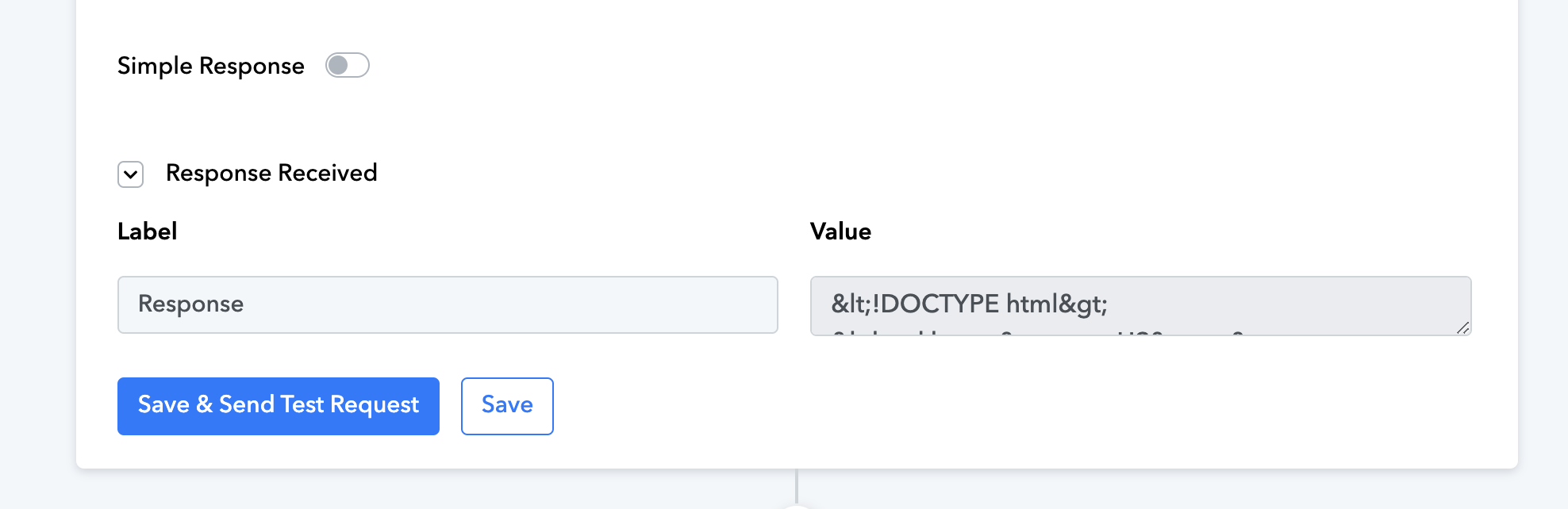
Could you please share your WordPress account credentials via the provided email address so that we can test the issue on our end?
Email: support@pabbly.com
Hey @MediaArtsAcademy
The WordPress "Create a User" action step is now working. The "JSON Basic Authentication" plugin was installed on your account but not activated. We have activated it, and it is now functioning correctly.
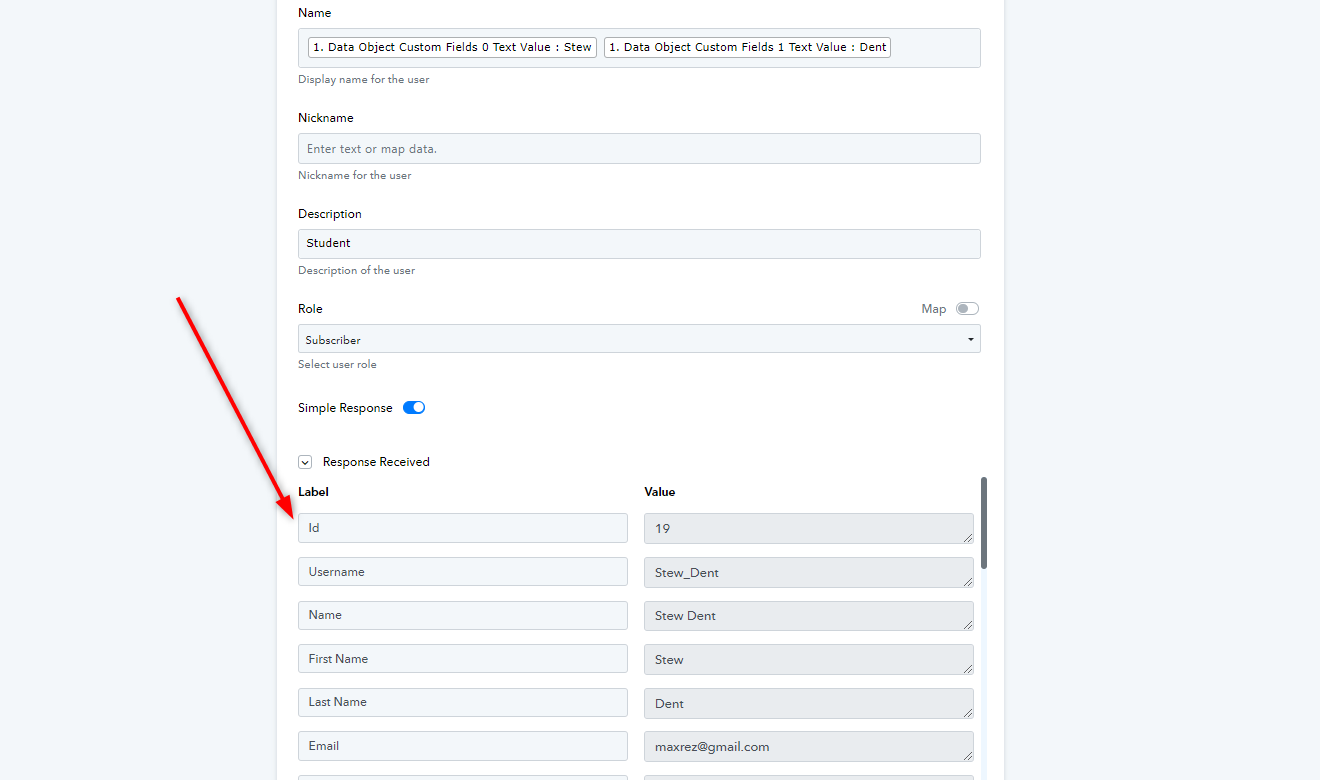
You can now add the further steps in your workflow. Let us know if in case you get stuck anywhere.
Thanks Luv!
I really appreciate your great customer support. Just one follow-up question. This workflow was set up in Test Mode on Stripe and tested through the website. Will the workflow work the same way when it is in Live Mode on Stripe? The Payment Link is different on Stripe from the Test Mode to the Live Mode. Thanks.
Regards,
Steve
Hey @MediaArtsAcademy
Yes, it will work exactly the same way. You just need to use the payment link for the course instead of the test link.
Feel free to reach out to us in case of any issues.
Luv:
Do I need to adjust anything in the Workflow on Pabbly? I changed Stripe to Live mode and copied the (live) payment link to the purchase button on my website. Thanks..
Regards,
Steve
Hey @MediaArtsAcademy
Your workflow will remain unchanged except for the Filter step. The filter was set up to work with the test link you created. You will need to modify it for the new link you created in Stripe, just as you did previously.
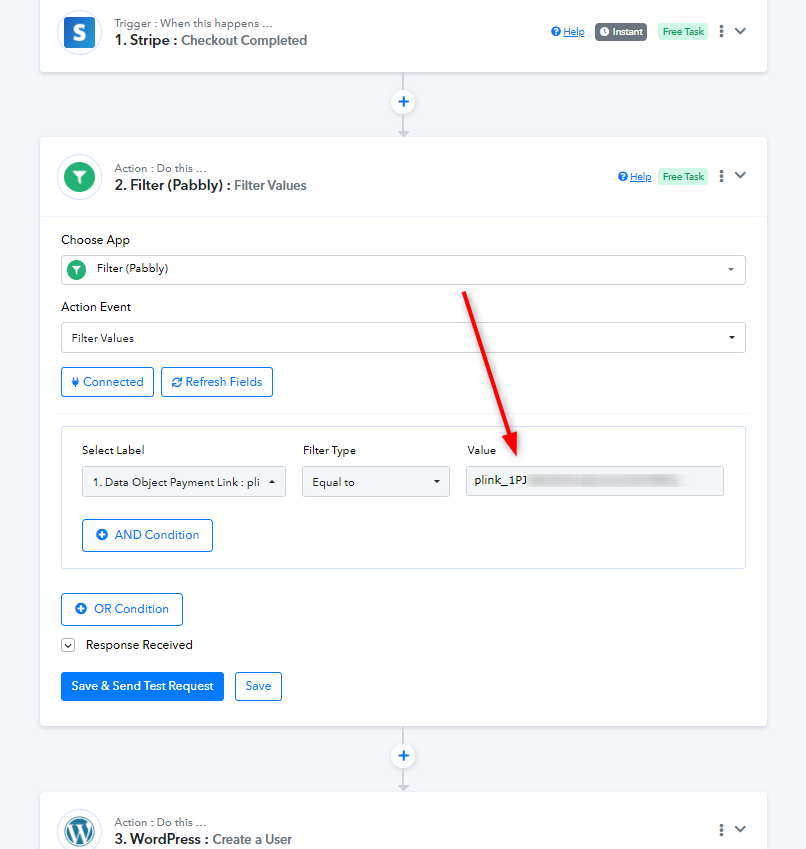
Luv:
Thanks so much! You and your team are incredible. I appreciate all the help. I should be good to go now. Thanks again.
Regards,
Steve
Hey @MediaArtsAcademy
That's great! Thanks for the update, we'd love to hear your thoughts! If you have a moment, please drop a short review for us on Google. Your feedback helps us improve.
Luv:
If I update passwords for WordPress and LearnDash how do I update the Pabbly Workflow? Thanks.
Regards,
Steve
Hey @MediaArtsAcademy
You will need to update the connection of the application if you make any changes, to avoid errors and ensure smooth workflow execution.
Kindly refer to the image below for instructions.
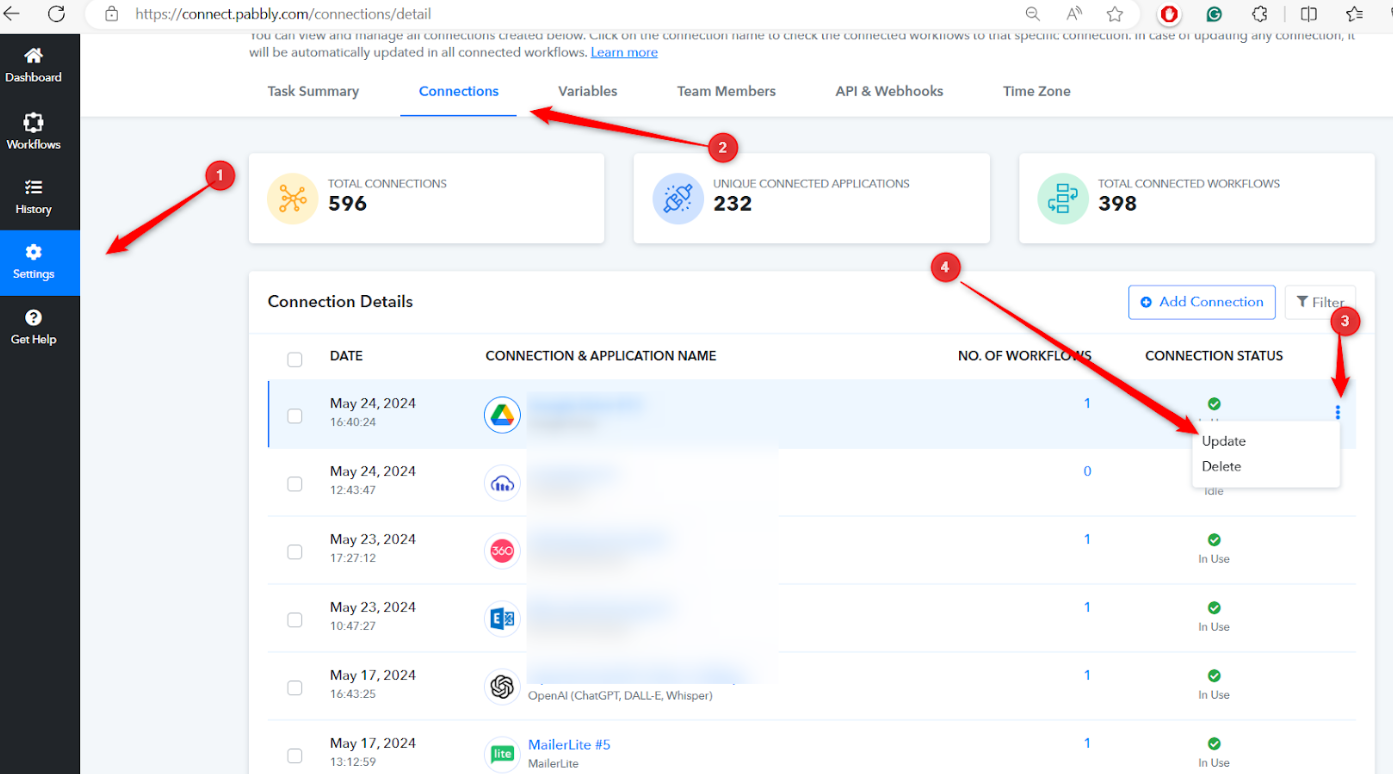
Luv:
Thanks. This worked perfectly. I have an additional question. Can we automate an email to be sent through Twilio SendGrid with the Username and Temporary Password to the email that made the payment on Stripe? Thanks.
Regards,
Steve
Hey @MediaArtsAcademy
Yes, you can certainly do this. Simply add an additional step for Twilio after LearnDash. We have a video prepared for this use case on our YouTube channel. Please refer to the video below.
Thanks Luv!
It was actually Twilio SendGrid and it was easy to integrate a Pabbly Action to send an email.
Regards,
Steve
Hey @MediaArtsAcademy
That is great! Kindly let us know if you face any issues further.