Pabbly + Spreedsheet + Telegram
Status: Closed · Asked by tzzyl on · 0 views
Hello there,
I have a list of items on my spreadsheet: SAMPLE LIST : https://docs.google.com/spreadsheets/d/1RYlJOvJwdfxfiq2eaDYhWs0qZ9nWq9ByHBGa8VeT5vA/edit#gid=759064107.
I need to have send each row per day to my telegram channel.; I already get the integration working but the issue here is, I can only either send all at once (which I don't want) or fill the row daily manually.
I just to have a list of items in the spreadsheet, say 2000 rows, and use pabbly to pick each row and have it sent to the telegram channel daily.
I've tried all means but doesn't seem to get it right. It's sending all data at once instead of iterating and sending after allotted hours.
Can you help?
Instead of setting Google Sheet as trigger, you need to do this -
1. Trigger - Scheduler - Daily at your desired time
2. Number Formatter - Counter - Increment of 1, no reset
3. Gsheet - Get Row(s) action - Pick row with the Final Result you get from Counter step
4. Send the row data to telegram
This way now you are picking up next row everyday at scheduled time instead of using GSheet as trigger.
Instead of setting Google Sheet as trigger, you need to do this -1. Trigger - Scheduler - Daily at your desired time
2. Number Formatter - Counter - Increment of 1, no reset
3. Gsheet - Get Row(s) action - Pick row with the Final Result you get from Counter step
4. Send the row data to telegramThis way now you are picking up next row everyday at scheduled time instead of using GSheet as trigger.
That was smooth, thanks!
Is there a way to make things a bit more interesting by making it available to a person one automating with a passkey?
That was smooth, thanks!
Is there a way to make things a bit more interesting by making it available to a person one automating with a passkey
I did not understand your question, can you give more details please
Instead of setting Google Sheet as trigger, you need to do this -1. Trigger - Scheduler - Daily at your desired time
2. Number Formatter - Counter - Increment of 1, no reset
3. Gsheet - Get Row(s) action - Pick row with the Final Result you get from Counter step
4. Send the row data to telegramThis way now you are picking up next row everyday at scheduled time instead of using GSheet as trigger.
Just an update on this, please.
It's turns out I'm getting the same data on every loop sent to telegram. I've configured it just like the way you direct.
Is there a way I would make it change the data sent according to what's provided on the Gsheet?
Currently, I'm on receiving text on ROW one only.
In addition, the data is getting sent twice.
IMG : a/NwIMQKN
I need to see your workflow screenshots. Share those.
I need to see your workflow screenshots. Share those.
Here: a/DzT53yY
Following the number as instructed
You did not map the final value from Number Formatter - Counter step to Google Sheet get rows action steps.
You need to map it like this, so it will pickup only one row everytime it runs.
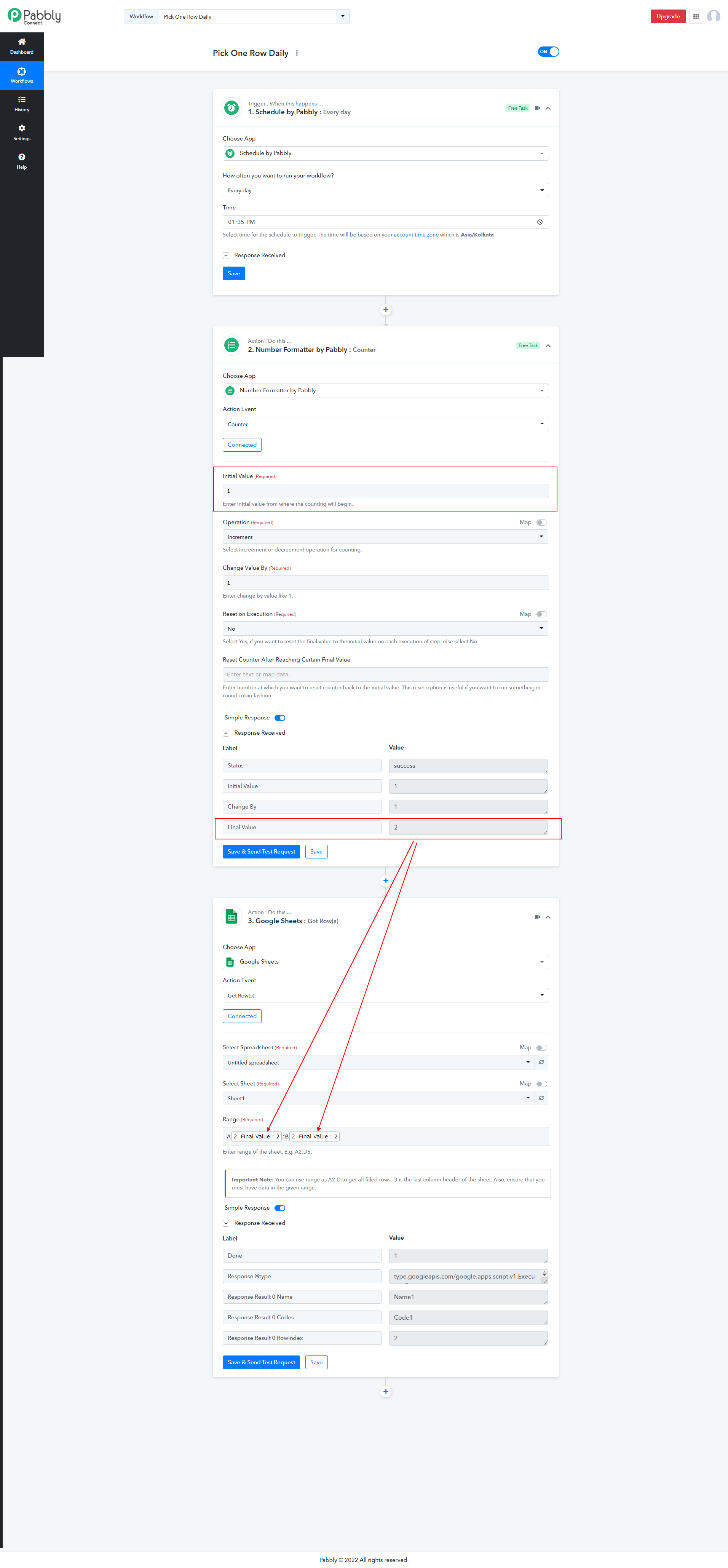
You did not map the final value from Number Formatter - Counter step to Google Sheet get rows action steps.You need to map it like this, so it will pickup only one row everytime it runs.
Thanks but using this range, The telegram is not receiving the data from googlesheet.
a/U4kDGud
You need to remap values from ghseet step to Telegram step.
You need to remap values from ghseet step to Telegram step.
I’ve done that but it’s on sending mapped data and not iterating to new rows/data then having it populated on Telegram
It only send 1 message per day to telegram if you have set scheduler as trigger like that. Share full screenrecording of your workflow if possible.
Also tagging @Pabbly @Supreme to check your workflow.