Pabbly to connect to only specific woocommerce products
Status: Closed · Asked by Jeffscamera on · 0 views
I set up Pabbly to connect my woocommerce to Lulu.
I have one product with 2 variables set up in my store. One variable is soft cover and the other is hard cover. I set up a separate work flows for each variable (e.g. 1. Hardcover and 2. Softcover). Each Pabbly workflow has its unique webhook url that I added in Woocommerce.
The problem: when one of the variables is ordered on the website (e.g. hardback) Pabbly is sending two orders to Lulu - it is sending the hardback and softback as two separate orders. When in reality the customer ONLY ordered the hardback.
Another problem: I have other products on my website that are NOT books. For example, a visitor orders a calendar. The calendar is not in any way associated with Lulu. But when I get that Woocommerce order it sends an order for the two books (hardback and softcover) to Lulu.
1. How can I prevent every product order on my store from triggering a book order sent to Lulu?
2. How can I have Woocommerce send only the variable product ordered (e.g. hardcover book) to Lulu without also triggering an order for softcover too?
Since initially writing this I have done the following for each product variation:
- Under webhook I turned off simple response and Re-Captured the webhook response
- I added "Iteratior" as next action
- Next action is "Filter"
- Last action is Lulu
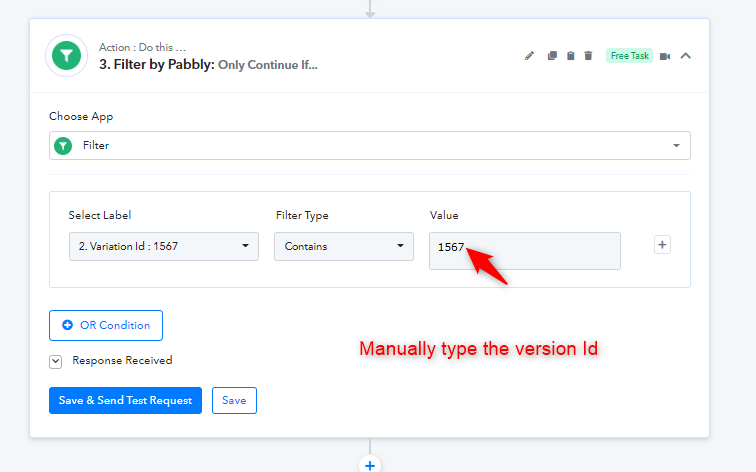
In the filter action I have
Select Label - Variation Id: 1567
Filter Type - Contains
Value - Variation Id: 1567
As a result, I get Status - Success and Message - Condition is true
BUT when I order either book on my website it is sending two orders to Lulu - both books (the two variations).
Am I missing something in the filter? Is this system capable of doing what I'm asking?
Thank you.
Hey @Jeffscamera
Am I missing something in the filter? Is this system capable of doing what I'm asking?
Could you please share the name of the workflow in which you have configured the filter action step?
I have applied the filter in two separate workflows (one for each variable product).
1. Lulu hard cover (currently set to inactive to avoid triggering extra order when someone chooses softcover book)
2. Lulu Softcover
Hey @Jeffscamera
Kindly manually type the version Id in the filter action step instead of mapping dynamically which will run the automation for every possible data that comes in the respective field.
That simple tip seems to have fixed everything! Thank you for helping me learn and assisting me!