problem with connecting instagram for business
Status: Open · Asked by alphaclub2307 on · 0 views
I have made my instagram account a business account and linked to my facebook account too. but it is not available to connect when i try in pabbly. I have refreshed so many times checked the connection of facebook and insta. what to do
Hello @alphaclub2307 ,
Thank you for sharing the details and granting access.
We reviewed your workflow and found that the action “Instagram for Business: Publish Photo” is currently failing due to an invalid image link format.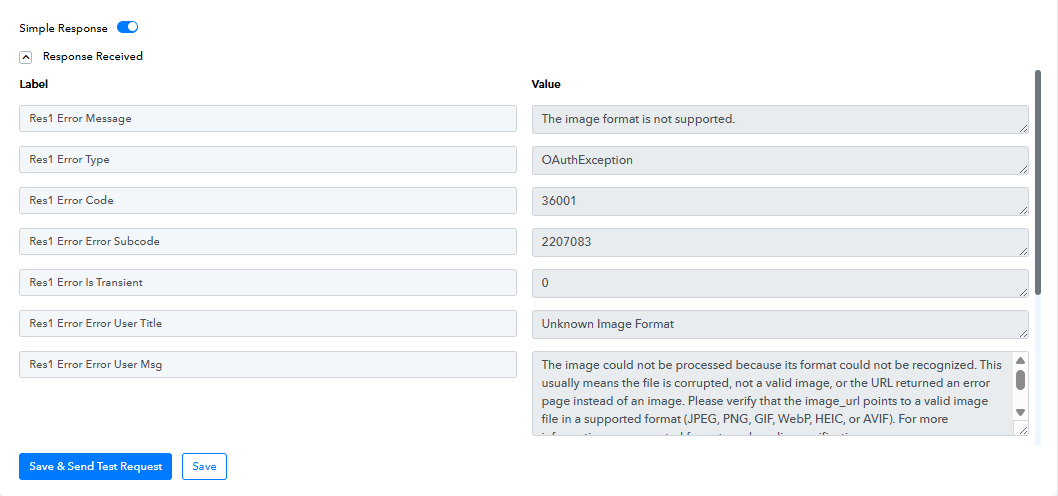
Use a Direct Google Drive Download Link
Since your current link is a Google Drive preview URL, replace it with a direct download link using this format:
https://drive.google.com/uc export=download&id=YOUR_FILE_ID
For your file, it should be:
https://drive.google.com/uc export=download&id=1a0ECmHevQtYTtuxEhWII1Ntt7nYkhBOe
Use this new URL in your Instagram Publish Photo action step and test again.
This should resolve the issue and allow your image to be successfully published.