Python Code Issue
Status: Open · Asked by Jitesh T on · 0 views
Hi Support,
I am really not happy with Python code step.
I am facing many with Pabbly Python code. I am using Pycharm editor to manage my Python code. The code runs smoothly in my pycharm. When I paste and save the same code, it runs sometimes on "Save and Send Test Request" submit. Python code indentation also unintended when I refresh and open the same step again. However, If I press "Save and Send Test Request" button again it throws an error "Internal server" or sometimes an indentation error not sure why. It is a very frustrating and time-consuming process. I wasted my whole day on it.
import requests
import datetime
import jsonSCIENER_CLIENT_ID = '{{ScienerClientId}}'
SCIENER_CLIENT_SECRET = '{{ScienerClientSecret}}'
SCIENER_USERNAME = '{{ScienerUsername}}'
SCIENER_PASSWORD = '{{ScienerPassword}}'def convert_date_to_unix_ms(date_str, date_format):
try:
date_obj = datetime.datetime.strptime(date_str, date_format)
unix_time = date_obj.timestamp()
milliseconds = int(unix_time * 1000)
return milliseconds
except ValueError:
raise ValueError("Invalid date string or format")def get_current_unix_ms():
current_time = datetime.datetime.now()
unix_timestamp = current_time.timestamp()
return int(unix_timestamp * 1000)def sciener_get_lock_id_from_alias(access_token, lock_alias):
api_url = "https://euapi.sciener.com/v3/lock/list"
data = {
"clientId": SCIENER_CLIENT_ID,
"accessToken": access_token,
"lockAlias": lock_alias,
"pageNo": 1,
"pageSize": 20,
"date": get_current_unix_ms(),
}
api_response = requests.get(api_url, params=data)
if api_response.status_code == 200:
lock_list = api_response.json()["list"]
if lock_list:
return lock_list[0]["lockId"]
else:
return Falsedef sciener_set_custom_passcode(access_token, keyboard_pwd, keyboard_pwd_name, lock_alias, start_date, end_date):
lock_id = sciener_get_lock_id_from_alias(access_token, lock_alias)if lock_id:
api_url = "https://euapi.sciener.com/v3/keyboardPwd/add"
data = {
"clientId": SCIENER_CLIENT_ID,
"accessToken": access_token,
"lockId": lock_id,
"keyboardPwd": keyboard_pwd,
"keyboardPwdName": keyboard_pwd_name,
"startDate": start_date,
"endDate": end_date,
"addType": 2,
"date": get_current_unix_ms(),
}
api_response = requests.post(api_url, data=data, headers={})
if api_response.status_code == 200:
return api_response.json()reservation_date_format = "%d/%m/%Y %H:%M:%S"
counter = 0
rcode = ''
rooms = json.loads('')
reserved_rooms = json.loads('')
passcode_creation = ''
new_passcode = ''
sciener_access_token = ''
for reserved_room in reserved_rooms:
for room in rooms:
if room["id"] == reserved_room["id_zak_room"]:
start_dt = reserved_room["dfrom"] + ' ' + "14:55:00"
if passcode_creation == "now":
start_dt_ms = get_current_unix_ms()
else:
start_dt_ms = convert_date_to_unix_ms(start_dt, reservation_date_format)end_dt_ms = int(start_dt_ms + 11 * 60 * 60 * 1000)
sciener_set_custom_passcode(sciener_access_token, new_passcode, rcode, 101, start_dt_ms, end_dt_ms)
counter += 1print(json.dumps({"success": "true", "passcode": new_passcode}))
Code unintended code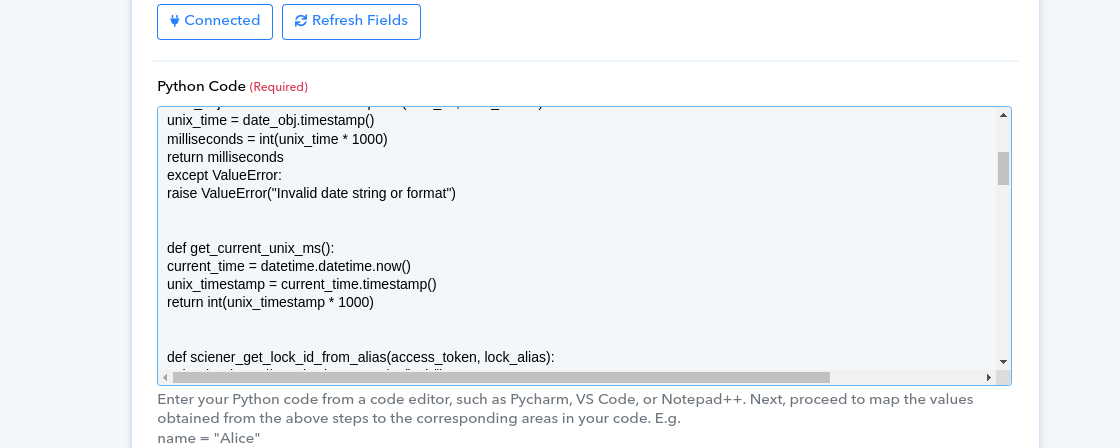
Please help me to fix all those problem so I can focus more on production instead of wasting my time on indentation. How I can check the detail error if I get "Internal server error"?
Thanks,
Jitesh
Please check the following video.
https://drive.google.com/file/d/14l93mtsXoYRntQMiMLFTraXVRWTeTwa8/view?usp=drive_link
Hi @jitesh_tandel,
Could you please share the Workflow URL in which you have this concern?
Please allow us some time to look into this concern. We will get back to you with an update soon.
@ArshilAhmad Any updates?
The API you're trying to run on Code by Pabbly is not supported there. Kindly try converting it into a REST API format and then use it with API by Pabbly. That should work for your needs.
youtube.com/watch?v=bmf4och_kTk
Further, we currently have only a limited library of Python on the platform. You can check on the following thread.
https://forum.pabbly.com/threads/python-code-by-pabbly.12014/
Thanks!
I already split Python code and integrated the API with the Pabbly API. I still don't have an answer as to why Python code indentation is lost upon "Save or "Save and Test Request"
I already split Python code and integrated the API with the Pabbly API. I still don't have an answer as to why Python code indentation is lost upon "Save or "Save and Test Request"
Because the library you are trying to import in the code is actually not supported on the Code by Pabbly.
You can check the further details here -
https://forum.pabbly.com/threads/python-code-by-pabbly.12014/
Sorry, I don't agree with your reply. If you can check the below Workflow then you will find that I have Python code whose indentation doenn't maintain even though I have very simple code.
https://connect.pabbly.com/workflow/sendwebhookdata/IjU3NjUwNTZhMDYzNjA0Mzc1MjY1NTUzYzUxMzAi_pc
Is it my Editor/IDE issue or Pabbly code editor issue? I use your recommended editor Pycharm which is well-known for Python programming.
If you're attempting to execute the API request on Code By Pabbly, I regret to inform you that it won't function as expected.
New Python code just does basic things. It doesn't have REST API integration at all. Did you get a chance to look at my workflow? If you have time then please check my above given workflow. As I mentioned in my previous comment, I already split my Python code and I am using Pabbly API action to perform REST API.
Do you think Python code indentation is related to REST API integration? It must be something else. Can you check my Python code in the above workflow? If everything looks good to you let me know.
We are checking on the input code and shall notify you with an update soon.
Hey @jitesh_tandel
We have tested your used code on this web app and we are getting the following error - https://www.online-python.com/
Traceback (most recent call last):
  File "main.py", line 82, in
    rooms = json.loads('{{ZAKRooms}}')
  File "/usr/lib/python3.8/json/__init__.py", line 357, in loads
    return _default_decoder.decode(s)
  File "/usr/lib/python3.8/json/decoder.py", line 337, in decode
    obj, end = self.raw_decode(s, idx=_w(s, 0).end())
  File "/usr/lib/python3.8/json/decoder.py", line 353, in raw_decode
    obj, end = self.scan_once(s, idx)
json.decoder.JSONDecodeError: Expecting property name enclosed in double quotes: line 1 column 2 (char 1)
** Process exited - Return Code: 1 **
So, can you please correct once which can be run on that application that we can try to process on Code By Pabbly at our end?
Additionally, could you please test this code on the web application available at https://www.online-python.com/ and input all the required information, including the client ID, secret, username, and password? After running the code successfully there, copy it and paste it into Code By Pabbly.
import requests
import datetime
import json
SCIENER_CLIENT_ID = '{{ScienerClientId}}'
SCIENER_CLIENT_SECRET = '{{ScienerClientSecret}}'
SCIENER_USERNAME = '{{ScienerUsername}}'
SCIENER_PASSWORD = '{{ScienerPassword}}'
def convert_date_to_unix_ms(date_str, date_format):
    try:
        date_obj = datetime.datetime.strptime(date_str, date_format)
        unix_time = date_obj.timestamp()
        milliseconds = int(unix_time * 1000)
        return milliseconds
    except ValueError:
        raise ValueError("Invalid date string or format")
def get_current_unix_ms():
    current_time = datetime.datetime.now()
    unix_timestamp = current_time.timestamp()
    return int(unix_timestamp * 1000)
def sciener_get_lock_id_from_alias(access_token, lock_alias):
api_url = "https://euapi.sciener.com/v3/lock/list"
    data = {
        "clientId": SCIENER_CLIENT_ID,
        "accessToken": access_token,
        "lockAlias": lock_alias,
        "pageNo": 1,
        "pageSize": 20,
        "date": get_current_unix_ms(),
    }
    api_response = requests.get(api_url, params=data)

    if api_response.status_code == 200:
        lock_list = api_response.json()["list"]
        if lock_list:
            return lock_list[0]["lockId"]
    return False
def sciener_set_custom_passcode(access_token, keyboard_pwd, keyboard_pwd_name, lock_alias, start_date, end_date):
    lock_id = sciener_get_lock_id_from_alias(access_token, lock_alias)

    if lock_id:
api_url = "https://euapi.sciener.com/v3/keyboardPwd/add"
        data = {
            "clientId": SCIENER_CLIENT_ID,
            "accessToken": access_token,
            "lockId": lock_id,
            "keyboardPwd": keyboard_pwd,
            "keyboardPwdName": keyboard_pwd_name,
            "startDate": start_date,
            "endDate": end_date,
            "addType": 2,
            "date": get_current_unix_ms(),
        }
api_response = requests.post(api_url, data=data)

        if api_response.status_code == 200:
            return api_response.json()
reservation_date_format = "%d/%m/%Y %H:%M:%S"
counter = 0
rcode = '16486504'
passcode_creation = 'now'
reserved_rooms = json.loads('[{"id_zak_room":37983,"id_zak_reservation_room":20609298,"door_code":null,"id_zak_room_type":13227,"dfrom":"07\/12\/2023","dto":"08\/12\/2023","occupancy":{"adults":2,"teens":0,"children":0,"babies":0},"product_id":"1095","rate_id":"111","customers":[{"checkin":null,"departed":"08/12/2023","checkout":"08/12/2023","id":22008640}]}]')
rooms = json.loads('{{ZAKRooms}}')
new_passcode = generate_random_passcode()
sciener_access_token = 'e1a51bea94648f213db804828b23db5f'
for reserved_room in reserved_rooms:
    for room in rooms:
        if room["id"] == reserved_room["id_zak_room"]:
            start_dt = reserved_room["dfrom"] + ' ' + "14:55:00"

            if passcode_creation == "now":
                start_dt_ms = get_current_unix_ms()
            else:
                start_dt_ms = convert_date_to_unix_ms(start_dt, reservation_date_format)

            end_dt_ms = int(start_dt_ms + 11 * 60 * 60 * 1000)

            sciener_set_custom_passcode(
                sciener_access_token,
                new_passcode,
                rcode,
                101,
                start_dt_ms,
                end_dt_ms
            )

            counter += 1
print(json.dumps({"success": "true", "passcode": new_passcode}))
I can do the test. I don't mind at all but again my concern is why the source code looks unindent. I always paste indented source code and the pabbly makes my code unindent. If I need to make changes directly in the Pabbly code editor/textarea, the source code looks like a mess.
It is not like with the above code. It also happens with the small code. Check the below code. Python prefers formatted code. Am I doing any mistake? Do I need to use any other editor than Pycharm, or Visual Studio?
from datetime import datetime
import jsondef convert_date_to_unix_ms(date_str, date_format):
date_obj = datetime.strptime(date_str, date_format)
unix_time = date_obj.timestamp()
milliseconds = int(unix_time * 1000)
return millisecondsdef get_current_unix_ms():
return int({{pc_unix_timestamp}} * 1000)def zak_find_lock_id(key, value):
zak_rooms = {{ZAKRooms}}
for obj in zak_rooms:
if obj.get(key) == value:
return obj["lock_id"]
return {{blank}}send_access_code = '1. Passcode Creation : now'
if send_access_code == "now":
start_dt_ms = get_current_unix_ms()
else:
start_dt = "8. Dfrom : 07/12/2023" + " 14:55:00"
start_dt_ms = convert_date_to_unix_ms(start_dt, "%d/%m/%Y %H:%M:%S")end_dt = "8. Dto : 08/12/2023" + " 20:00:00"
end_dt_ms = convert_date_to_unix_ms(end_dt, "%d/%m/%Y %H:%M:%S")
lock_id = zak_find_lock_id("id", 8. Id Zak Room : 37983)
output = json.dumps({"lock_id": lock_id, "start_date": start_dt_ms, "end_date": end_dt_ms, "date": get_current_unix_ms()})
Can you please try that once and share the screenshot on the same? So that we can process it further.
(valid in site for 24 hours only)
https://codeshare.io/qALXMk
Can you please try that once and share the screenshot on the same? So that we can process it further.
(valid in site for 24 hours only)
https://codeshare.io/qALXMk
Ignore above code. I have very very small python code now. As per your recommendation, I split my python into chunks of small codes. The below given code is copied from the python text editor. I also attached screenshot of the same source code. The below code is working pretty well so we do't need need to run in the other online python editor. I still don't have answer why the Pabbly python text editor breaks source code indentation. Do you have any solution on it? I will close this ticket immediately once you provide me the solution.
import jsoncurrent_time_ms = int({{pc_unix_timestamp}} * 1000)
send_access_code = ''
if send_access_code == "now":
start_dt_ms = current_time_ms
else:
start_dt_ms = 7. Result : 1701957300000end_dt_ms = 8. Result : 1702062000000
output = json.dumps({"start_date": start_dt_ms, "end_date": end_dt_ms, "date": current_time_ms})
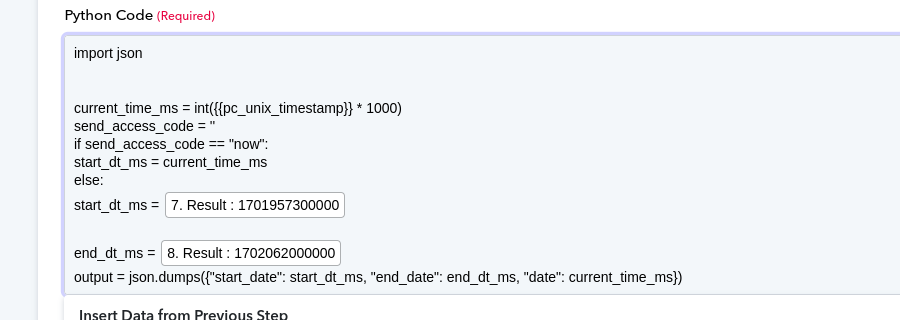
Ignore above code. I have very very small python code now. As per your recommendation, I split my python into chunks of small codes. The below given code is copied from the python text editor. I also attached screenshot of the same source code. The below code is working pretty well so we do't need need to run in the other online python editor. I still don't have answer why the Pabbly python text editor breaks source code indentation. Do you have any solution on it? I will close this ticket immediately once you provide me the solution.
Here is the recorded video for the same issue.
Here is the recorded video for the same issue.
https://drive.google.com/file/d/1lBKmdu5IPe87KJydi_mKhQ0ohFCVvLiZ/view?usp=sharing
We have made some changes in the code and it is working fine now.
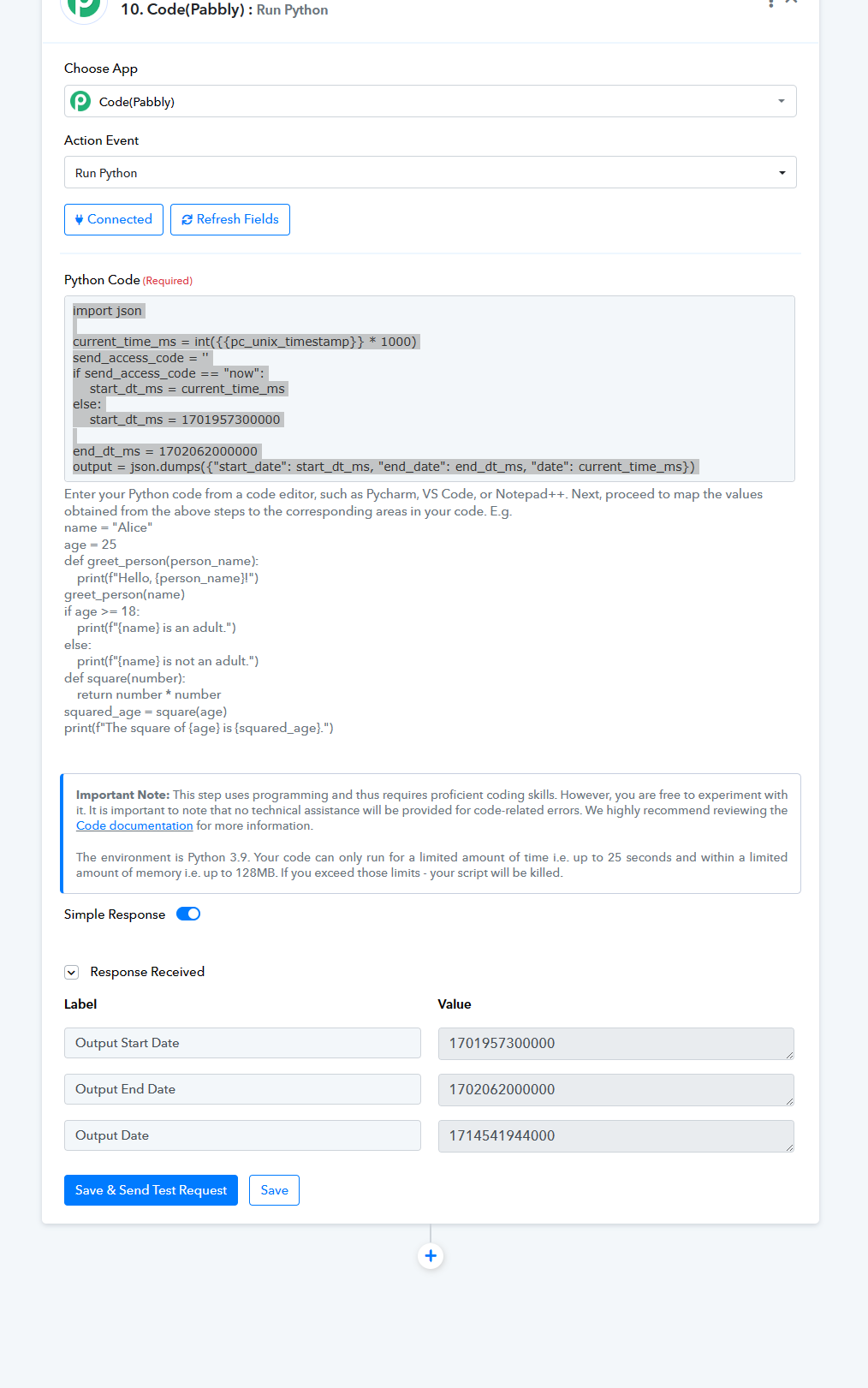
We have made some changes in the code and it is working fine now.
Thanks. I would like to know what changes you made so in the future it would be useful for me.
I've corrected the indentation in the code snippet to ensure that it follows Python's syntax rules correctly. Here are the changes I made and why:
- Added proper indentation: In Python, indentation is used to define code blocks within conditional statements and loops. I added indentation (four spaces) to the lines of code inside the if and else blocks to indicate that they are part of these conditional blocks.
- Updated the if-else structure: The original code had an issue where the if block didn't have a proper indentation, leading to the "expected an indented block" error. I adjusted the indentation so that the if and else blocks are properly defined.
Thanks. Have you checked my below-attached video? In the attached video, you can see my code is indented and properly formatted as per Python code style. I copy-paste the same code and paste in the Pabbly Editor. Do I need to indent again in the Pabbly code editor every time?
If so, why do you recommend Pycharm or Visual Studio? It seems to be a bug in your Python code editor.
https://drive.google.com/file/d/1lBKmdu5IPe87KJydi_mKhQ0ohFCVvLiZ/view?pli=1
In Pabbly's code editor, you might need to manually adjust the indentation time you paste code. But while we pasted it worked correctly as shown in the previous screenshot.
PyCharm and Visual Studio Code are recommended because they are feature-rich integrated development environments (IDEs) that offer advanced code editing capabilities, including automatic indentation, syntax highlighting, debugging tools, and more.