Q1 for connecting 'Kartra.com to Lulu.com to print when customer orders'
Status: Closed · Asked by 3Awakenings on · 0 views
There is so much I dont understand about setting this up so I'll go one step at a time.
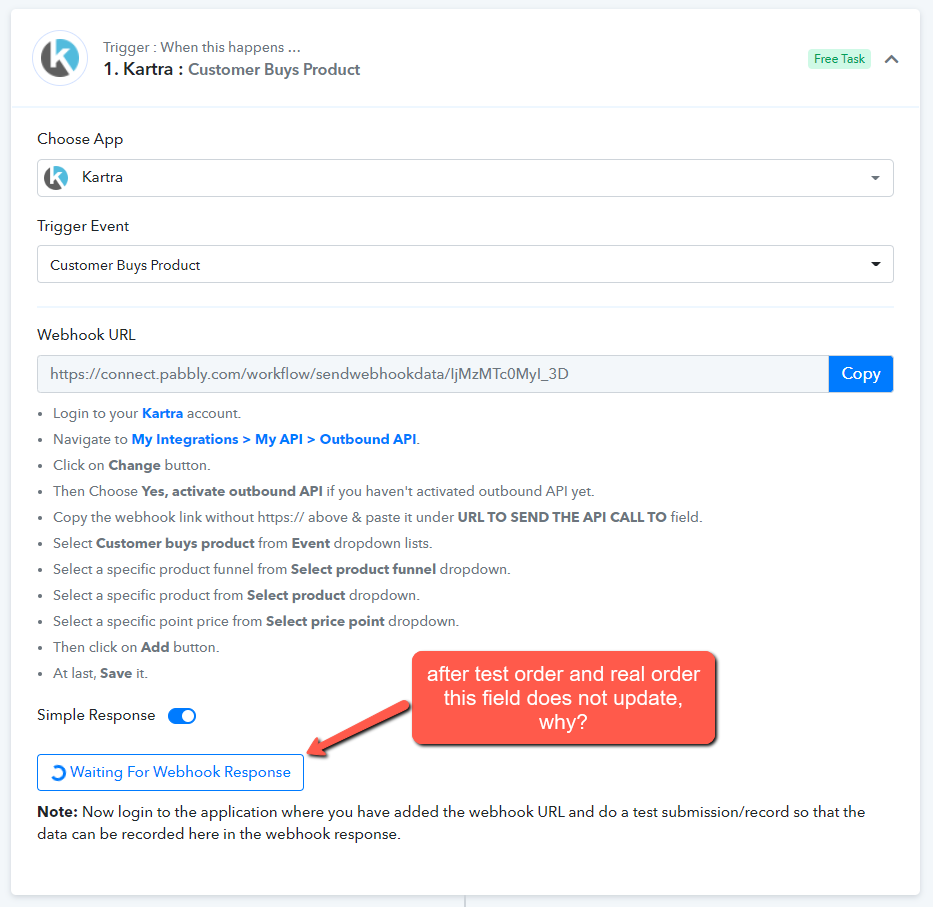
At the moment, I'm still trying to get pabbly to 'Capture the webhook response'
1. I added the webhook url to kartra 'My APIS' and created the job 'customer orders --> book --> any price point' & saved it
2. Then in pabbly I clicked 'capture webhook response'
3. I then did an order in test mode AND I also did a real order with credit card but 'capture webhook response' never updated
Why isnt 'capture webhook response' updating?
Attachments
Hey @3Awakenings
Could you please record a short video on how you are trying to capture the Kartra webhook response?
Moreover, Kartra's trigger event is a descriptive-based webhook trigger where it only captures the webhook response once send by the application's server end.
If your data is not arriving so there is a good chance that it is not being sent to Pabbly Connect's webhook URL In cases like these, you will have to contact the Application support team to see why your data is not coming.
To double-check, you can also confirm it through a webbooks testing site by the name of webhook.site.
You can copy the webhook URL provided by Webhook.site inside the application and do the test event inside the triggering application to see if the webhook is being captured correctly inside Webhook.site. This will double confirm the issue.
Here is a sample video that you can follow to track the webhook issue:
You can check out the following video for your concern -
Thanks, I'll do this and report back if problem remains unsolved
Thanks, I was able to get this to work.... I realized I was using a http rather than https for the pabbly webhook url