Razorpay and acadle integration
Status: Closed · Asked by Anupam on · 0 views
I need to integrate RazorPay and Acadle i.e if anyone pays money in a razorpay payment page, automatically the accadle login invite should be sent to the user and one welcome email should be sent.
I am little confused about which trigger to use it in razor pay, example "order paid" or "payment captured" etc.
I also want this to be triggered only for one particular payment page in my razor pay login. If payment is made in other payment pages (which have different product than acadle) invite email should not be generated.
Please help me regarding this.
Watch first part of this video for razorpay -
youtube.com/watch v=69HP5BgoZBw
Use payment captured trigger.
I dont think that razorpay allow payment page specific webhooks, so you need to setup it at account level in razorpay.
Then you can filter it via amout in pabbly connect easily.Razorpay does not send product name in webhook data, so you have use filter to know for which thing/product customer paid.
This way you won't waste any tasks.
Thanks. But " payment captured" trigger did not work. Should it be order paid?
Are payments auto captured in your account
If Razorpay does not send product name in webhook data,to know or which product customer paid, how do we apply the filter to the amount? Example my product is 5999. So for all amount of 5999 paid through my razor pay data, i need to apply the filter? Or is there a hidden field or page name filter etc I can apply? Is there any video?
Are payments auto captured in your account?
No Sir. That we need to do manually keeping in mind our 10 day refund policy.
If Razorpay does not send product name in webhook data,to know or which product customer paid, how do we apply the filter to the amount Example my product is 5999. So for all amount of 5999 paid through my razor pay data, i need to apply the filter Or is there a hidden field or page name filter etc I can apply Is there any video
Yes, you need to filter by price data you get in webhook.
No Sir. That we need to do manually keeping in mind our 10 day refund policy.
Pabbly team will be more helpful here. I have no experience with this usecase.
Okay. Thank you very much. Now atleast I know what question to ask to Pabbly Team.
@Anupam
Yes you need to put a filter based on the transaction amount as shown below and use the trigger event as "order paid" -
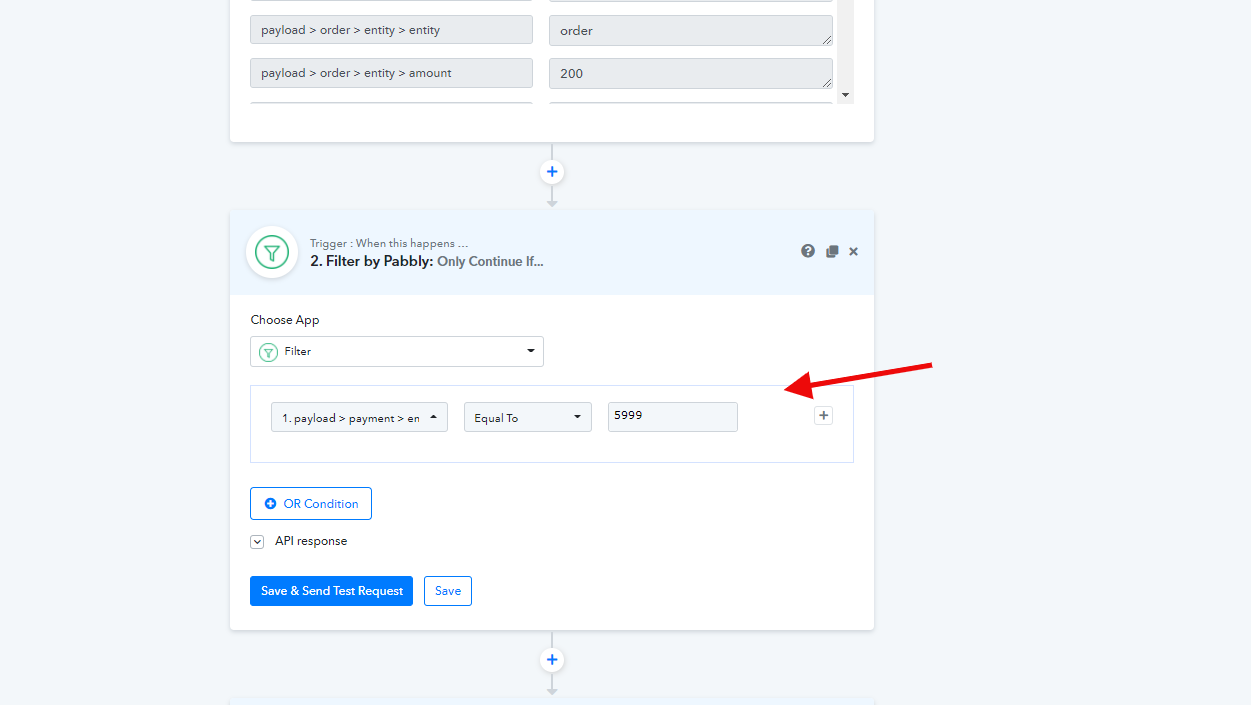
Razorpay webhook data does not provide product names, based on which you can easily make use of filter. The only solution here is to use the filter based on the transaction amount.
Additionally, Razorpay does not offer the option to set the webhook based on products. They have a common section for setting up webhooks for all products.
Thank you very much.