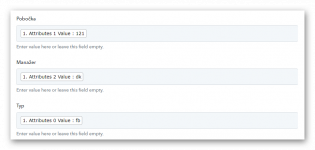
Hi, I use 1 webhook to receive responses from multiple forms.
Forms are completely same, they just differ in location name, logo and UTM parameters.
Forms use conditional logic.
Every field is mapped and received correctly, just UTM parameters (www.xxxx.xx=?&1=Attribute1&2=Attribute2&3=Attribute3) that should go to Column 1: Attribute 1, Column 2: Attribute 2, Column 3: Attribute 3 keep changing their order to 1-3-2 / 3-2-1 / 3-1-2 / 2-1-3 / 2-3-1
Thank you for your help.
Andrew
Forms are completely same, they just differ in location name, logo and UTM parameters.
Forms use conditional logic.
Every field is mapped and received correctly, just UTM parameters (www.xxxx.xx=?&1=Attribute1&2=Attribute2&3=Attribute3) that should go to Column 1: Attribute 1, Column 2: Attribute 2, Column 3: Attribute 3 keep changing their order to 1-3-2 / 3-2-1 / 3-1-2 / 2-1-3 / 2-3-1
Thank you for your help.
Andrew