Replace name
Status: Open · Asked by caleb.cheatham on · 0 views
Hey I'm having a hard time with this. I'm bringing in a company name through a webhook, and if it contains words like LLC, Co, company, inc, etc. I'm removing it from the company name and sending it back. I know how to replace the text, but when I keep sending it back to lead connector it's not updating the company name. It can see it replacing in the history, but then it keeps going down the router and it messes it up. Any help would be appreciated.
Hi @caleb.cheatham,
Please grant me access to your workflow by adding me as a team member. This will allow me to gain a better understanding of your issue.
Once you have added me as a Team Member, do let us know the name of your workflow.
Email: arshil.ahmad@pabbly.com
Also, remember to revoke access once your query has been resolved.
Attaching a video for your reference:
After reviewing your Task History, it appears that the data obtained from the webhook (company name) satisfies the criteria for multiple routes in your Router. Because of this, whenever the company name captured passes through the Filter of your router, the company name undergoes an update in LeadConnector.
I suggest you remove the duplicate conditions so that the captured data fulfills the condition of only one of your routes.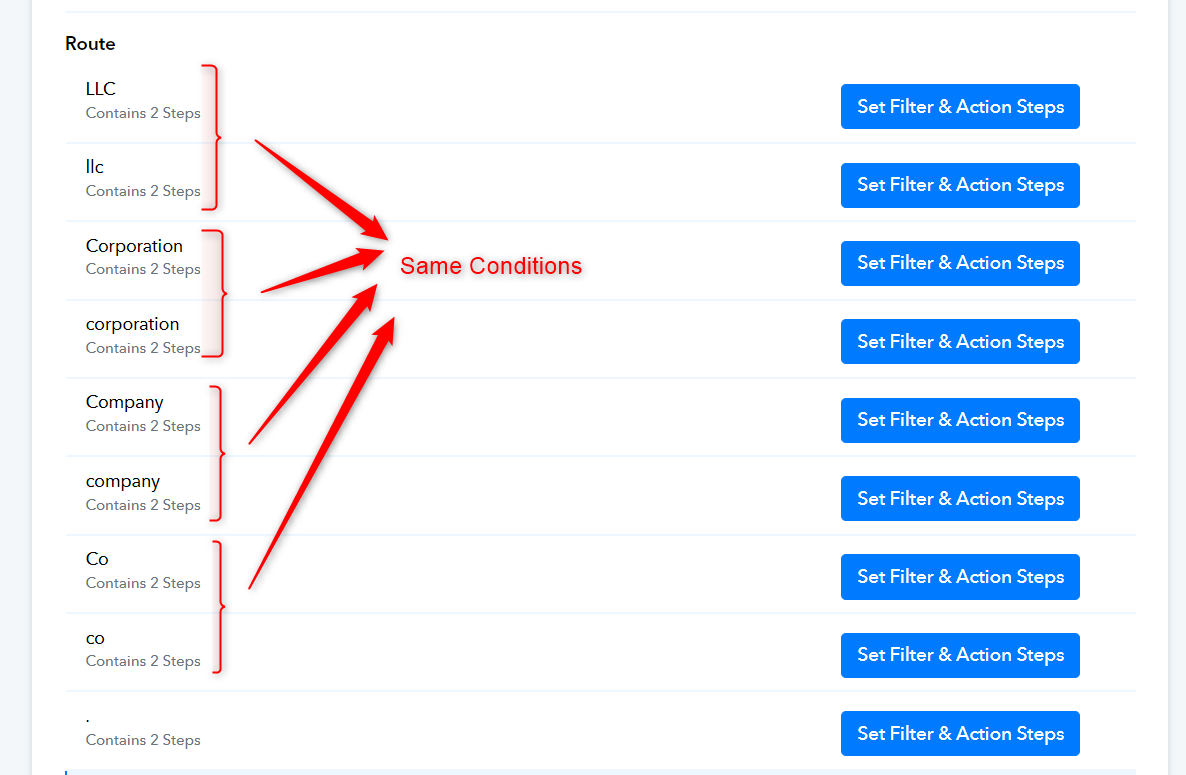
Some of the companies use Co, co, or co. So, when I put those in the same condition, I can only remove one of those on the replace text, because it has to be exact. Any tips on how to solve that without the mess above happening.
You can also add multiple 'Replace Text' actions to your workflow. Simply map the result of one 'Replace Text' action to the next.
https://drive.google.com/file/d/1SsGAk6h-Pw2-hs8aP4U6C-toNruumV8t/view?usp=sharing
I think I got that part but I only have one more problem after that. Here is the link to a loom that shows the problem. I don't know how to make it send which condition was true and not update the contact on the conditions that were false. https://www.loom.com/share/792ba8caae8a425eae5af6cc03979fa9?sid=946d9e82-cc81-440b-ba3f-0f62e2b84227
Map the result of the First Text Formatter's 'Replace Text' action to the Second and map the result of the Second Text Formatter's 'Replace Text' action to the Third. Utilize the result of the Third Text Formatter's 'Replace Text' action in your LeadConnector.
This helps a lot. Thank you!
One last question. If im trying to replace like (inc, INC, INC., Inc, Inc.) could I do text replace for (inc,INC,Inc) and also (.) to replace all of those. Video because I know it's hard to understand: https://www.loom.com/share/224a4117b7154b87af58f3eaa1f91bb0?sid=dd70afe9-d489-43d2-b43a-c2c070a355fc
Yes, you can. That's exactly what I did in the example I shared in the video posted above.