RFC: Lookup Spreadsheet Row in Google Sheets, if not found -> create new
Status: Closed · Asked by AgentM on · 0 views
Hi,
I am new to Pabbly (coming from Zapier) and really enjoy working with it.
But now I ran into a problem without having a solution for it:
I have a task "Lookup Spreadshet Row in Google Sheets" with two possible options, a matching line could be found or not. In Zapier it was just a simple checkbox for the option "Create Google Sheets Spreadsheet Row if it doesn’t exist yet?" - how can this be achieved in Pabbly?
Did not find any inputs for conditional behavior in the data flow.
Thanks for your help.
Hey @AgentM
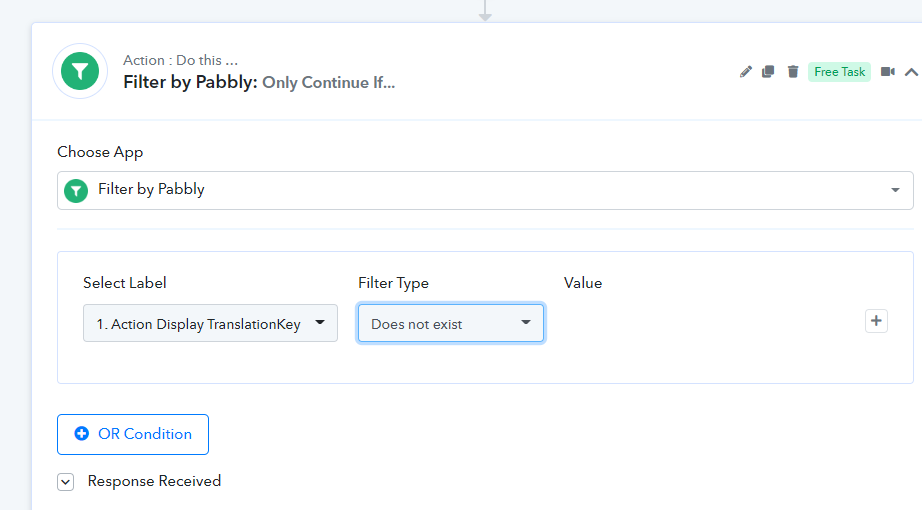
You can use the Filter action step with the "Does not Exist" filter type for your work. I hope this might help you out.
Yes, thank you, will try it out. :)
Hi @AgentM
Did this work for you? I am facing the same issue but cannot get my head around it.
IF it exists, update, else add new row. That should be it, shouldn;t it. How does a filter work, should it not be a router?
Hi @AgentM
Did this work for you I am facing the same issue but cannot get my head around it.
IF it exists, update, else add new row. That should be it, shouldn;t it. How does a filter work, should it not be a router
For your usecase you need to use Router instead of filter. Here is video on Routers -
youtube.com/watch v=6XDASZVv3tw
Make sure you always try this with data which exist in gsheet. Only then you will be able to set filter in Router that Row Index key:value does not exist.
My this video also help -
@GroeiGarage: Yes, it did work for me. I did a "Google Sheets : Lookup Spreadsheet Rows", then a "Router" where I use the "Filter" to check for "Route 1" is the data is not present and follow with a new row and "Route 2" to update the row.