Schedule by Pabbly Trigger issue
Status: Open · Asked by Thomas1721 on · 0 views
Hi Pabbly team,
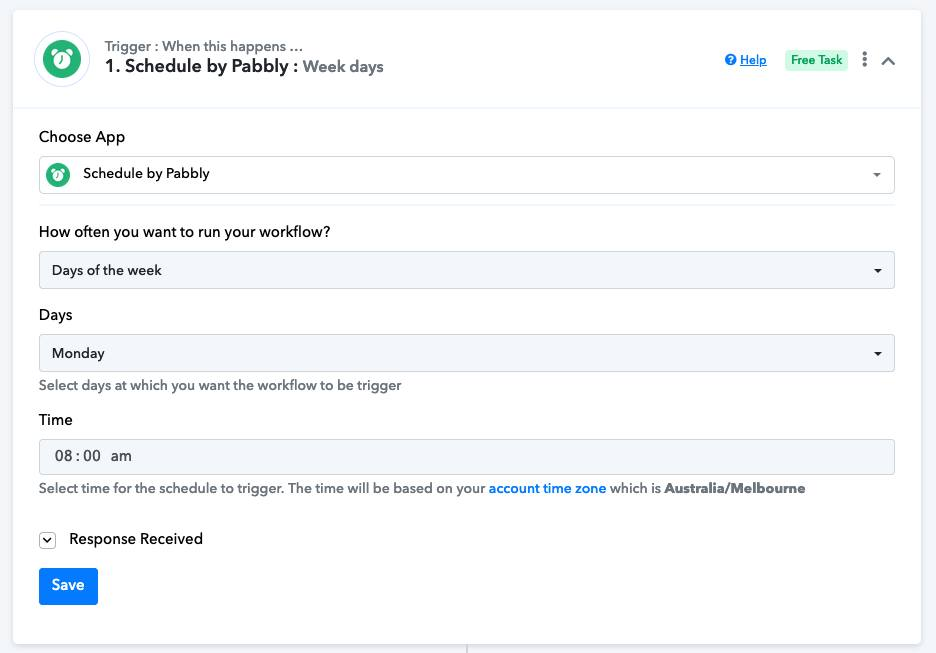
The schedule app setting as shown in the photo only gets triggered on a bi-weekly basis even though I set it to weekly.
The workflow was executed successfully last Monday (08 Jan) and I had to manually re-execute it today.
Please advise if I set it up correctly?
Thanks.
Hi @Thomas1721,
You have set up the scheduler correctly to trigger on a weekly basis, and it should be triggered every Monday at 8 AM automatically. Please allow us some time to look into the reason for the workflow not being triggered automatically. We will get back to you with an update soon.
Can you please check your workflow now it should work now on your scheduled day of the week.
Thank you very much for the prompt support. I can't confirm until it runs in subsequent weeks. I will report back if there are any issues. May I ask if this issue is isolated to my workflow or in general for all Schedule workflow in my time zone?
May I ask if this issue is isolated to my workflow or in general for all Schedule workflow in my time zone?
It seems like this has only been noticed in your workflow so far.
Hi, this issue is still happening to my workflow.
It didn't get triggered this week again.
Can you please look into? Thanks.
Hey @Thomas1721
Can you please share the workflow URL once in which you have experienced it?
Sure it is: IjU3NjMwNTZjMDYzMTA0MzA1MjY1NTUzYzUxMzM1MTYyNTQzMyI_3D_pc
I had to manually re-execute the workflow for this week.
We have forwarded your concern to the technical team and they are currently looking into it.