Send on event not working
Status: Closed · Asked by ddra90n on · 0 views
Hi, my goal is to "trigger" a series of workflows, one after another. When one workflow finishes, it automatically triggers another workflow to start, and so forth and so forth. The way I'm doing it is when one workflow finishes, I update the "trigger" cell in another spreadsheet to "send to pabbly." I have both "send event" and "send on schedule" turned on. But it's not working. Here's a short video: https://www.loom.com/share/fd616ec6bcc5475cbff6908755bb8790
Really appreciate the help!
Nick
Hey @ddra90n
The way I'm doing it is when one workflow finishes, I update the "trigger" cell in another spreadsheet to "send to pabbly." I have both
Could you please check that both the sheets are not in the same spreadsheet? If not then kindly try setting the 2 sheets in 2 different spreadsheets.
Hi @Supreme , I can confirm that the sheets are not in the same spreadsheet. But it's still not working. Here's my newly recorded video: https://www.loom.com/share/ae07779f90f741efae24692f3086fb06
These are the 3 separate spreadsheets in the video.
https://docs.google.com/spreadsheets/d/1qhMNnTqVV9zhpp1WoVPJ-aQXEQFFsKCfO9qfhtySEdE/edit?usp=sharing
https://docs.google.com/spreadsheets/d/1KeWath-QShXyJcD9994q8VtUoDVq09v_fCOaH6Tc8Zw/edit?usp=sharing
https://docs.google.com/spreadsheets/d/1zs-IBiWnXDED70Cz2KjCLo-Zo5lpTHPKClsk6o38qjA/edit?usp=sharing
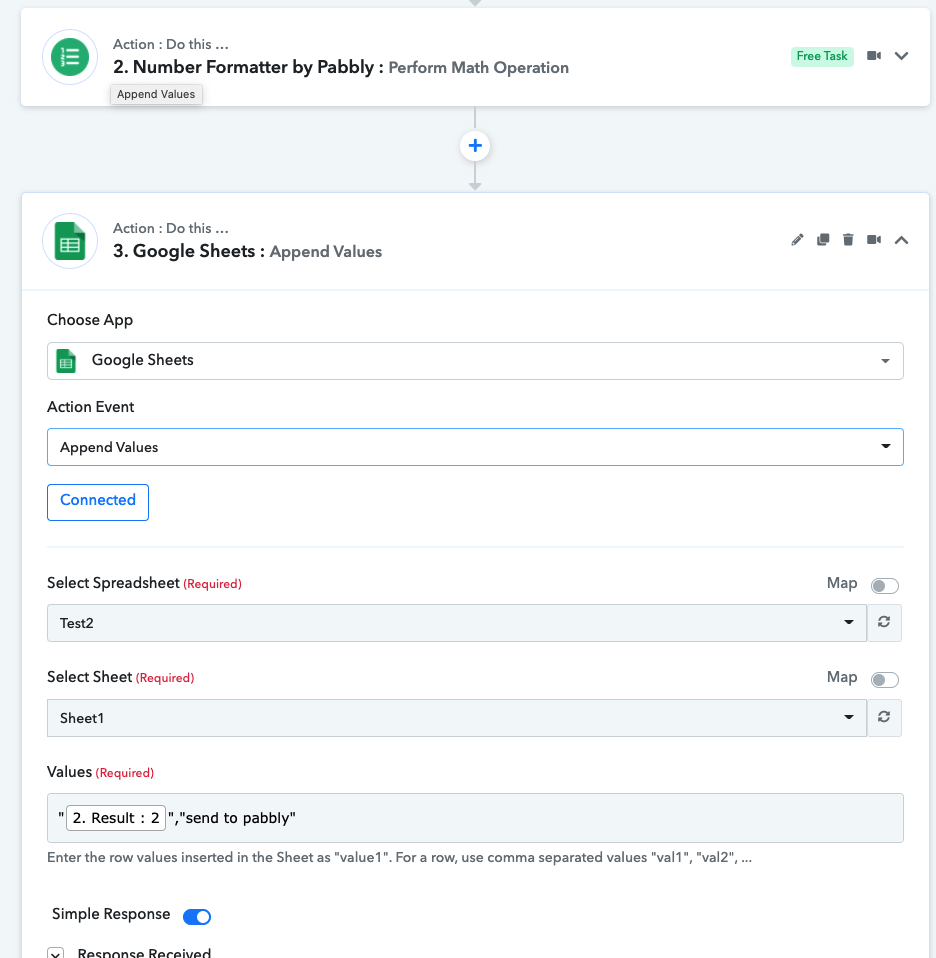
If this works properly, I should have "3" in A1 of Spreadsheet named Test3.
Attached is my workflow setup.
Thank you!
Attachments
Hey @ddra90n
We have added the header in the Test3 sheet and re-captured the webhook response again and did the Initial setup again wherein in the Test 2 sheet you have selected the triggering column C instead of B.
Kindly try again at your end and let us know if that works for you.