Sending from Shopify to Infinity label attribute
Status: Closed · Asked by wibbler on · 0 views
I'm looking to send product SKUs ordered in Shopify to Infinity.
If I send them to a Text attribute in Infinity, it works fine. But when I send them to a Label attribute, I get the following error:
"Invalid data "CHS" supplied to "label" attribute: Data "'CHS'" is not an array supplied to App\Item\Types\Label class"
This is how the field is setup in Pabbly: LAmGxBK
This is the attribute in Infinity, showing the label that Pabbly seems to error on: j9TPt19
I have reconnected the Infinity integration in the workflow.
What am I doing wrong?
Hey @wibbler
I have reconnected the Infinity integration in the workflow.What am I doing wrong?
In the Label fields of your Infinity, you need to pass the respective label Id which you can retrieve the Id with the help of " Infinity: Get Attribute "
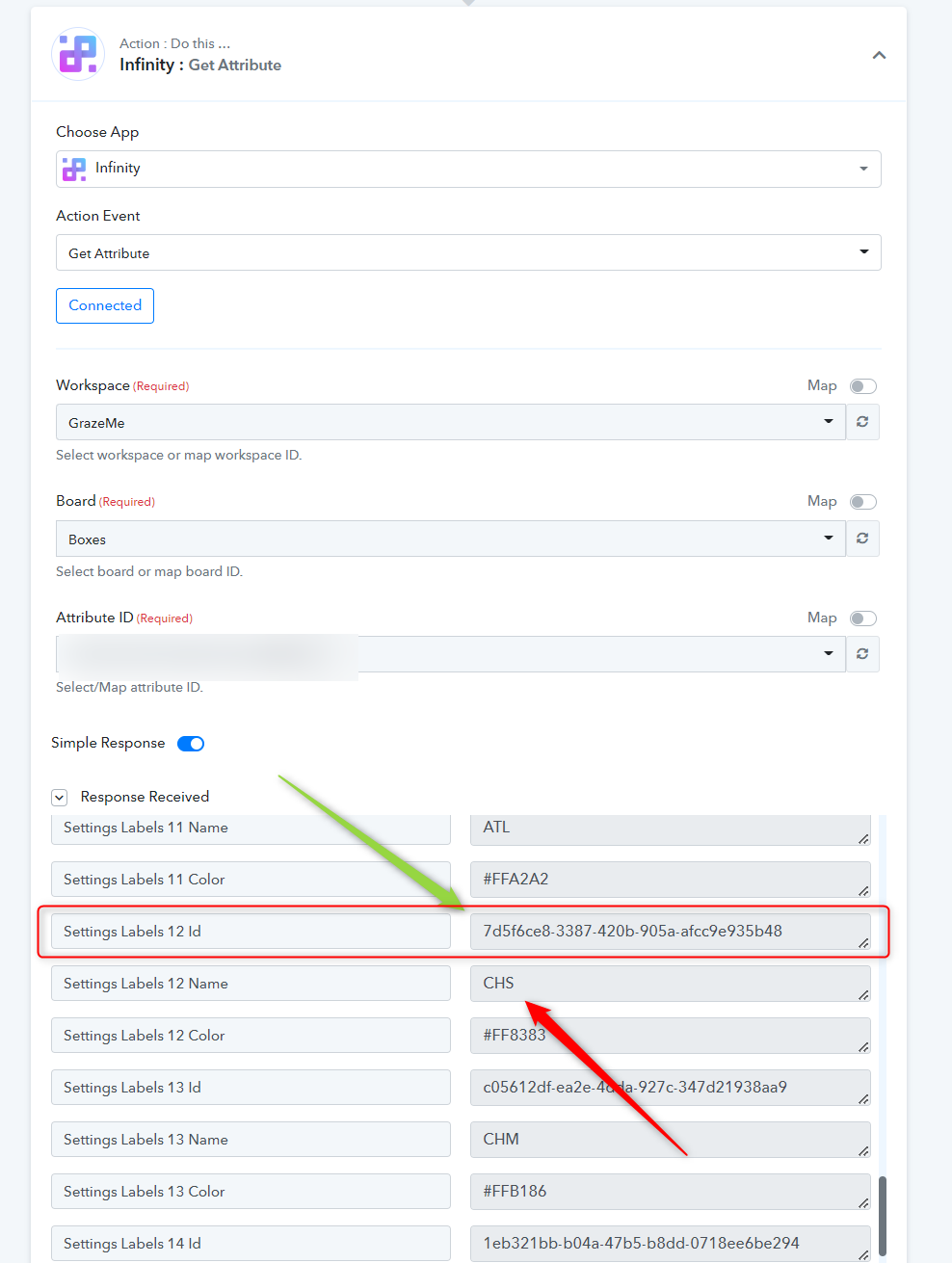
After receiving the Id of the Lable, you can design the Lookup Table action step to make the label and its respective IDs dynamic.
Thanks for your reply. I have the ID now, thanks to your first instruction. However, I'm confused about what the Lookup Table step will achieve. If an item with SKU of CHS is ordered, how can I turn this into a Label on the order in Infinity with the Lookup Table?
For visual help, here is the Infinity table. The "Boxes" column is the plain text that get's sent well through Pabbly. What I want is to have them as labels in the "Boxes (Label)" column.
iivXA2U
Hey @wibbler
We have recorded a short video for your better understanding.
Please can you move this discussion to the private chat. The video is useful, but has my email address in it.
Hey @wibbler !
As per your request, we have moved the thread to the private thread.
Thank you for the answers on this thread. I have managed to get it working.
I have another similar but different scenario on my workflow. I want to set a Label in Infinity every time, but in this scenario no information is coming from the trigger form to "look up". So therefore a Look Up table won't help. I know the Attribute ID and Label ID - how do I set the field on this occasion?
Actually - I cannot edit the previous post, but please ignore it for now.
I have NOT got this working so far. I am also trying this functionality in another table in Infinity, but in both places I get the same result. The below screenshots are from this other table.
Here is the field from Formaloo I am collecting: ZF9f6df
Here is the Attribute I want to update in Infinity, and the ID I want to translate "Package 1 - Original Savoury Table" to: O0BQopq
Here is the Lookup Table with expected lookup "translation": IZfDSQr
Here is the success message on the Lookup table: 4ep4qns
Here is the field I'm trying to update with the Lookup Table value: UhT1Khb
Here is the error I always get: https://i.imgur.com/4m5rm9Y.png
What is wrong?
btw this is "2. Booking Confirmation - FORMALOO > INFINITY" workflow.
We are looking over it and will get back to you.
Hey @wibbler
Could you please share your Infinity account with us at (admin@pabbly.com), so that we can look into your concern and do some testing on the API accordingly?
Ok, I have shared this workflow to admin@pabbly.com
Hey @wibbler
Thanks for the account details, our tech team is currently looking into it.
We will get back to you with an update soon.
Hey @wibbler
We are unable to find your Infinity account on our mailing address, could you please confirm the sharing of your Infinity account at (admin@pabbly.com)?
Moreover, you can also share your credentials on the thread as well.
My apologies, I thought you meant the workflow in Pabbly.
I have just now added you as a Member on my Infinity account, with admin access to the Board in question.
Let me know if you still need credentials.
Note: The "Package" field in the Pabbly workflow is empty currently. As everything else works, I've removed this so I can continue working.
Hey @wibbler
The "Package" field in the Pabbly workflow is empty currently. As everything else works, I've removed this so I can continue working.
We want your Infinity accounts credentials to test the complete label concern. Since, we are unable to use the Board from the shared member account.
ok
u: [email hidden]
p: P@bbly
Hey @wibbler
Thanks for sending the account details with us, we will inform you with an update soon.
Hey @wibbler
Meanwhile, you can pass the value in the field by passing it in the square bracket.
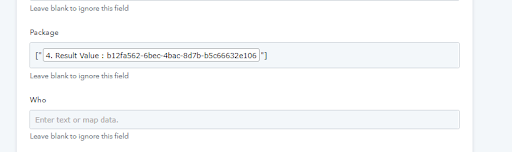
Will this enter it correctly in the Label field of Infinity? If so, is this all I need to do from now on?
Hey @wibbler
For now, you can try passing the Id in square brackets. Moreover, our tech team is currently looking into main concern.
thanks. That works :)