Shared Drive is not displaying all folders
Status: Closed · Asked by borobusinesslab on · 0 views
I have connect my Share Google Drive. However, it does not display for full list of folders. Even if I search for the specific folder that I need, it does not show up.
Hey @borobusinesslab
Kindly refresh the Folder Id field once and check again.

Thanks but I already tried that and it doesn't work. Not showing all my folders
Hey @borobusinesslab !
There are some limitation for the Folders to be shown in Google Drive step.
The maximum as of now is 100.
But in case you need a specific Folder, which doesn't reflects through the dropdown, In that case you can use the "Google Drive: Search Folder" as mentioned below-
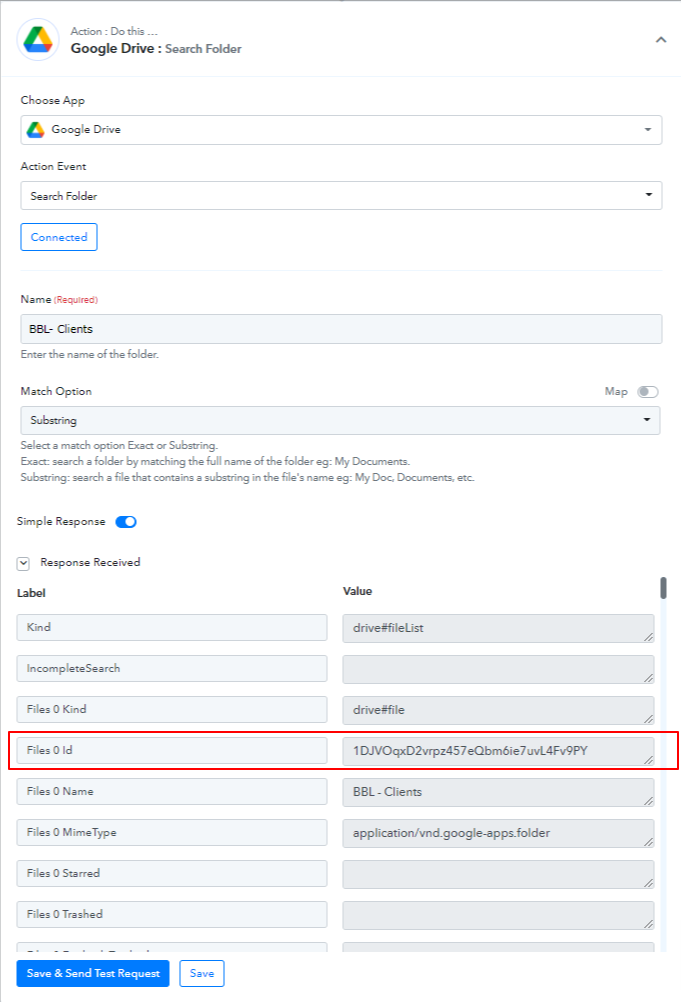
It will provide you with Folder ID, which you need to map in your Google Drive step as done below-
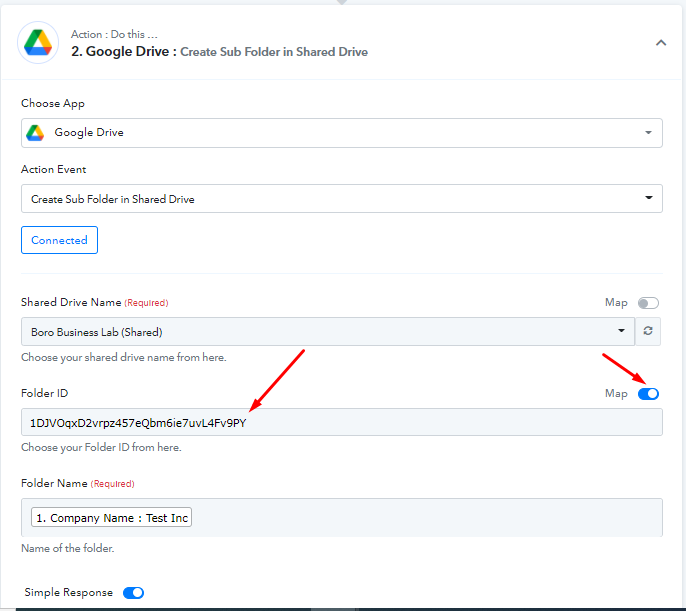
Kindly check on this and let us know if this works for you.
Thanks. That worked