Sheets Update Record --> Airtable - issue with choosing record
Status: Closed · Asked by britney.gardner on · 0 views
I'm trying to create a workflow where if a Google Sheet record gets updated, it will also update the same line on an Airtable database.
However, when it comes to choosing WHICH record, Pabbly only gives me a record string that looks like "rec03QBJKk1OjT6og" or similar, with a whole list of them. If I choose to map the record and use my data, it results in an error. This happens whether I use the Get Record Airtable action OR the Update Record Airtable action.
Any ideas?
Hey @britney.gardner
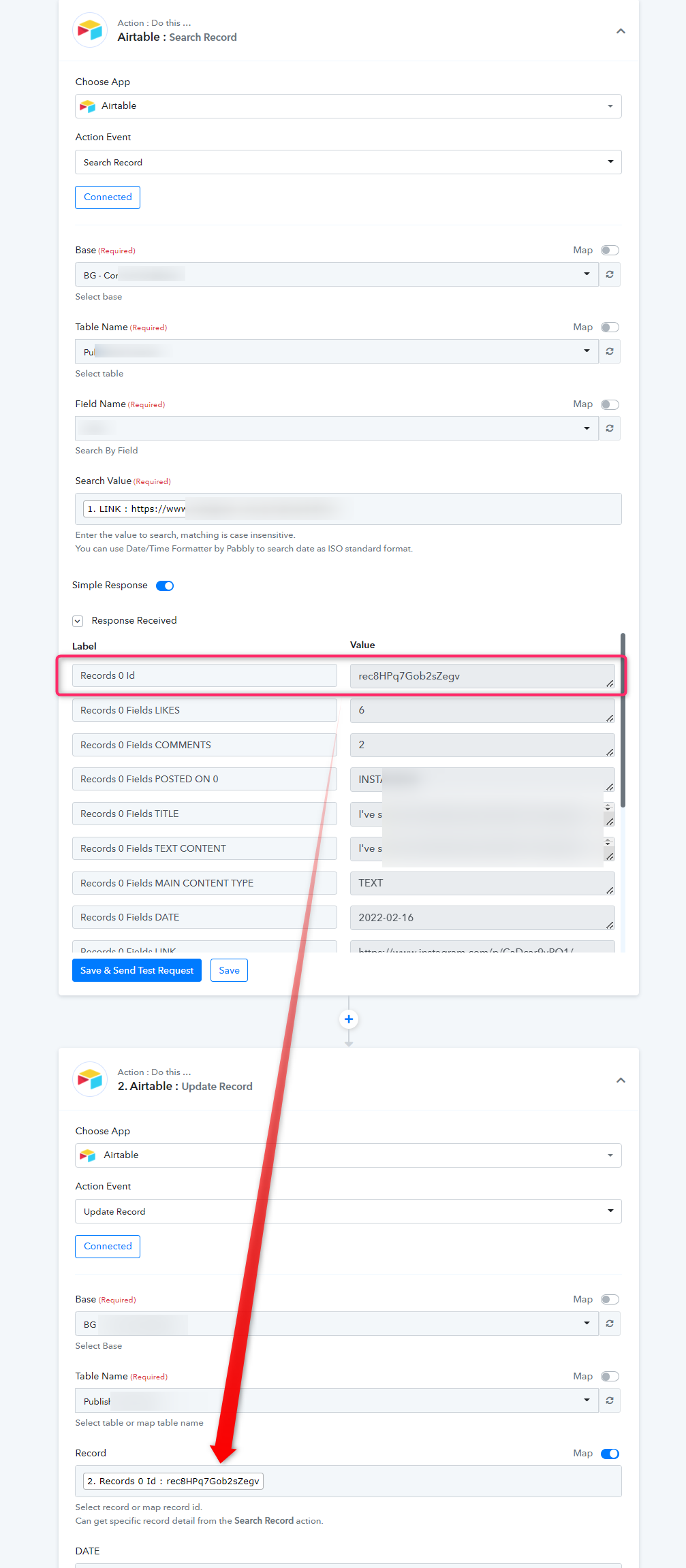
To update a record in Airtable you need to pass the record Id in the record field which you can retrieve with the help of the "Airtable: Search Record" action event.
Kindly check the following screenshot for a better understanding. Although we have done that for you in your workflow.
hi, i am having the same issue,
and it's because when Pably is sourcing the information, it is not covering all the fields that are available in airtable, how can i fix this?
Can you please share the workflow URL once in which you have tried the same so that we can look into it?