Shopify line_items array not available for Iterator / Filter (4 workflows affected)

Status: Closed · Asked by Ryadan Jeavons on · 0 views

Ryadan Jeavons — Question ·
I have four workflows in my account, all built the same way and all Shopify → MemberVault course-purchase automations. All four are triggered by Shopify's "Order Payment" event, and I need to check multiple line items in a cart, since a customer might buy a course alongside other products, and the course could be in any cart position, not just the first item.
These are the only four workflows in my account, so it should be easy to identify them.
I'm running into two related issues, present across all four:
1. The Iterator step shows "no options" when I try to select an array to loop over — I switched the trigger's Response Format to Advanced/Raw and recaptured, but line_items still doesn't appear as a selectable array, only as flattened individual fields like line_items 0 title, line_items 1 title, etc.
2. My captured sample data only ever reflects the most recent real order (usually 1 item), so I can't get line_items 2, 3, 4 etc. to appear as selectable fields for a Filter's OR conditions. I can't get a multi-item test order to stay captured — either the "recapture/waiting for webhook response" screen gets stuck and never completes, or a new single-item real order overwrites the sample before I can finish building the OR conditions.
Could you help with either:
- Exposing the full line_items array so it can be used with the Iterator step across all four workflows, or
- Manually adding line_items 2, 3, and 4 (title field) as available options in each Filter step's field picker, even without a fresh capture containing that many items
Trigger app on all four: Shopify V2, event: Order Payment
Thanks for your help!
Pabbly Support — Reply ·

Hello Ryadan,

The use case you require would involve capturing the response as an array in the Shopify trigger step and then iterating through all the line items.

Please share the Workflow URL so we can look into this concern.

Thanks & Regards,
Arshil Ahmad
🌐 Pabbly.com

Pabbly Support — Reply ·

It appears that you have captured a simple response in your trigger step.

Please log in to your Pabbly Connect account in an Incognito tab. Then, click Advance, select Re-Capture Webhook Response, and place a multi-product order on Shopify. Check whether the advance response is captured in the trigger step.
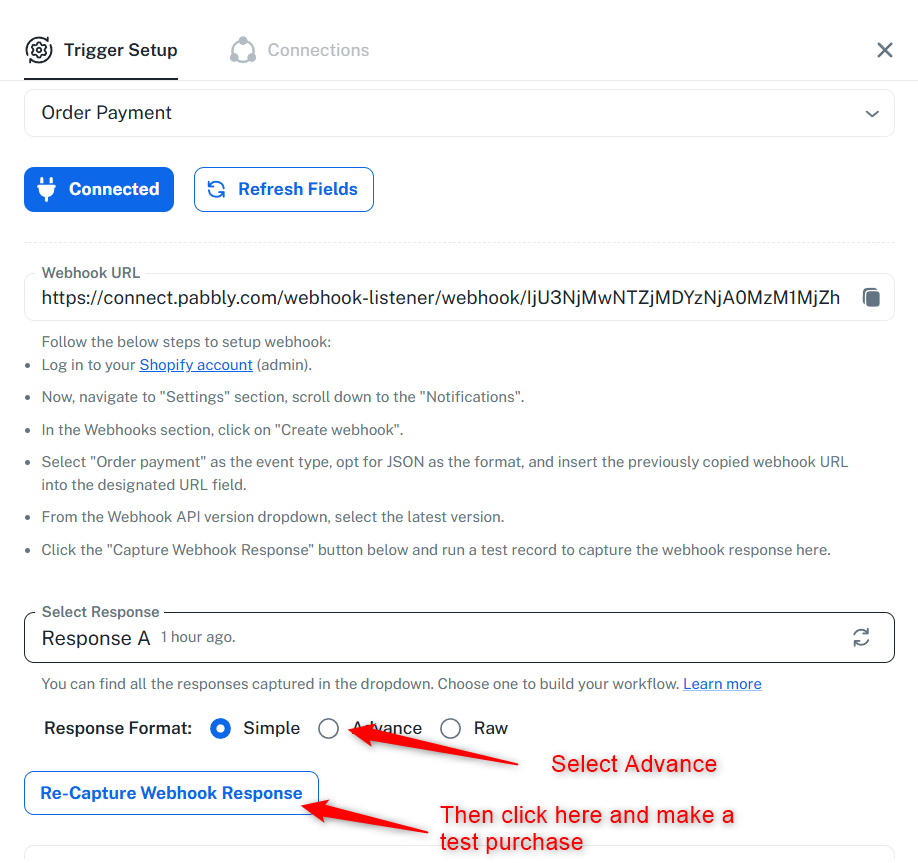
image.png
Thanks & Regards,
Arshil Ahmad
🌐 Pabbly.com

Pabbly Support — Reply ·

Just following up—could you please try re-capturing the webhook response in an Incognito tab by placing a multi-product order on Shopify and let us know if the advanced response is captured in the trigger step?

Thanks & Regards,
Arshil Ahmad
🌐 Pabbly.com
Pabbly Support — Reply ·

Just following up on this. Could you please try re-capturing the webhook response in an Incognito window by placing a multi-product order on Shopify? Then, let us know whether the advanced response is captured in the trigger step.

Thanks & Regards,
Arshil Ahmad
🌐 Pabbly.com
Pabbly Support — Reply ·

Just following up on our previous message.

Since we haven't heard back from you, we're closing this support ticket for now.

If you still need assistance, please feel free to send us an email at support@pabbly.com, and we'll be happy to investigate it further.

Thanks & Regards,
Arshil Ahmad
🌐 Pabbly.com

Back to all forum threads · Log in to reply