Shopify to zoho crm sales order
Status: Closed · Asked by tj.hudson on · 0 views
Good Afternoon,
I am trying to create a new sales order in Zoho CRM once an order is placed in Shopify. I have already created the flow that updates or creates a new contact in zoho but I also need zoho to pull the sales order information from shopify to create the sales order in zoho crm.
I have tried to create the flow to have zoho create a new sales order once a shopify order is created but it asks for a "deal", which is required. Not even sure what this is. I have also tried to "get sales order" but I have not found success.
Shopify order--> Zoho CRM creates a sales order --> Contact in zoho crm now has the connected sales order in their account.
Any help is appreciated.
Hey @thudso3
Kindly allow us some time, we are currently looking into it.
Shall notify you with an update soon.
Any update on this thread?
Hey @catco.hello
You can refer to the following shared workflow where you will get the desired action steps to create a sales order in Zoho.
Please check this out and let us know. - https://connect.pabbly.com/workflow/share/CEBRY1IFBGdRGwBqVgUFIgAUUlYDWlQ3Bx5WRFxTAXkDTQNWBEUKYFoWAiBQH1IzBUxQOg5SV24MGFdTVQNWJVVPABIAA1YsUB1WZVQRCToIVlF5UjM#
Hi, The flow you've shared is for Zoho CRM. I am looking for New order on shopify >> New customer in Zoho Books >> New sales Invoice creation on shopify. I've followed this video:
youtube.com/watch?v=_W-hZCb9pVk
However, invoices are not created and sometimes customers are also not added onto Zoho. Please help. I have added photo below of my flow. I'll like to set this flow up and buy an yearly plan from you guys.
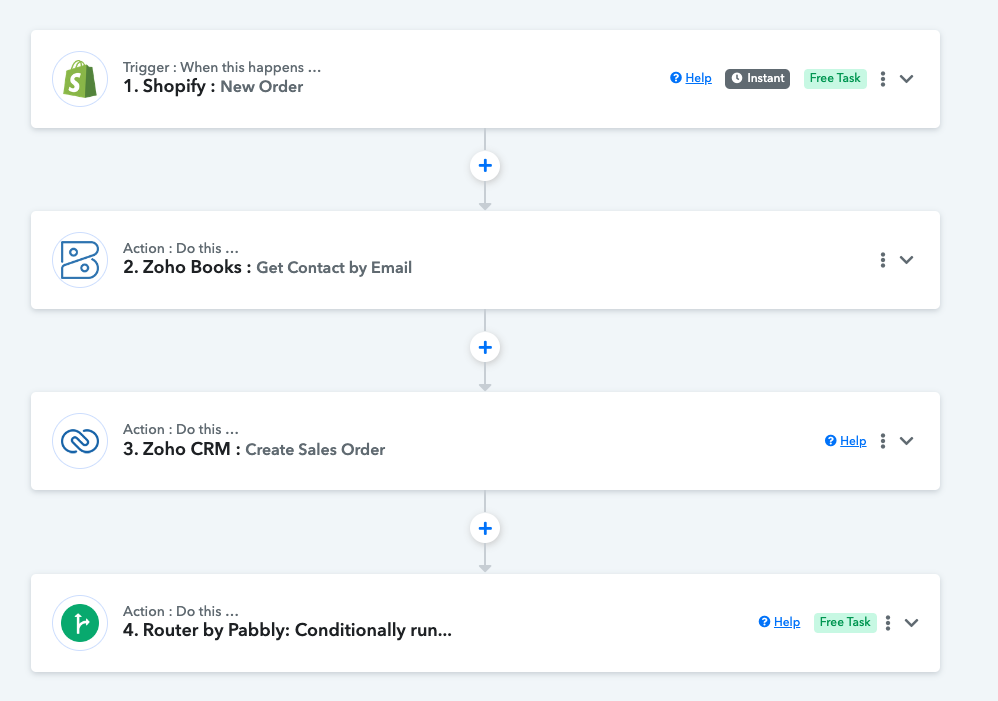
Kindly share the workflow URL in which you have configured the Zoho CRM action steps.
This the link. Please let me know, would like setup multiple setups with Pabbly.
However, invoices are not created and sometimes customers are also not added onto Zoho. Please help. I have added photo below of my flow. I'll like to set this flow up and buy an yearly plan from you guys.
After a thorough investigation of the workflow, we discovered that when creating an invoice, you used the contacts' IDs instead of the Customers' Contact IDs, and you missed passing the Customer's Contact ID in the "Create Invoice" action step.
Though we have corrected the workflow mapping and the filter condition for now. So, please check the mapping once and then try again.
Hi thanks for correcting it. Will check and get back.