SpreadSimple and Google sheet
Status: Closed · Asked by victor.a on · 0 views
Hi, I am trying to connect SpreadSimple to Google sheet but I can't get all information. I have created an online store in SpreadSimple and I have created a workflow in Pabbly to get all info from New Orders into a Google Spreadsheet. I only get two items from every order in my Google Sheet, even if there are more products in an order. How can I get all items from every order into my Spreadsheet?
Thanks for your help
Hey @victor.a
Upon examining your workflow, it seems that SpreadSimple is successfully capturing multiple products. However, mapping these products in the Google Sheet step appears to be somewhat complicated. To address this, you can utilize the "Line Itemizer" function within your workflow to achieve your desired outcome. Please disable the simple response button for SpreadSimple and then capture a test response containing multiple products.
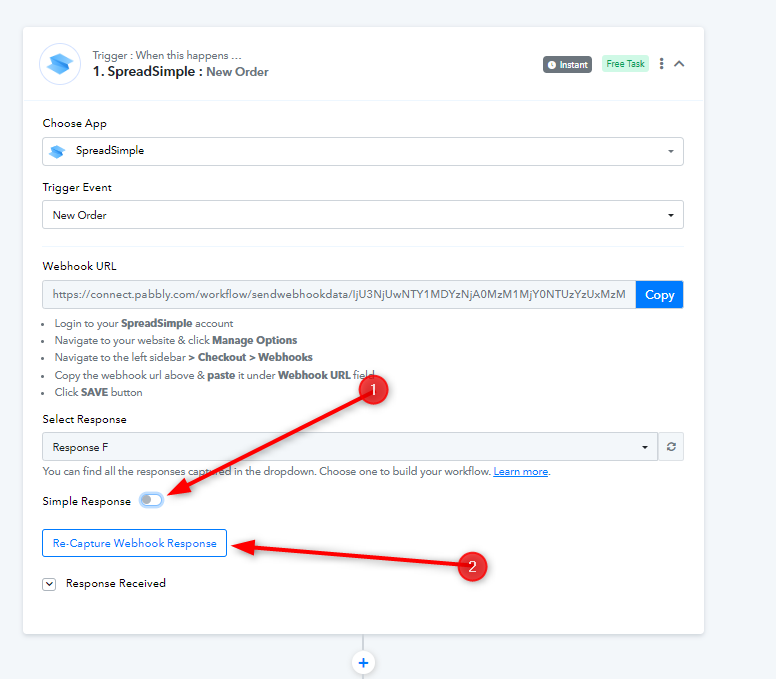
After that, kindly refer to the instructions mentioned in this video after 03:00 -
youtube.com/watch?v=GqaiQO_ekUQ
You can then map the response from "Data Transformer" into your Google Sheet.
Let us know if this works for you.
Thanks for your answer. It worked perfectly! Big thank you!!!!