Stripe invoice no amount
Status: Open · Asked by COBEAS on · 0 views
Hey,
I want to create an invoice in Stripe with the following workflow:
Webhook received (with customer and product details) -> find customer in Stripe -> create invoice item with price object in Stripe -> create invoice in Stripe
When I do this, everything goes well, I can find the customer ID and create an invoice item and the amount is correct but when I create an invoice in Stripe the amount always says 0
What goes wrong here?
Edit:
Also there are no items on the invoice.
Hi @COBEAS,
You need to use the 'Create an Invoice Item with Price Object' action event, followed by the 'Create an Invoice' action event to generate an invoice.
[IMG alt="image (95).png"]https://forum.pabbly.com/attachments/image-95-png.33769/[/IMG]
That was exactly the workflow I was using. Right now I am using another way of making my invoices but that still doesn't resolve the issue that occured.
Please try creating the invoice in the manner suggested above. If the issue persists, let me know. Also, share the workflow URL in which you have tried to create the invoice.
hello, I have the same problem, I followed all the steps you mentioned, but still AMOUNT = 0
Hey @kasmimed
Kindly provide us with your email address linked to your Pabbly Connect account.
Also, the workflow name in which you are getting issues?
So we can check on it and guide you further.
I have the same problem here's the workflow link : https://connect.pabbly.com/workflow/share/WBBRY1UCVTZWHAdtBVYGIQoeVVECWwNiXUQDEVdYUSlSH1YTAUBdN18TUHJVEgRlAElUPgRYBz8MGAEFAFYCcVFIAz9cXwZ8UB1VLlYXADNYBlF5VTQ#
Hey @mouadj
As I can see from your workflow, you are currently using the "Stripe: Create an Invoice Item" action step.
Instead, I request you to use the "Stripe: Create an Invoice Item with Price Object" action, then create an invoice and check if you are still facing this issue.
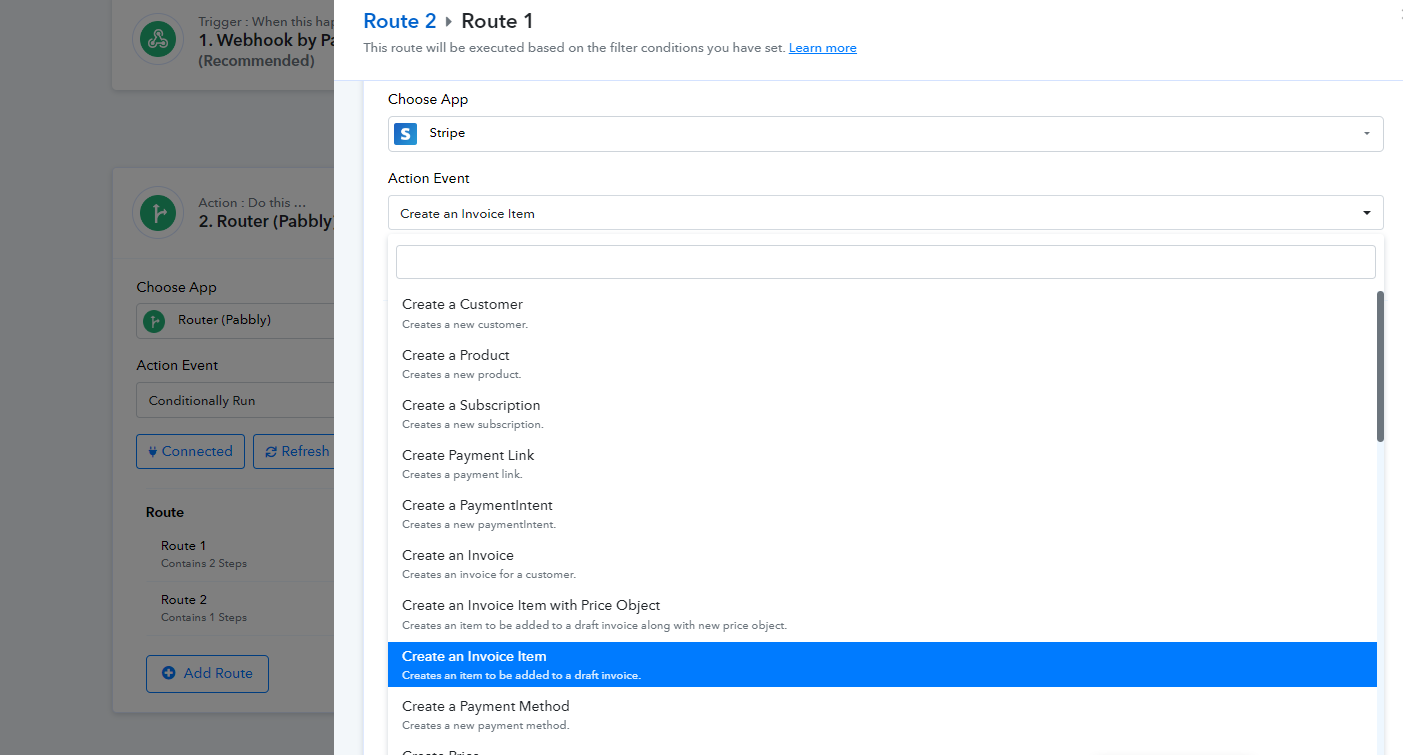
Hey @mouadjAs I can see from your workflow, you are currently using the "Stripe: Create an Invoice Item" action step.
Instead, I request you to use the "Stripe: Create an Invoice Item with Price Object" action, then create an invoice and check if you are still facing this issue.
I used both of them and the same problem 0 amount
Could you please record a short video explaining the issue after adding the "Stripe: Create an Invoice Item with Price Object" action step?
Specifically, show the process of making a new connection and the result showing 0 in the "Stripe: Create an Invoice Item with Price Object" action step.
This will help me understand the problem better and check it from our end.
Could you please record a short video explaining the issue after adding the "Stripe: Create an Invoice Item with Price Object" action step?Specifically, show the process of making a new connection and the result showing 0 in the "Stripe: Create an Invoice Item with Price Object" action step.
This will help me understand the problem better and check it from our end.
Can you check the workflow ?
Yes, we have checked your workflow and forwarded your concern to the technical team.
Please allow us some time and I will update you soon.
Yes, we have checked your workflow and forwarded your concern to the technical team.Please allow us some time and I will update you soon.
Thank you. still waiting for the technical team's answer
Our team is currently working on it, and we will surely provide you with an update as soon as we hear back from the tech team.
Thank you for your patience and understanding.
Hey @mouadj
Could you kindly provide us with the API key for your Stripe application so we can assist you further?
If yes, please send it to us via email at support@pabbly.com. We'll then be able to proceed with checking from our end and offering assistance.
Also, please be aware that to assist you effectively, we may need to access your Pabbly Connect account. If you're comfortable with this, please grant us permission by stating in your next email: "You have my permission to log into my Pabbly Connect account and do the testing from your end, and edit workflow {If required}. Here is the registered email address and API of Stripe for testing"
Hey @mouadjCould you kindly provide us with the API key for your Stripe application so we can assist you further?
If yes, please send it to us via email at [EMAIL]support@pabbly.com[/EMAIL]. We'll then be able to proceed with checking from our end and offering assistance.
Also, please be aware that to assist you effectively, we may need to access your Pabbly Connect account. If you're comfortable with this, please grant us permission by stating in your next email: "You have my permission to log into my Pabbly Connect account and do the testing from your end, and edit workflow {If required}. Here is the registered email address and API of Stripe for testing"
Sorry for late answer but I found no problem with using it on your competitor. I was using pabbly for almost 1 year now but I think it's time to change. You made me lose hundreds of dollar and days to resolve a problem that should not be here. sorry again and thank you for your kindness and service.
Hey @mouadj
We are very sorry to hear about the issues you've faced.
We value your loyalty over the past year and are committed to resolving any issues you are facing. To address your concerns in a better way, we would like to offer a meeting to discuss the problems in detail and find a solution.
Please let us know a convenient time for you, and we will set up a Google Meet session to assist you further.
Thank you for your patience, and kindness, and for allowing us to help you.
To proceed with testing within the workflow with the related action step, we need your consent. Please confirm if you’re comfortable with us conducting the tests and making any necessary adjustments in your workflow.