systeme.io integration
Status: Closed · Asked by tycoon1962 on · 0 views
Dear Support,
I'm capturing data from the systeme.io form submission on the page:
https://dna.coachsundeep.in/home
Following this procedure:
- Login to the Systeme.io account.
- Navigate to the "Settings" section from the "Profile" icon and click on "Webhooks".
- Click on the "Create" button in the "Webhooks" tab and enter the name of the webhook.
- Copy the above webhook URL and paste it into the "URL" field. Choose the event as "Contact tag added". Click on "Save".
- Click on the below "Capture Webhook Response" button and do a test record so that the webhook response can be captured here.
Response Received
Label
Value
Contact Unsubscribed
0
Contact SourceURL
Contact RegisteredAt
2024-06-19T09:04:29+00:00
Contact NeedsConfirmation
1
Contact Locale
en
Contact Id
264390326
Contact Fields 0 Value
IN
Contact Fields 0 Slug
country
Contact Fields 0 FieldName
Country
Contact Email
[email hidden]
Contact Bounced
0
However, the name, WhatsApp number and phone numbers are not captured.
Please advise.
This log may help
Request
Headers
- Request url:https://connect.pabbly.com/workflow/sendwebhookdata/IjU3NjUwNTZhMDYzMzA0MzQ1MjZhNTUzMjUxMzEi_pc
- Request method:POST
- Accept:application/json
- Accept-Encoding:gzip
- Content-Length:270
- Content-Type:application/json
- User-Agent:SystemeIO-Webhook
- X-Webhook-Delivery-Attempt-Id:01902fbd-8da3-7dca-a8dd-6056a553ab36
- X-Webhook-Delivery-Attempt-Timestamp:2024-06-19T09:04:30+00:00
- X-Webhook-Event:CONTACT_CREATED
- X-Webhook-Event-Timestamp:2024-06-19T09:04:29+00:00
- X-Webhook-Message-Id:01902fbd-8d0e-7542-a1d6-1a3711e3d1d0
- X-Webhook-Signature:150b384552973f03b5788269828cb9aec2c2611f7a20113e193178d9f53bf3e6
- X-Webhook-Subscription-Id:01902fba-ccc9-796d-b2f9-063c5f86b9d9
Content
{
"contact": {
"id": 264390326,
"email": "[email hidden]",
"registeredAt": "2024-06-19T09:04:29+00:00",
"locale": "en",
"sourceURL": null,
"unsubscribed": false,
"bounced": false,
"needsConfirmation": true,
"fields": [
{
"fieldName": "Country",
"slug": "country",
"value": "IN"
}
],
"tags": []
}
}
Hey @tycoon1962
Please use the 'Search Contact by Email' action step to obtain the relevant data.
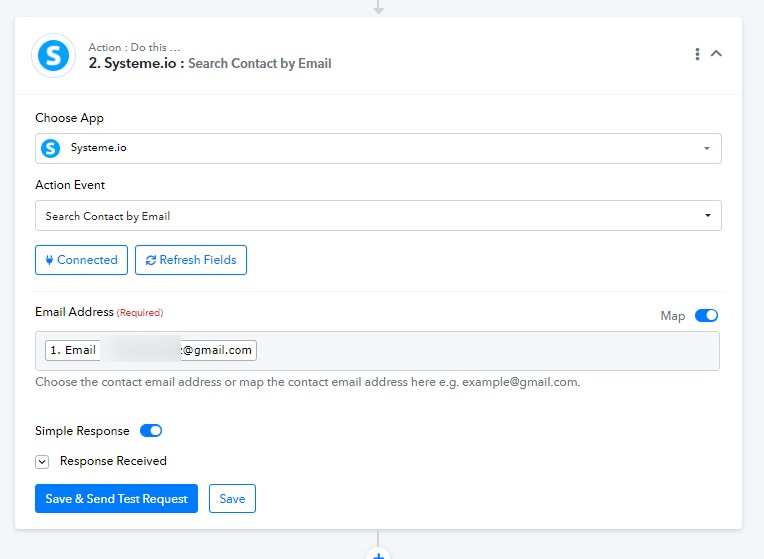
Ok. Thank you