Tag or Mention in Teams
Status: Closed · Asked by Corleone on · 0 views
Using the "Send Message in Channel" trying to figure out how to tag a member so they get a notification.
Seems to be removing the tags.
https://learn.microsoft.com/en-us/graph/api/resources/chatmessagemention?view=graph-rest-1.0
Hey @Corleone
You can simply pass the HTML content along with the format for mentioning someone or tagging.
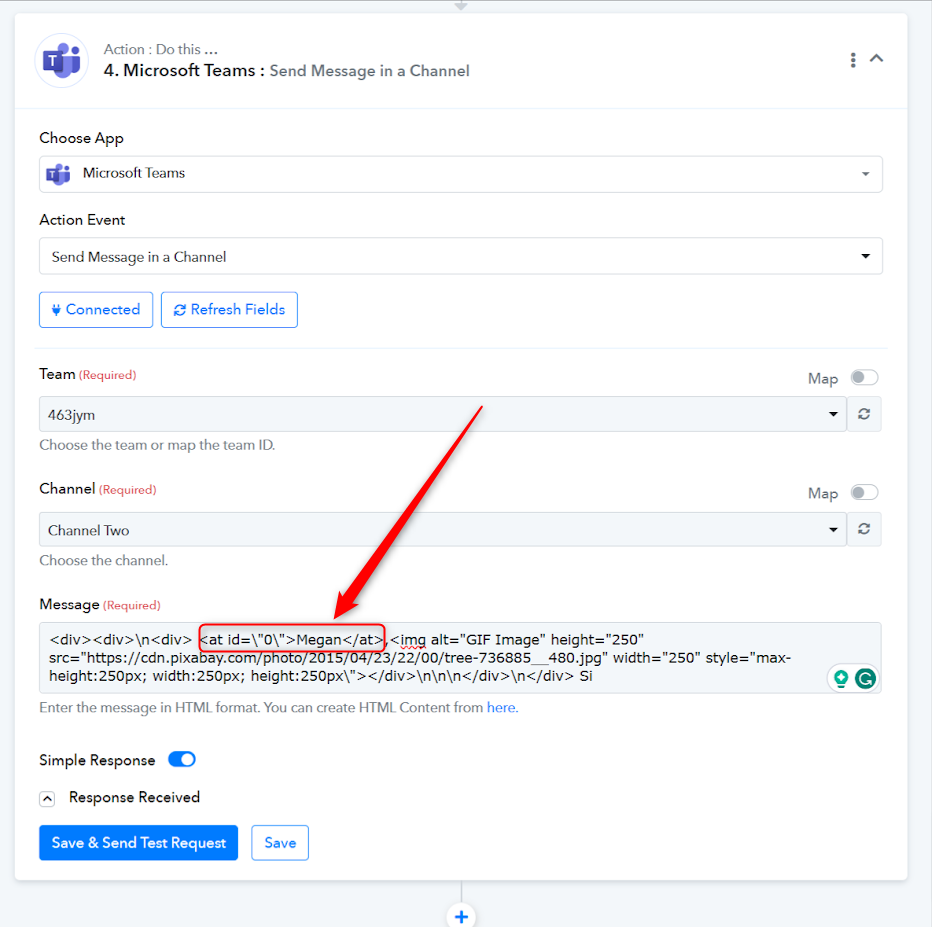
The second mention has an id attribute of 1, matching the id property of the second instance, which is 1.
Hey @CorleoneYou can simply pass the HTML content along with the format for mentioning someone or tagging.
The second mention has an id attribute of 1, matching the id property of the second instance, which is 1.
I've tried this multiple times. I cannot get it to work. Please show full example with code and output so I can compare to my own.
The code in the screenshot seems to be incomplete.
Thank you
To mention your team members, simply use their display name, email, or userID enclosed in "at" tags. For instance, you can mention Jane Doe with Jane Doe, or use their email like [email hidden], or even their user ID as jane-doe-user-id.
To mention your team members, simply use their display name, email, or userID enclosed in "at" tags. For instance, you can mention Jane Doe with Jane Doe, or use their email like [EMAIL][email hidden][/EMAIL], or even their user ID as jane-doe-user-id.
I have tried ALL of these multiple times with the same result. It will post the info within the tags but it does not tag the user.
Hey @Corleone
Can you please share the workflow URL and the screenshot of the HTML that you are passing in the MS Team action step to send a message?
I figured it out. I didn't see the Beta API option before. I was able to formulate the json request using POST just as I needed.
Thanks for the update @Corleone