Tallyfy Launch Process Action issues
Status: Closed · Asked by Anders Nielsen on · 0 views
Hi, I can see you have a Tallyfy integration but it’s really lacking a lot to be useful and forces you to use Zapier.
I need to fill out Kick-off form fields and “Assign someone else” to them when launching the process for it to be of any use:
https://share.getcloudapp.com/YEuWDjBp
This means you can’t really any useful and very basic data to it (like Name, email etc.).
In additional I’m missing a way to add assign guests when launching a procedure:
https://share.getcloudapp.com/v1uQE6jG
This means that you can’t even assign a client to the Blueprint. So basically the Launch Process task is already there, but it offers no way to input any data for the process making it unuseable.
Could you add this please?
See this video for how it works in Zapier where you can set everything. You can populate both Kickoff form fields as well as the field of every task as well as setting assignments and guests for every step: https://share.getcloudapp.com/BluWRJo5
I have made a feature request here:
https://pabbly.hellonext.co/p/tallyfy-launch-process-step-not-useable
Hey @apps
Thanks for posting the API request, our tech will look into it and add the feature in the Tallyfy's integration accordingly.
Also missing a way to find a process by name (not exact match, but loosematch). If not it is not possible to use the "Complete task" action in Pabbly Connect because it requires knowing the Process ID.
I see from Tallyfys documentation and video:
326754823 that Zapier has a Find Process Task (see the video how it works), that makes this possible.
See also this: https://support.tallyfy.com/article/251-how-to-mark-process-task-complete-using-zapier
Basically the use case is sending a call back from the booking system (Novocall) to Tallyfy telling it that the call has been booked (so to continue the process) as well as to complete todo lists.
Hey @apps
Thanks for the update, we will forward your concern to our tech team.
Hey @apps
For now, we have implemented the Global search feature in the Tallyfy action event so now you can pass the kickoff field in the action step.
Meanwhile, please test these features now and let us know if that works for you.
Hi, thanks.
I don't quite understand how I would use these though? Because the Launch Process action doesn't show all fields in the Blueprint still. Only the kickoff fields, so I still cannot populate the other fields which are needed (and like Zapier does).
For instance I need to set different guests in each step and and other content to the fields in the steps
How would I solve this?
Hey @apps
Meanwhile please share the output of the action step with us and let us know if it passed all the fields to our Tallyfy correctly or not.
Later, we will try to add the rest of the fields which you have mentioned.
Ok, yes I tested and it passed it perfectly:
You can see the result here in step 2
https://connect.pabbly.com/workflow/mapping/IjU3NjEwNTY0MDYzMzA0M2Q1MjY4NTUzZCI_3D_pc
Just missing the rest of the fields to fill out.
Hey @apps
Thanks for the update. We have forwarded your requirement to our tech team and they will look into it.
Furthermore, we kindly ask for more time to continue working on the matter.
Great! Thank you!
Searching with the Global Search I can't make work. See this:
https://share.getcloudapp.com/OAujNyBK
This flow:
https://connect.pabbly.com/workflow/mapping/IjU3NjEwNTY0MDYzZTA0Mzc1MjY5NTUzNiI_3D_pc
What am I doing wrong?
So I see that I have found the process ID based on the email. But based on the process ID I don't see how I can find the Task ID of the "Beslut hardware til indkøb" step. How do I find that so I can compelte a task in a specific process?
Any news on this?
Hey @apps
Our developer has checked the current possibility of adding the task in the action event and as of it is not possible to add the additional feature in Tallyfy.
You may post the request on our platform here - https://pabbly.hellonext.co/ Once, we add the feature to the action event we will notify you accordingly in near future.
Ok, I created a request for finding task ID based on task name.
But how does the Tallyfy Global Search work? It seems broken: see here:
https://share.getcloudapp.com/2Nu7Z6Bv
Hey @apps
But how does the Tallyfy Global Search work? It seems broken: see here:
As we can see from your video you are passing Process in the On field only, if you want the task as well, you can pass Task as well, as you can pass comma-separated values in the area.
Further, Pabbly Connect's structure doesn't support recovering the response dynamically.
Sorry, I don't understand what you mean.
My question is:
How would I find a specific task inside a specific process. Can you provide an example please. There is not documentation for this Global Search flow and it is not obvious how it works.
I want to find the task "Opstartskald: Problembeskrivelse" inside a specific process which I search for by email.
How can I do that?
To find the process I can search by email, however how do I then find the specific task inside that process by task name?
This does not work:
https://share.getcloudapp.com/YEuW2yKE
Hey @apps
How can I do that?
To find the process I can search by email, however how do I then find the specific task inside that process by task name?
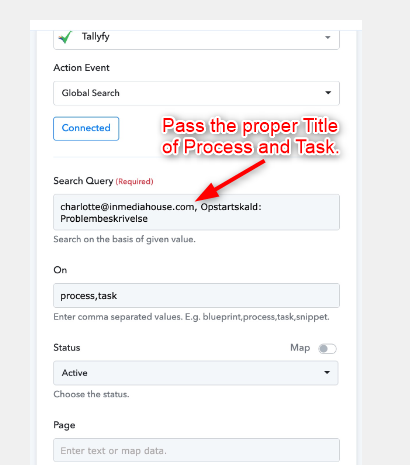
1. Task title is exact match. So you're saying I cannot search based on a kickoff field (eg. the email)? That is the the only name that is consistent because I need timestamps inside my process name. And the timestamp the other apps I send from do not know about.
2. The task search does not work still even if I search exact match:
See this video: https://share.getcloudapp.com/lludL5eW
3. How can I search by "Contains" instead of exact match - because then I could put the email in the process name to work around point 1?
Hey @apps
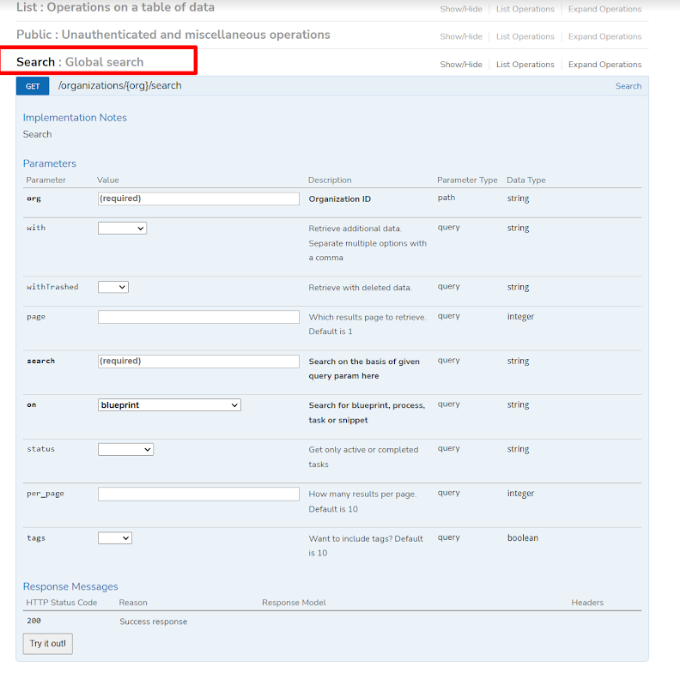
You can refer to the following API docs of Tallyfy and try the Global Search action event over there where you can search according to the available condition.
https://api.tallyfy.com/#!/Search/get_organizations_org_search
Then let us know how you want the action step to search and whatever search it works there we can also implement the same.