TASK CONSUMED - Unlimited Plan
Status: Closed · Asked by TLM TLM on · 0 views
Please tell me why this is not resetetting every month?
Hello,
Thank you for reaching out to us.
We checked the account associated with the email address you contacted us from.
We can see that your account currently has the following subscriptions:
Pabbly Connect Ultimate One Time Plan
Pabbly Connect Upgrade to Ultimate Plus One Time Plan
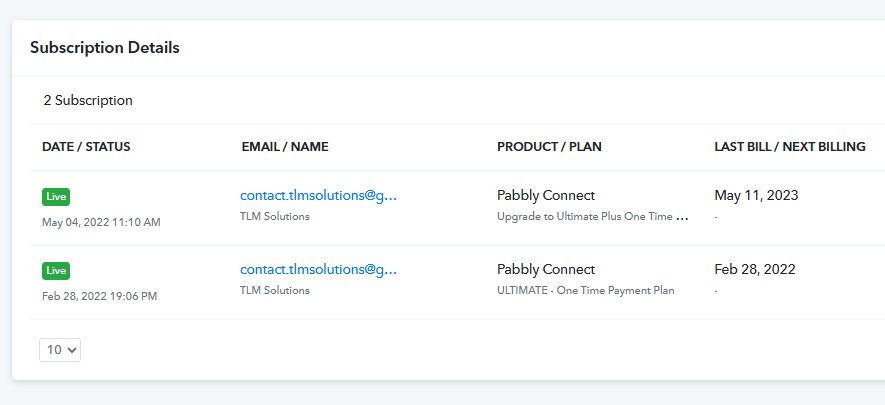
Based on these subscriptions, your account is allotted 20,000 tasks, and these tasks have already been exhausted.
At the moment, we could not find any Unlimited Plan associated with this account. If you have purchased an Unlimited Plan using this or any other account, kindly share the purchase details, such as the Invoice ID, Transaction ID, or any other payment reference. This will help us trace the purchase and verify it.
Once we receive the details, we'll be happy to investigate further.
Thanks and Regards,Preeti Paryani
Customer Success Associate,
Pabbly.com
This Ultimate One Time Plan had the feature was allotted 20,000 tasks that would renew every month. Can you share the plan details?
Also, Why does my account page not reflect my subscription feature details?
I checked the features on web archives. Here are some screenshots of the features that i had purchased.


The image attached are of the offer you were running in 2025. I purchased when it was 20000 task every month. Please check.
Hello,
Thank you for reaching out to us and for sharing the screenshots.
Upon reviewing your account, we can confirm that you have purchased the following lifetime plans:
Pabbly Connect Lifetime Ultimate Plan
Pabbly Connect Upgrade to Ultimate Plus Lifetime Plan
Each of these plans provides 10,000 paid tasks per month, giving your account a total of 20,000 paid tasks every month.
We'd also like to clarify the "Unlimited Free Tasks" mentioned in the product description. Pabbly Connect has two types of tasks:
Free Tasks – These include certain internal Pabbly actions and triggers. These are covered under the Unlimited Free Tasks benefit and are not deducted from your monthly paid task quota.
Paid Tasks – These include API requests and most third-party app actions. These are deducted from your monthly allotted paid task limit, which is 20,000 tasks in your case.
The 20,000 paid tasks reset automatically on the 1st of every month. Upon checking your account, we can confirm that your tasks were successfully reset at the beginning of the current month. However, due to high task consumption, the entire monthly quota has already been exhausted. Your task balance will be refreshed again on the 1st of next month.
If you'd like to continue running your workflows before the monthly reset, you can purchase a monthly plan, which will provide an additional 10,000 tasks for $19. At the moment, we do not offer smaller task top-up packs.
You can find our monthly plans by scrolling down to the Frequently Asked Questions section on our pricing page and opening the question "Do you have monthly plans available?"
https://www.pabbly.com/connect/#faq
I've also attached a screenshot highlighting where you can find the monthly plan details.
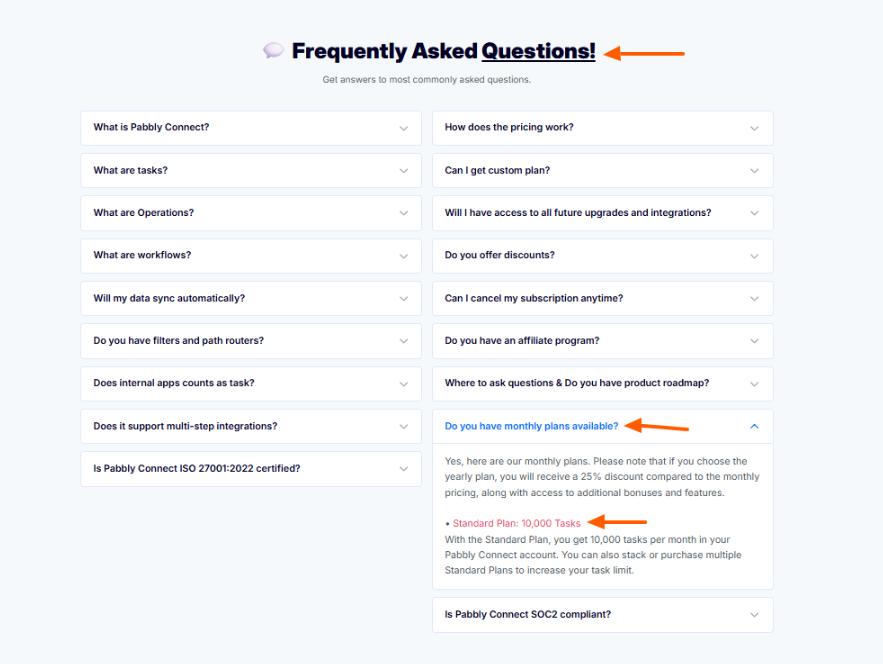
Please feel free to reach out to us, if you face any difficulties in finding the plan.
The image attached are of the offer you were running in 2025. I purchased when it was 20000 task every month. Please check.
Thanks and Regards,
Preeti Paryani
Customer Success Associate,
Pabbly.com
Thanks