Task did not execute
Status: Closed · Asked by Rashmi Shrivastava on · 0 views
Hello Rashmi,
Thank you for sharing the execution details.
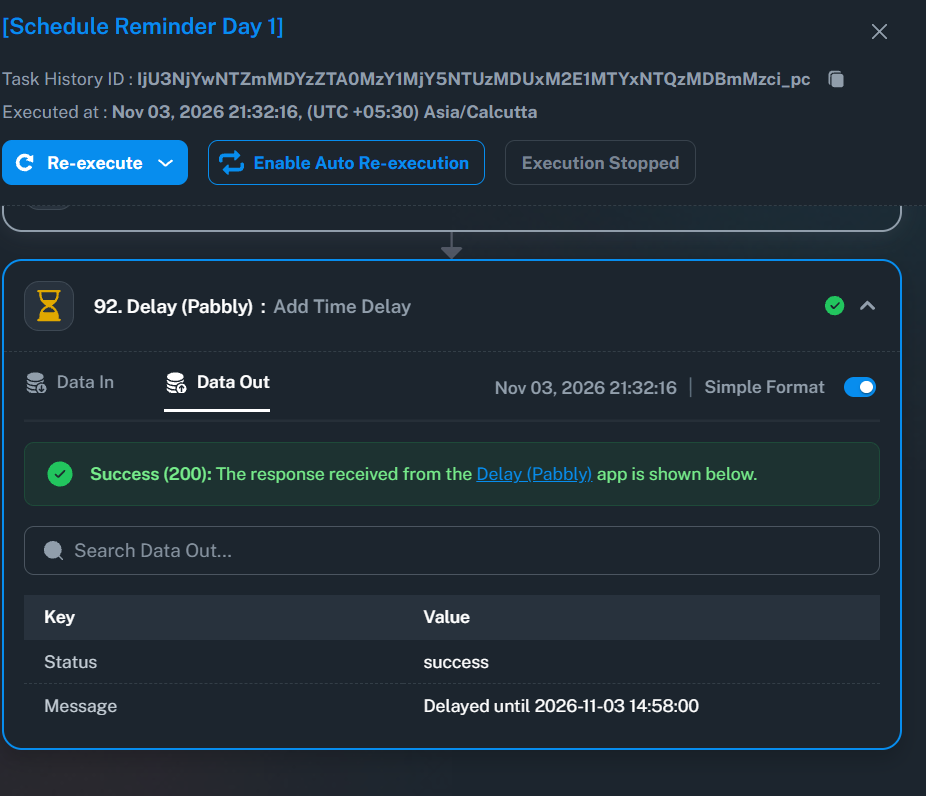
Upon reviewing the workflow history, we can see that the Delay (Pabbly) step was executed on November 03, 2026 at 21:32:16 IST (UTC+05:30), which is 09:32:16 PM IST.
The delay was configured with the following value:
Delayed until: November 03, 2026 14:58:00 UTC
When converted from UTC to IST (+05:30), this becomes:
November 03, 2026 20:28:00 IST (08:28:00 PM IST)
Therefore:
Configured delay time: November 03, 2026 08:28:00 PM IST
Delay step execution time: November 03, 2026 09:32:16 PM IST
Since the workflow reached the Delay step on November 03, 2026 at 09:32:16 PM IST, the configured delay time of November 03, 2026 at 08:28:00 PM IST had already passed. As a result, the steps further to the Delay module did not execute, and the workflow did not proceeded further.
In short, the delay timestamp had already expired when the Delay step was executed, which is why the workflow further to that point did not executed.
Kindly add the future time in the Delay step ahead of the Delay step's execution so that the workflow does not stall again.

Hello Rashmi,
I hope you’re doing well. I just wanted to follow up regarding my last message.
Hello Rashmi,
I hope this message finds you well. I’m following up on my previous message. Further, this is our last follow-up. This Forum thread will be closed automatically as we have not received a reply. You can start a new thread or email us at support@pabbly.com to raise your concern.