Technical issue with Calendly, Does not take into account the selected user
Status: Closed · Asked by Idriss98 on · 0 views
Task History ID: IjU3NjIwNTY0MDYzNzA0MzM1MjY0NTUzMTUxMzI1MTZhNTQzNyI_3D_pc
Hello,
I have a Calendly pro account. I have several users in this account, each of them has specific events in their calendar.
When I create a Calendly + Google Sheets or Airtable automation for a specific user, which I select on Pabbly Connect, I end up on the Google Sheets with all the users' events.
Can I have help please ? It's urgent.
Hey @Idriss98
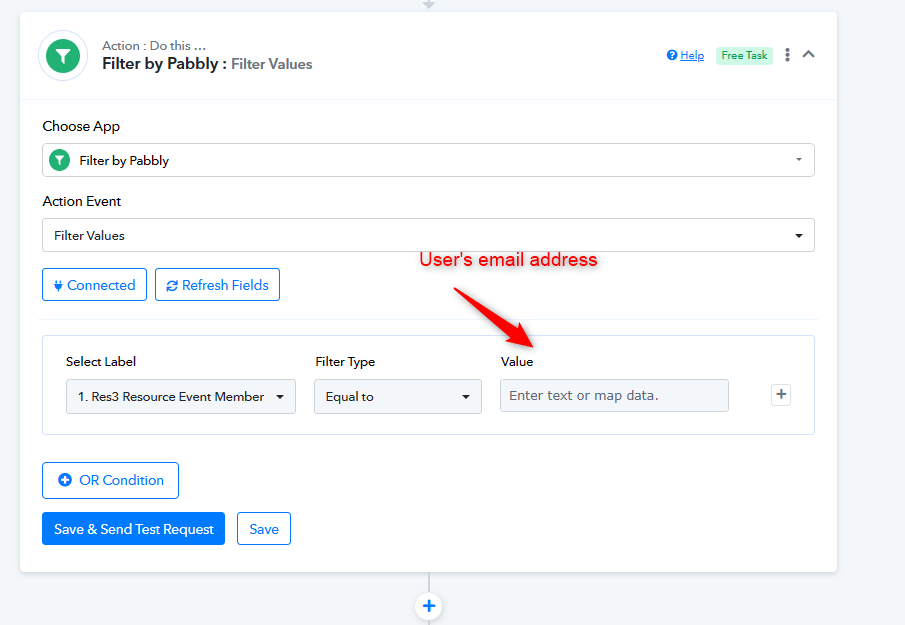
Kindly add a Filter action step right after the trigger event. Simply input the email address of the specific user you want to target. This ensures that the workflow gets processed exclusively for that particular user. It's a quick and effective way to tailor the process to your needs.