telegram upload image or pdf to google drive
Status: Open · Asked by Kong Wai Wong on · 0 views
I followed your instructions to upload an image from Telegram to Google Drive, but unfortunately, the image cannot be opened for normal viewing. It appears as shown below:
Could you please advise on how to ensure the image can be viewed properly at the end of the entire process? And how can I do it with other types of files like PDF, MP4, or excel? and How can I do an if function in Pabbly to connect with Telegram and Google Drive?
Thanks & Cheers
Kewe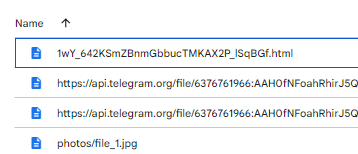
Hi @Kiwi,
Please watch the video shared below to understand how you can upload a Telegram file directly to Google Drive. Even though the video shows a file being uploaded to OneDrive, the concept remains the same; you can simply replace OneDrive with Google Drive as your action step.