Text Convert
Status: Closed · Asked by 平城寿 on · 0 views
I want to convert a multi-line result retrieved from a Google Sheet into text and paste it into the body of an email, which option should I use?
Hey @Hisashi
You can use the Line Itemizer action step to process the multiple line item to comma-separated values which you can pass to the email box.
The answer does not seem to be sufficient.
Here is what I would like to do
1. extract multiple rows of data from a Google sheet
2. extract only the columns I need out of the extracted data, paste them into Gmail and send
For example, the
No, First Name, Last Name, Email
are extracted, then
If multiple lines containing "No," "First Name," "Last Name," and "Email" are extracted, only the columns other than "No" are pasted into Gmail and sent.
Do you have a sample that achieves this?
1. extract multiple rows of data from a Google sheet
2. extract only the columns I need out of the extracted data, paste them into Gmail and send
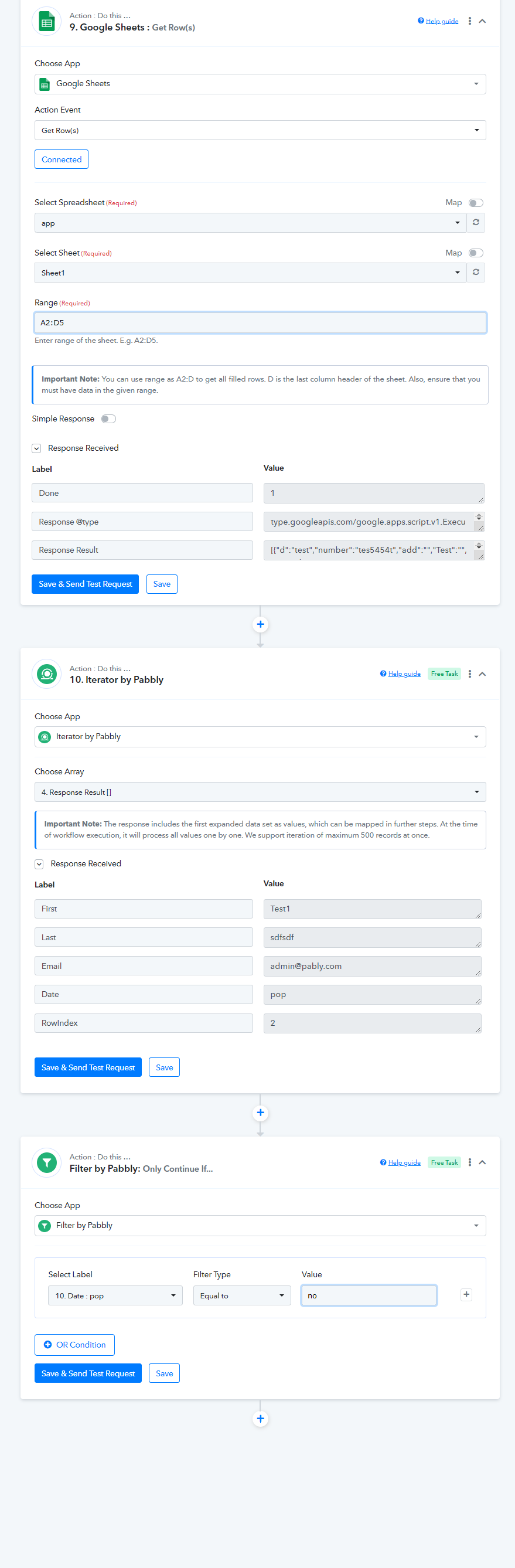
You can refer to the following screenshot on how you can extract the range of data from Google Sheets and process it through the Iterator action step and with the help of FIlter you can only process the row which has no in it.