Text replacement
Status: Closed · Asked by jod.z on · 0 views
[TABLE]
[TR]
[TD]When replacing text, do I need to create a separate action for each possible output?
For example, I have a form that outputs:
Shipped to you|5
Pick up in St. Louis Park|0
Pick up at a meeting|0
I want to change it so it just says:
Shipped
St. Louis Park
Meeting
Do I need to create a new action for each of those or can I do all of them in one action?
I've already set up similar actions for another form output, but wondered if it can be combined into one action. I'm just learning the tool and want to know the best way to go about it :)
Thanks,
Jodi[/TD]
[/TR]
[/TABLE]
Hey @jod.z
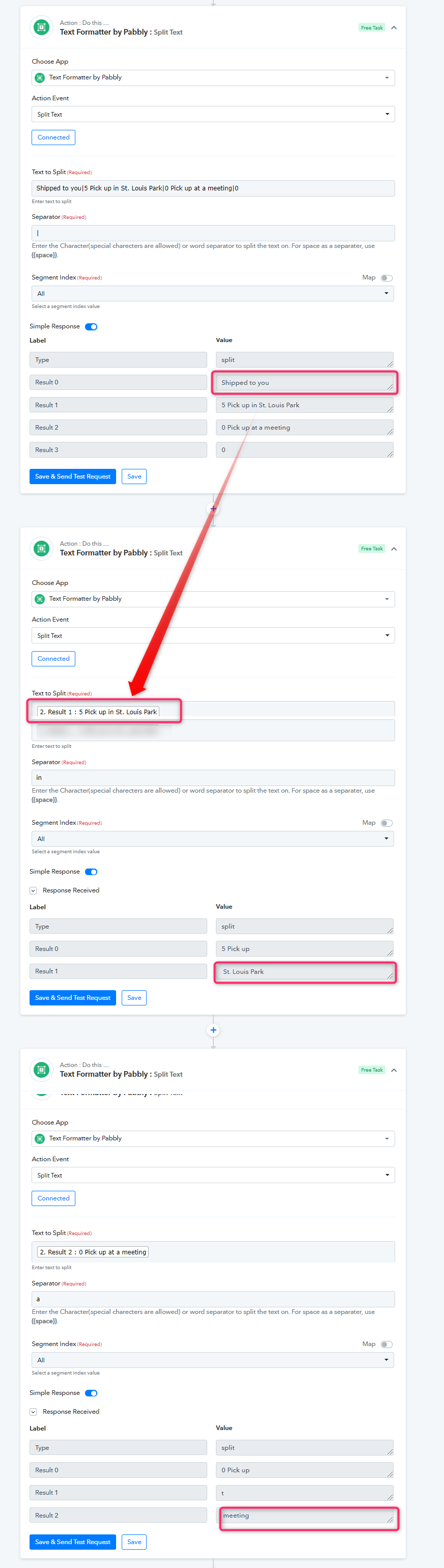
As per your concern. You might need to add new action steps to split the text for each line.
Okay, thank you!
I'm unable to get it to work. I've got the actions set up, but when it sends to Google Sheets, it's not formatting like I asked it to. Do I need to add the formatting actions before the Google Sheet action? I tried both and can't get it to work either way.
Also, is there a way to send the whole task as a test without actually filling in the form and using up one of my tasks? If I click "Save and Send test Request" on the Google Sheet action, is that just sending to the sheet without doing the formatting steps?
Either way, it doesn't seem to be working for me.
Hey @jod.z
We made a workaround as per your request of the fields you have mentioned and automated the whole steps in Google Sheets.
Please check this out for a better understand and try a similar step at your end. Then try the complete workflow -
Shared workflow - https://connect.pabbly.com/workflow/share/WBBWZANEBS0DSQhcB2IFYV1KAxBSGARSAWYGFA##

It's still not working. Maybe I'm not understanding what it's supposed to do. Here's what I'd like to happen:
- This form is filled out and a purchase is made: https://mnrovers.org/cycling-jersey-order/
- The results are sent to a Google Sheet
- On the way there, I'd like some formatting and text changes
- Date - MM/DD/YYYY
- Shirt size - only show the size, not the other stuff
- Shipping method - only show Shipped, Meeting, or St. Louis Park, depending which was chosen
When setting it up and looking at your example, it looks like it's working, but when it's sent to my Google Sheet, none of those actions seem to have come through.
I've played with it more and I'm understanding better now and have it mostly working. But how can I get the shipping method to work because the text replace/parser/splitter will be different, depending on the option chosen.
Output possibilities:
Shipped to you|5
Pick up in St. Louis Park|0
Pick up at a meeting|0
Should be sent as:
Shipped
St. Louis Park
Meeting
Hey @jod.z
As mentioned earlier, the output which you are looking forward to can only be accomplished separately with the help of Text Formatter as shown below -
Shared workflow - https://connect.pabbly.com/workflow/share/WBBWZANEBS0DSQhcB2IFYV1KAxBSGARSAWYGFA##[IMG width="589px" alt="2021-08-12_16h29_21.png"]https://forum.pabbly.com/attachments/2021-08-12_16h29_21-png.2837/[/IMG]
I understand how it's working for the sizing. But for the shipping option, your example only works if they choose "Shipped to you|5".
Is there a way to say,
if
Pick up at a meeting|0
is chosen
then
replace it with "Meeting"
and the same for the other two options?
I think I have it working now. I ended up changing the form to these choices:
Pick up (Meeting)|:$0.00
Pick up (St. Louis Park)|:$0.00
Sent to you (Shipped)|:$5.00
So I have something consistent to split:
(
and
)|