Thrive Cart Trigger issue
Status: Closed · Asked by Peter Pel1 on · 0 views
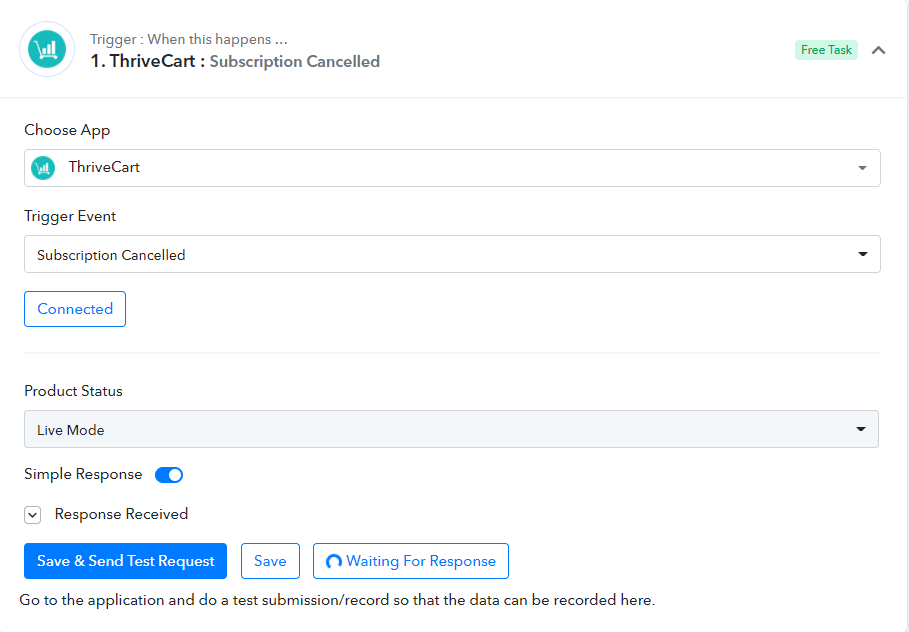
Thrive Cart trigger "subscription canceled" is not working.
I tried clicking on Save and Snd Test Request and then canceling an existing subscription. But it did not work.
The same API token connection is working for the new purchase trigger. So do I need to change something in my workflow or is there any bug?
This is the name of the workflow : CLONE - [Fagun123]
Thank You
Thrive Cart trigger "subscription canceled" is not working.I tried clicking on Save and Snd Test Request and then canceling an existing subscription. But it did not work.
The same API token connection is working for the new purchase trigger. So do I need to change something in my workflow or is there any bug?This is the name of the workflow : CLONE - [Fagun123]
Thank You
Can you please confirm if you're checking in live mode or test mode? If you could provide us a short video of how you're doing at your end it would be great.
Thanks!
Can you please confirm if you're checking in live mode or test mode? If you could provide us a short video of how you're doing at your end it would be great.Thanks!
I am checking in Live mode and please find attached a short video explaination
Can you please confirm if you're checking in live mode or test mode? If you could provide us a short video of how you're doing at your end it would be great.Thanks!
This is what I do in Zapier with my Delay for Cancellation of Subscription and I want to find out if it can be done in Pabbly Connect so that I can switch completely all my workflows to Pabbly
@Peter Pel both the videos are Private. Make them unlisted instead.
@Peter Pel both the videos are Private. Make them unlisted instead.
I have made them unlisted now. Thank You Fagun
I have made them unlisted now. Thank You Fagun
Thanks for the video. We have contacted the Thrivecart regarding the same as their subscription cancellation triggers are not working as expected as tested it from our end as well
We will keep you posted with the updates as soon as we hear from them. Further, you can also contact them once so that they can quickly resolve it.
Thanks for the video. We have contacted the Thrivecart regarding the same as their subscription cancellation triggers are not working as expected as tested it from our end as wellWe will keep you posted with the updates as soon as we hear from them. Further, you can also contact them once so that they can quickly resolve it.
Thank you and will be looking forward for the updates
@Peter Pel
Further, there is a workaround, which you can try and will work out perfectly. We tested it from our end for subscription cancellation triggers and they are working fine.
You can make use of "Webhook by Pabbly" and add the webhook URL in your Thrivecart account as shown below -
1. Copy the webhook URL as shown here -
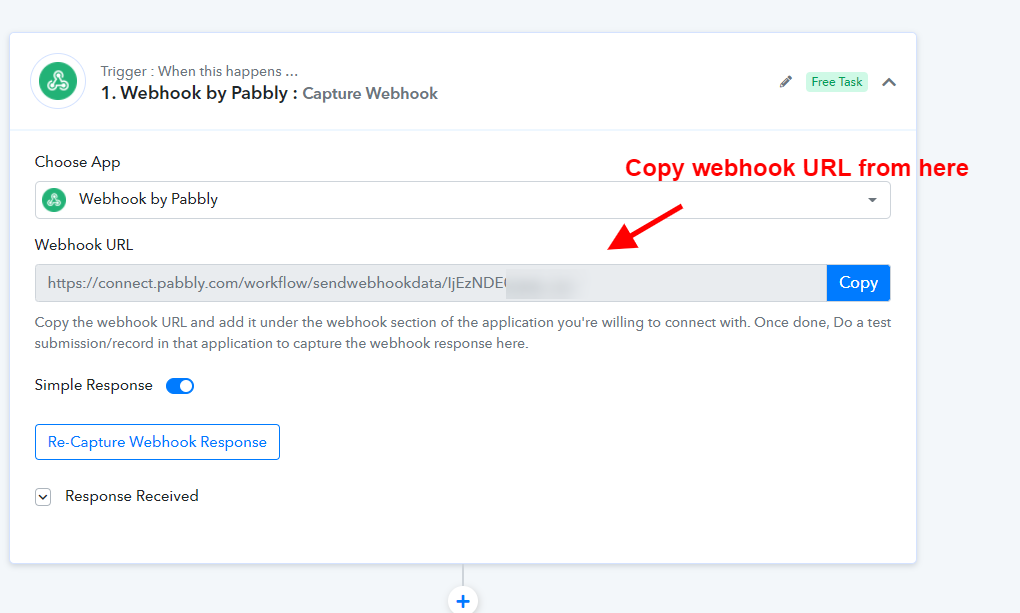
2. Login to your Thrivecart account and move the webhooks page from "Settings" -
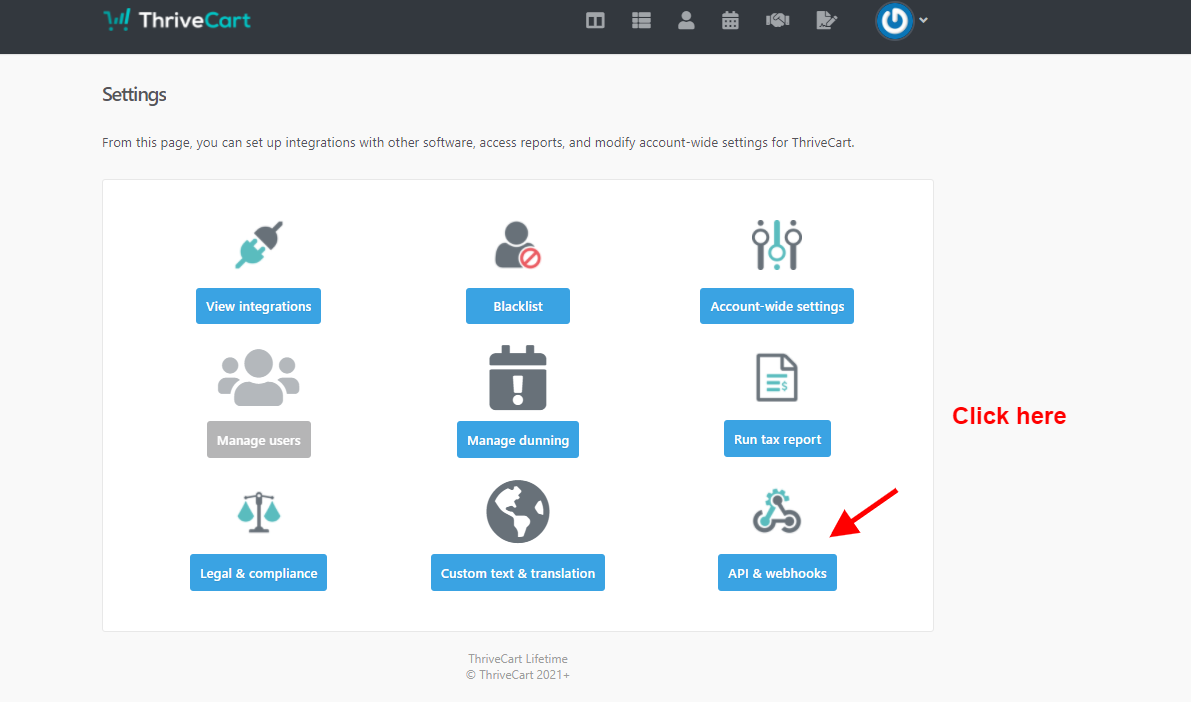
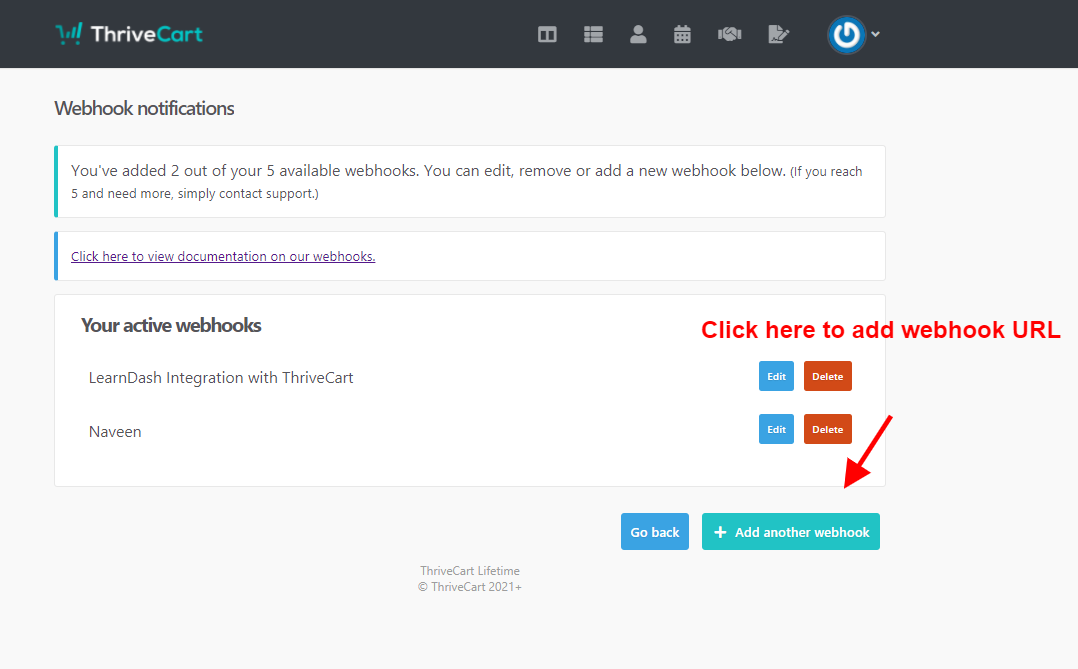
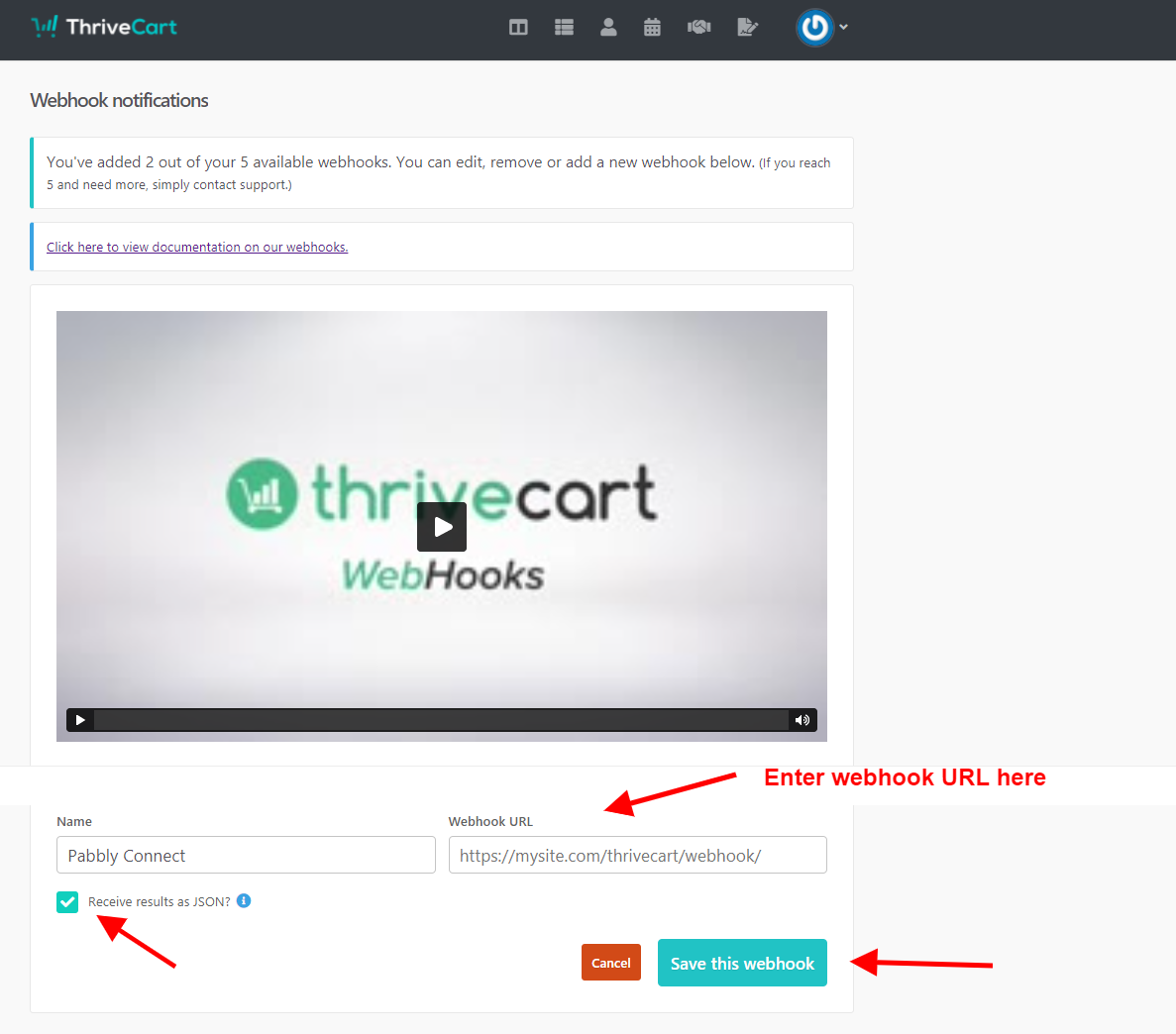
3. Now cancel a subscription from your Thrivecart account so that you can capture webhook respone as shown below -
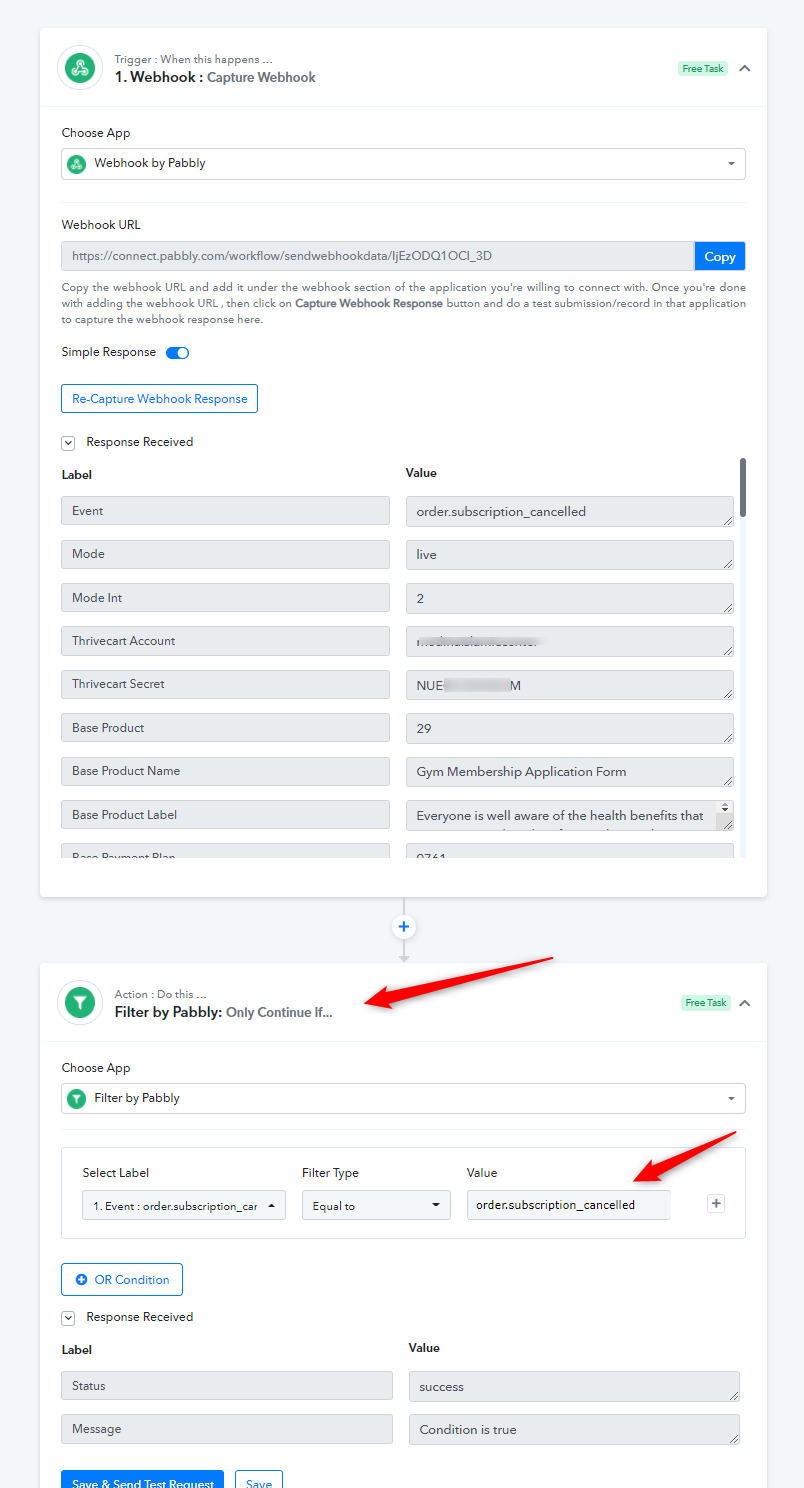
Please try this and let us know if you stuck at any step.
@Peter PelFurther, there is a workaround, which you can try and will work out perfectly. We tested it from our end for subscription cancellation triggers and they are working fine.
You can make use of "Webhook by Pabbly" and add the webhook URL in your Thrivecart account as shown below -
1. Copy the webhook URL as shown here -
2. Login to your Thrivecart account and move the webhooks page from "Settings" -
3. Now cancel a subscription from your Thrivecart account so that you can capture webhook respone as shown below -
Please try this and let us know if you stuck at any step.
@Pabbly
I was able to add the webhook but when I purchase a product it captures it but when I set up a subscription cancellation and cancels a subscription the webhook does not capture it.
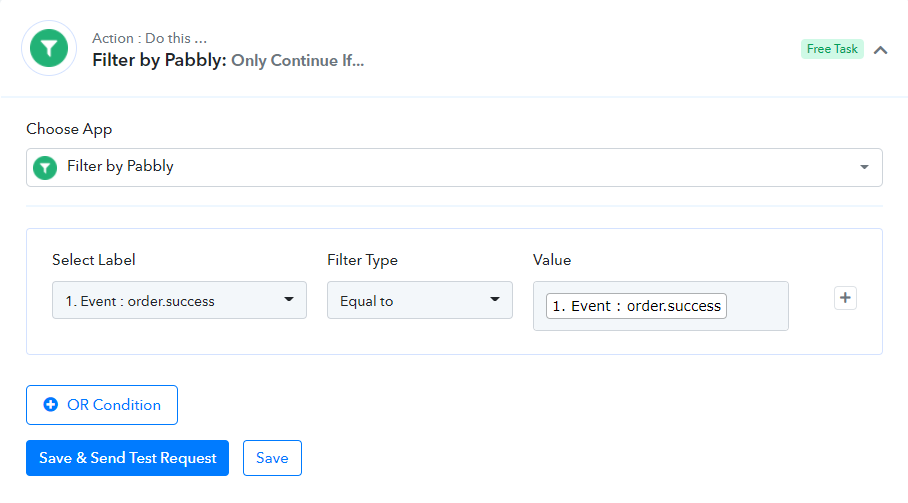
Because its not capturing the subscription cancellatoin, the event when I'm using the Filter shows Event Order instead of Event Cancellation.
I'm still stuck and would appreaciate if you help me finalize it with your workaround.
Thank you.
Attachments
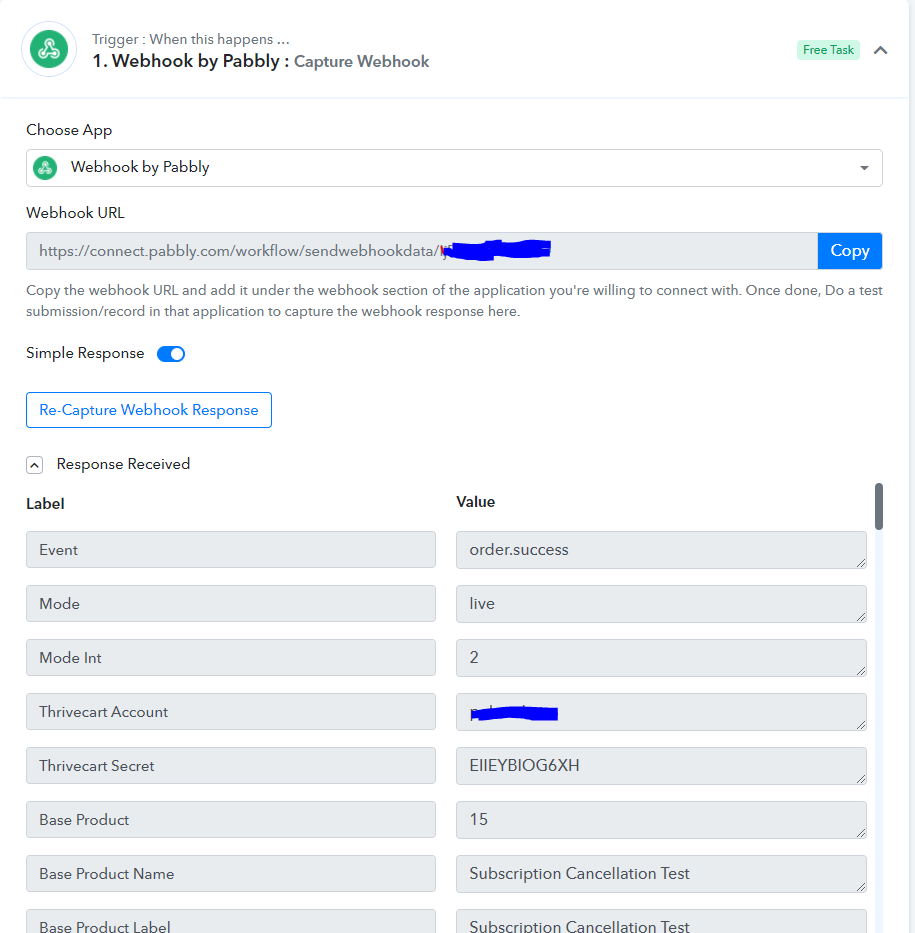
@PabblyI was able to add the webhook but when I purchase a product it captures it but when I set up a subscription cancellation and cancels a subscription the webhook does not capture it.
Because its not capturing the subscription cancellatoin, the event when I'm using the Filter shows Event Order instead of Event Cancellation.
I'm still stuck and would appreaciate if you help me finalize it with your workaround.
Thank you.
As we explained above, https://forum.pabbly.com/threads/thrive-cart-trigger-issue.1859/#post-9006 try to use Webhooks by Pabbly instead of subscription cancelled trigger, we are in touch with the ThriveCart regarding this, meanwhile, you can use the webhook section of ThriveCart to receive all events at one place, make sure to add a filter step to filter subscription cancelled data in your workflow just below the Webhooks by Pabbly step as mentioned above.
As we explained above, https://forum.pabbly.com/threads/thrive-cart-trigger-issue.1859/#post-9006 try to use Webhooks by Pabbly instead of subscription cancelled trigger, we are in touch with the ThriveCart regarding this, meanwhile, you can use the webhook section of ThriveCart to receive all events at one place, make sure to add a filter step to filter subscription cancelled data in your workflow just below the Webhooks by Pabbly step as mentioned above.
Thank you @Naveen for your swift response. Can you please show me how the webhook can capture the event order.subscription canceled because when i capture the webhook, it gives me order.success so I am not seeing the order.subscription cancelled in the filter to use as it was use in your instructions. Thank you.
@Pabbly
Attachments
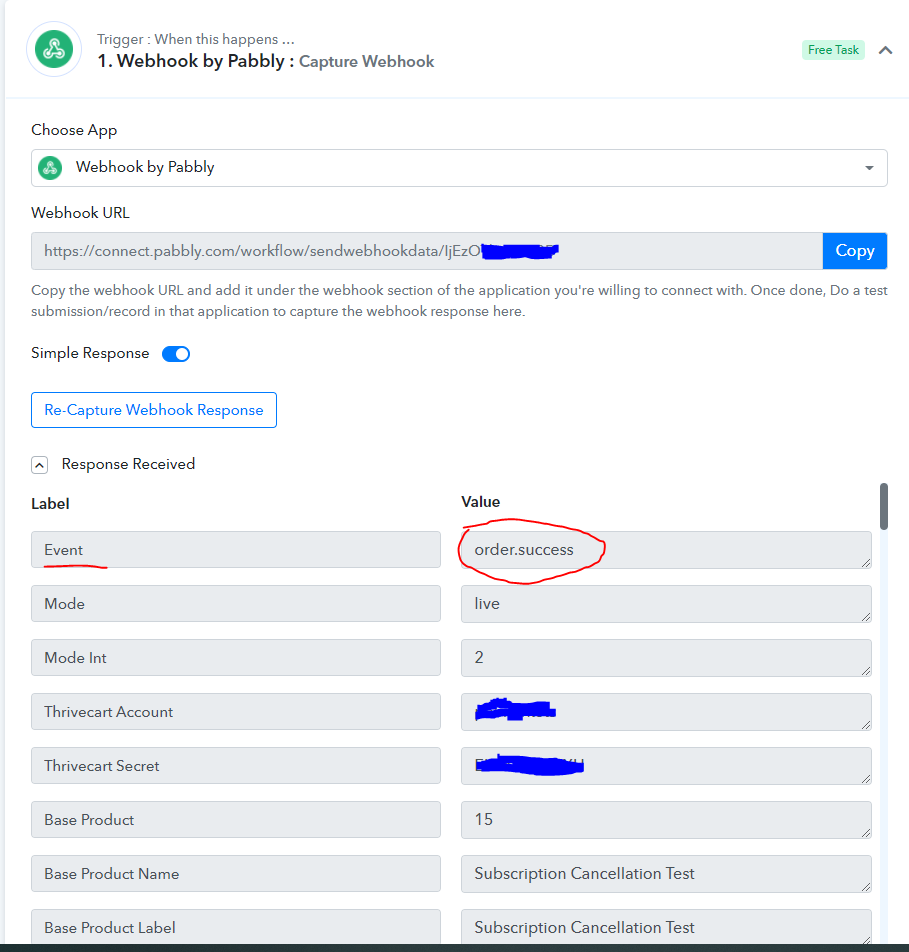
Thank you @Naveen for your swift response. Can you please show me how the webhook can capture the event order.subscription canceled because when i capture the webhook, it gives me order.success so I am not seeing the order.subscription cancelled in the filter to use as it was use in your instructions. Thank you.@Pabbly
You just need to click on Re-Capture Webhook Response button and then visit your ThriveCart account and cancel the existing subscription.
It will send the data to Pabbly Connect.