Todoist to Google Task
Status: Closed · Asked by Sophieja23 on · 0 views
Hi, I have problems with the date. I found the video to format date for google task but it is still not working. My workflow:
1. Todoist -> Trigger New Task
2. Date/time formatter
3. Google Task -> Action create task
4. Google Task -> Action update task due date
Thanks for your help.
Sophie
Attachments
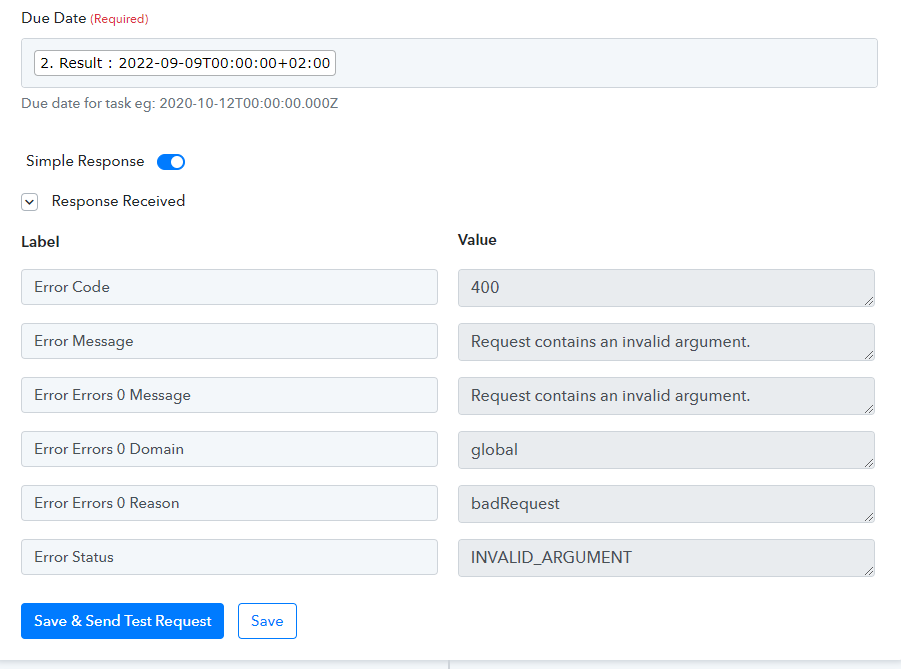
Hey @Sophieja23
As we can see from the screenshot you are not passing the date time in the correct format in the Due Date field.

Though we corrected the data format for you in your workflow and it is working now.
Kindly review that and let us know.
Hey @Sophieja23As we can see from the screenshot you are not passing the date time in the correct format in the Due Date field.
Though we corrected the data format for you in your workflow and it is working now.
Kindly review that and let us know.
Thanks a lot. It has updated my test date with the correct date. But its not working for new tasks. And I saw that you integrated a second time formatter. So I do have to format time before sending to google task and another one for updating the date?
And I saw that you integrated a second time formatter. So I do have to format time before sending to google task and another one for updating the date?
Yes, we have added the free action step to convert the data time format.
Thanks. And do you see why it is not working for new tasks?