Trying to filter based on labels which do not always return? Monday.com / xero
Status: Closed · Asked by jakebaker on · 0 views
Hello
I am trying to create a workflow that does the following:
1. Xero - Trigger on New or Updated Invoice
2. Filter - Invoice Status = Authorised
3. Monday.com - Search items by Column Value - Search is mapped from Xero InvoiceID, searching inside the InvoiceID column within monday.com
4. Filter - if InvoiceId is EMPTY
5. Monday.com - Create Item
The problem is that Stage 4 only works if Stage 3 finds the item.
If there is no matching item, the return is below: But this is no good because then the filter has en error because the label that I need to filter on isn't included?
Any advice on how to use the filter? I only want to continue if the INVOICEID is NOT found within Monday.com
Thanks!
Hello @jakebaker,
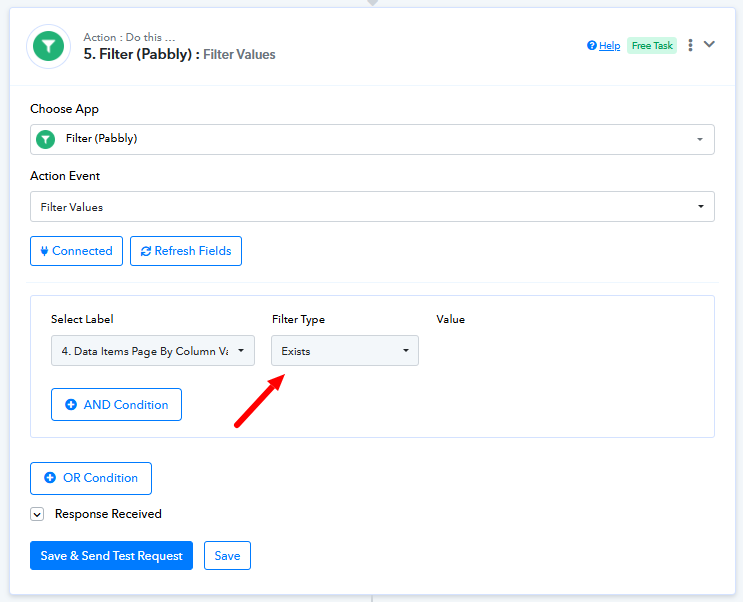
Please set up the filter with the condition set as "Exists". This ensures that the workflow will proceed only if the specified field is present in the response; otherwise, it will not.
Kindly refer to the attached image for more details. Please try this out and let us know if it works for you.
Hi Preeti,
That has worked!
Thanks so much for your help.
Jake
Thank you for the update! We’d love to hear your feedback, and it would mean a lot if you could leave us a quick review on Google.