Twitch Trigger does not work
Status: Closed · Asked by Epyx on · 0 views
Hi there,
i want to create a workflow that triggers an action when a twitch live stream started, so i set up all the steps and created the twitch connection with client id and secret.
After setting everything up i clicked on "Save & Send Test Request" and started a livestream on the provided user id account - but it always says "Waiting for Response"
If i try to choose an action with "Insert Data from Previous Step" it always gets
"status":"webhook_callback_verification_pending"
So why is the trigger getting no response? I stopped and started the livestream multiple times and waiting a couple a time...
Hey @Epyx
Can you tell us that after configuring the trigger event in the workflow, you started streaming afterward?
Since you have opted for the "New Live Stream " trigger event which will capture the response once the submission for that trigger event from Twitch.
Also, if you can record a short video on how you are trying to capture the webhook response would be very helpful.
Reach out to Twitch support: If you've followed the above steps and are still experiencing issues, it's recommended to contact Twitch support for further assistance. They can provide specific guidance or investigate any potential problems on their end.
As i said, i configured the workflow like this:
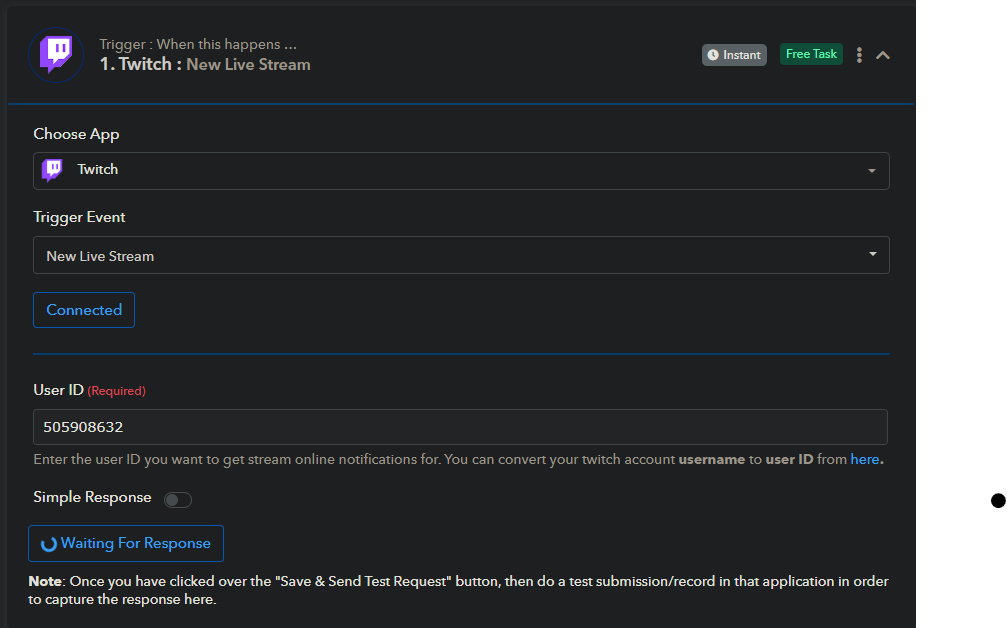
So now it is waiting for a response (start the livestream) so i started the livestream on the given user id and waited a few minutes.
Then i wanted to add an action - for example sending a mail over gmail - but i do not get any information and it does not seem that the trigger was called:
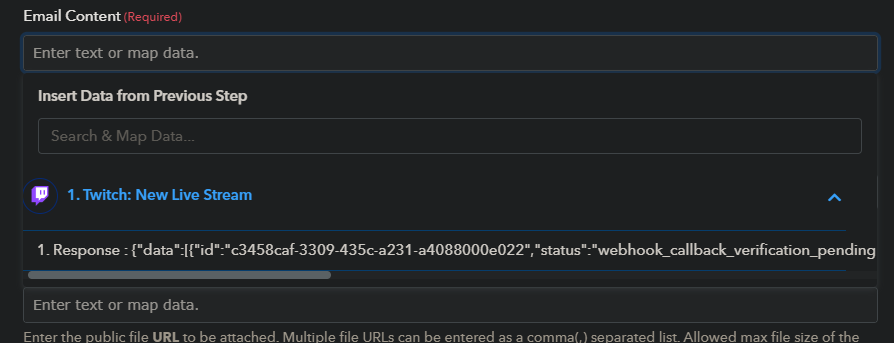
The message "status":"webhook_callback_verification_pending" indicates that the verification process for your webhook subscription is still pending. When you subscribe to a webhook on Twitch, the platform requires you to verify the subscription before it starts sending actual webhook events.
To complete the verification process, Twitch sends a verification request to the callback URL you provided when setting up the webhook. This request contains a challenge parameter that you need to respond to with the appropriate verification code.
Make sure that your code is set up to handle the verification request correctly. When you receive the verification request, extract the challenge parameter from the request payload and respond with the exact challenge value as the response. This will confirm that you control the provided callback URL, and Twitch will mark your webhook subscription as verified.
Once the verification is complete, you should start receiving actual webhook events related to the subscribed topic.
I have the same problem. How should we retrieve the verification message, when the URL is set to localhost (as in the setup description mentioned)?
In my opinion, this should be handled by pabbly. As user I'm not able to get these message.
Hey @steve wallet
Can you please elaborate on your concern about what step of the automation you are getting stuck in, so that we can look into it and help you accordingly?
I'm not able to setup the Twitch "New Stream" trigger.
I inserted the client ID and secret, but it does not work.
In my opinion, the URL you have to provide during the application setup on Twitch Developer site, should be a Pabbly URL, as the application must be validated with a secret, which is send over via callback.
Noone has something installed on localhost to answer this callback.
In my opinion, the URL you have to provide during the application setup on Twitch Developer site, should be a Pabbly URL, as the application must be validated with a secret, which is send over via callback.
Can you please record a short video on how you processing this part of the connection, so that I can check this with the technical team and help you accordingly?
Sorry, your developers just should read the Twitch API documentation.
The localhost URL only works for development purposes. In production when the software runs on a server a dedicated URL is necessary.
Hey @steve wallet
I'm not able to setup the Twitch "New Stream" trigger.
I inserted the client ID and secret, but it does not work.In my opinion, the URL you have to provide during the application setup on Twitch Developer site, should be a Pabbly URL, as the application must be validated with a secret, which is send over via callback.
Noone has something installed on localhost to answer this callback.
It seems like your Twitch webhook verification is still pending. This means Twitch hasn't finished confirming your subscription to the webhook yet. When you subscribe to a webhook on Twitch, they need to make sure it's you before they start sending you notifications.
We've tested the integration on our end, and it's working perfectly for us and other users too.
Ok, I was able to extract the webhook request from response data, but why is that not handled automatically? Just open a new window with that URL (which the javascript can easily extract) and everything is done.
Ok, I was able to extract the webhook request from response data, but why is that not handled automatically?
Could you please record a short video on the same, so that we can look into it?
Here you find a video how I did the settings.
ClientID and Secret are already condfigured and not part of the video.
https://drive.google.com/file/d/1JzyrHUegqoKSGJGTLiNEaDtESCVq-E_n/view?usp=sharing
Could you please attempt to retrieve the webhook response by initiating a new stream? This triggers when a live stream starts from the streamers you've specified.
Further, it appears that you haven't connected your Facebook connection correctly and because of that the pages are not getting listed.
So, please make a new connection in the incognito mode and then try again.
I already started a new stream while taking the video, but nothig happens.
FB connection I did multiple times, but pages are not loaded. If I specify the page as in the video posting works.
Would be great if you just post a video how to setup everything correctly.
I am forwarding your concern to the technical team, and they are currently looking into it.
We shall notify you with an update soon.
Hey @steve wallet
In response to your inquiry, we've implemented a minor adjustment to the trigger event. We suggest creating a new workflow and testing it out accordingly.
Hey @steve wallet
It's been a while since we last heard from you. Could you please let us know if you've tried out the new trigger event on Twitch?