Upload Photo to slack --> Upload Google Drive
Status: Closed · Asked by Dean_Chamberlain on · 0 views
I'm trying to upload an image from a specific slack channel, to a specific google drive folder.
I have the channel on slack, but struggling to map the file name.
Can you help please?
Hey @Dean_Chamberlain
I'm trying to upload an image from a specific slack channel, to a specific google drive folder.
I have the channel on slack, but struggling to map the file name.
You can refer to the following screenshot and then try it at your end. Further, as we can see from your workflow the file URL which you are passing is not a publicly accessible file in which Google Drive takes the file to upload.
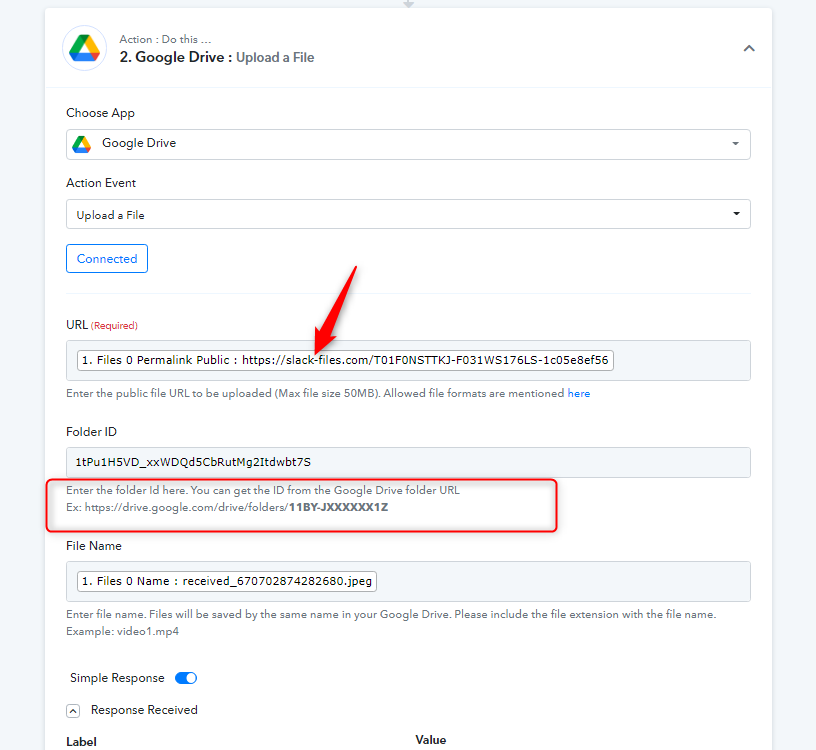
I've set the folder to public, but it's still saying Error. What am i doing wrong?
Hey @Dean_Chamberlain
The Image File URL which you are using is not publically accessible, you need to pass the publicly accessible file URL to upload the image.
So, capture the webhook response and the file attachment with the public access image URL.
How do i make it publicly assesible if i'm popping it onto the slack channel, surely it can pull it from there no?
Hey @Dean_Chamberlain
The File URL from slack which you are passing is actually a password-protected file and to upload any image into any application, you have to pass the file which is simply downloadable or viewable in nature.
So, kindly check the same from the Slack account and make the file URL publicly accessible.