[URGENT] Problem with automation Google Form and Active Campaign
Status: Closed · Asked by The_One_Piece_Is_Real on · 0 views
I created an automation to save a google form questionnaire directly to active campaign contact data.
The automation saves all the data to me on active campaign, but one piece of data fails to report (I checked, I matched all the questionnaire data correctly)
Help me
This is the automation https://connect.pabbly.com/workflow/share/XBRXZV4JBGcHTVA9Bk1TdA0ZAgZXDVRoV05RQ1JdUSkGSFEUURABaw1BWHpVHgBhB04AalMMUzJYTAsPA1UHdFBJUm1QT1QJAzAARVMMWHJcPg##
Hey @The_One_Piece_Is_Real
Could you please eleborate on your question in more detail and share any video recording of the issue with an example for checking?
Also, please let me know the email id through which you have create account on Pabbly Connect.
Hey @The_One_Piece_Is_RealCould you please eleborate on your question in more detail and share any video recording of the issue with an example for checking?
Also, please let me know the email id through which you have create account on Pabbly Connect.
Hi kunal,
My email ID is: [email hidden]
I send in attachment the video of the issue. One response from the form won't be saved in active campaign contact data.
Hey @The_One_Piece_Is_Real
Could you please remove the special characters from the Google Form's field and then check the scenario again?
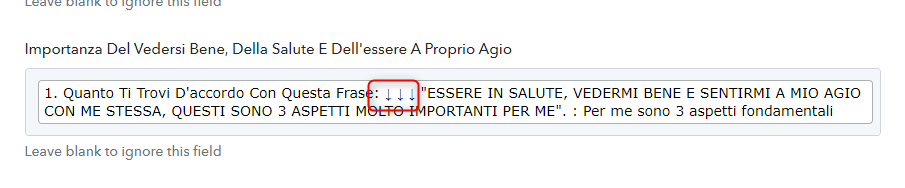
Hey @The_One_Piece_Is_RealCould you please remove the special characters from the Google Form's field and then check the scenario again?
I tried to eliminate the ↓↓↓, but it is not working again...
Could you please try to remove : the colon mark from the Google Forms and then try again?
Could you please try to remove : the colon mark from the Google Forms and then try again?
Hi kunal,
With your advice I found the problem. It was not ↓↓↓ or even : . the problem was the quotation marks " " . Now it works.
Thanks