Using Multiple Iterator
Status: Closed · Asked by Anwer Nkp on · 0 views
I want to use email to 100 users.
Data of each user is collected through GET Api.
Each Api response page contains 100 email ids
By using Iterator I am able to send email to these 100 users.
How can I use the same workflow to GET next 100 email ids and repeat
Hey [USER=7250]@Anwer.nk[p[/USER]
Could you please share the name of the workflow, so that we can check the possibility of the same?
Hey [USER=7250]@Anwer.nk[p[/USER]
Regarding your concern, you can use the Router action step where you can configure the individual API by Pabbly inside to run in a sequence.
Can you please elaborate,
Please allow us some time, we are currently looking into it.
I need to run the workflow on a scheduled basis.
Step1: Through GET function get the list of 500 users,
(reponse: You will get list of first 100 users, and in response there will be link to next page)
Step 2: SInce I have received the names of 100 Users, Using Iterator, I will take first name of user.
Step 3: Using API GET. I will take the contact details of the selected user again.
Step 4: I will send the selected user the required message.
___________________________________________________________________
This is repeated till 100 users received through the first API response. and using Iterator I am able to send the message to first 100 users.
Workflow stops after sending first 100 users
___________________________________________________________________
I want the workflow to GET next 100 users after this and continue until there is no next page.
Hey [USER=7250]@Anwer.nk[p[/USER]
This is repeated till 100 users received through the first API response. and using Iterator I am able to send the message to first 100 users.Workflow stops after sending first 100 users
You can set the individual routes in the router action step and inside you can see the Get API step to iterate the leads in flow.
In a similar way set the another get action step in another route to iterate the leads.
E.g. -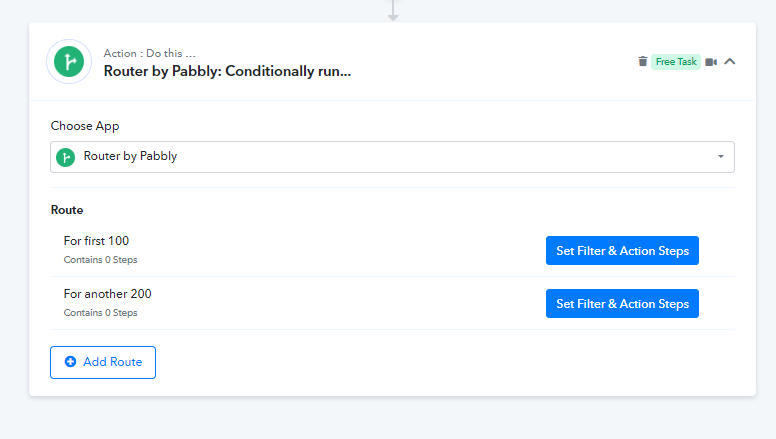
Thanks for the quick reply,
Since the number of users are growing, rather than creating router each time for next 100
Can I create next router automatically.
Hey [USER=7250]@Anwer.nk[p[/USER]
Unfortunately, it is not possible to create an instantaneous router in a live workflow.