VARIABLE_VALUE
Status: Closed · Asked by OnPoint Rental on · 0 views
i was getting an error on my process: VARIABLE_VALUE
So i have tried to follow the videos of using:
Text Formatter by Pabbly
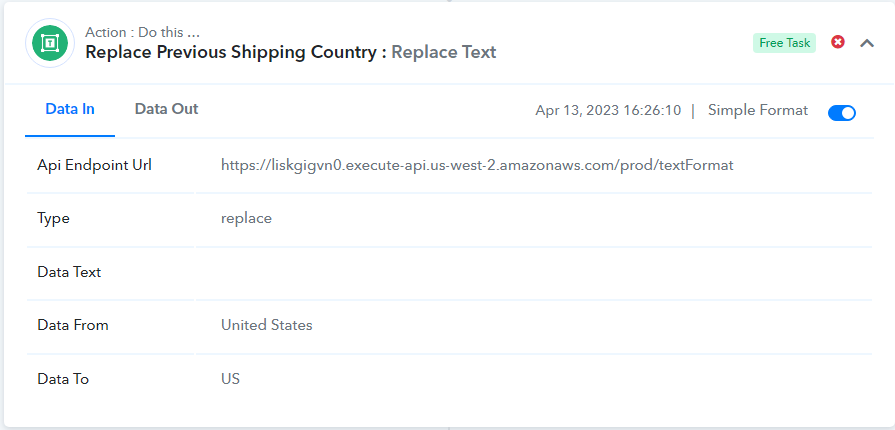
How the heck do you make a convert to "US" when the data keeps pushing "United States"
What is the code for this????
Atempt#1 -
Your Workflow URL: https://connect.pabbly.com/workflow/mapping/IjU3NmMwNTZhMDYzMzA0MzY1MjZjNTUzNiI_3D_pc
Your Task History ID: IjU3NjAwNTZkMDYzNzA0MzQ1MjZlNTUzMDUxM2I1MTY0NTQzMSI_3D_pc
Atempt#2 -
Your Workflow URL: https://connect.pabbly.com/workflow/mapping/IjU3NmMwNTZhMDYzMzA0MzY1MjZjNTUzNiI_3D_pc
Your Task History ID: IjU3NjAwNTZkMDYzNzA0MzQ1MjZmNTUzNTUxMzA1MTYzNTQzMCI_3D_pc
Atempt#3 -
Your Workflow URL: https://connect.pabbly.com/workflow/mapping/IjU3NmMwNTZhMDYzMzA0MzY1MjZjNTUzNiI_3D_pc
Your Task History ID: IjU3NjAwNTZkMDYzNzA0MzQ1MjZmNTUzYzUxMzU1MTZhNTQzNCI_3D_pc
current status still nothing but seem now i have no error i am lost and without error now.
only error is no data moving to Wave.com from Flowlu.com - CRM Account is Created
If i can not create this simple task what hope is there of me finishing the dozens of other I need to have built in the next few days???
Hey @Glenn G
How the heck do you make a convert to "US" when the data keeps pushing "United States"
It seems that in your current workflow, the United States has been mapped twice in your "Text formatter: Replace text". This could potentially lead to an incorrect output of "USUS" instead of the intended "US".
To address this issue, I recommend you to map the Text field again in the "Text formatter: Replace text" step to ensure that the United States is only mapped once.
Once you have made the necessary changes, I suggest that you test the workflow again to confirm that the issue has been successfully resolved.
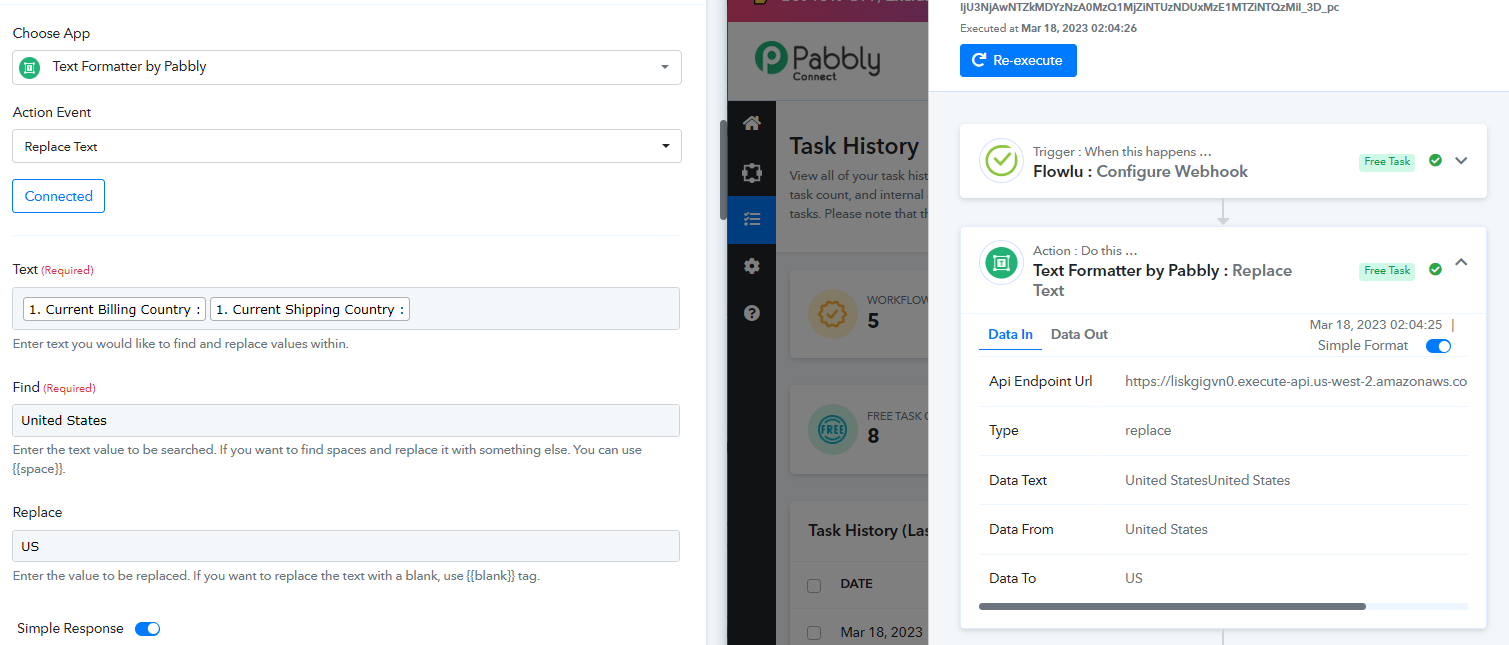
only error is no data moving to Wave.com from Flowlu.com - CRM Account is Created
Also as I can check, it appears that you are not currently receiving the "current legal name" from Flowlu which you have mapped in Wave.
To resolve this issue, I would highly recommend that you take steps to ensure that you are receiving the "current legal name" from Flowlu before attempting to execute the workflow again. 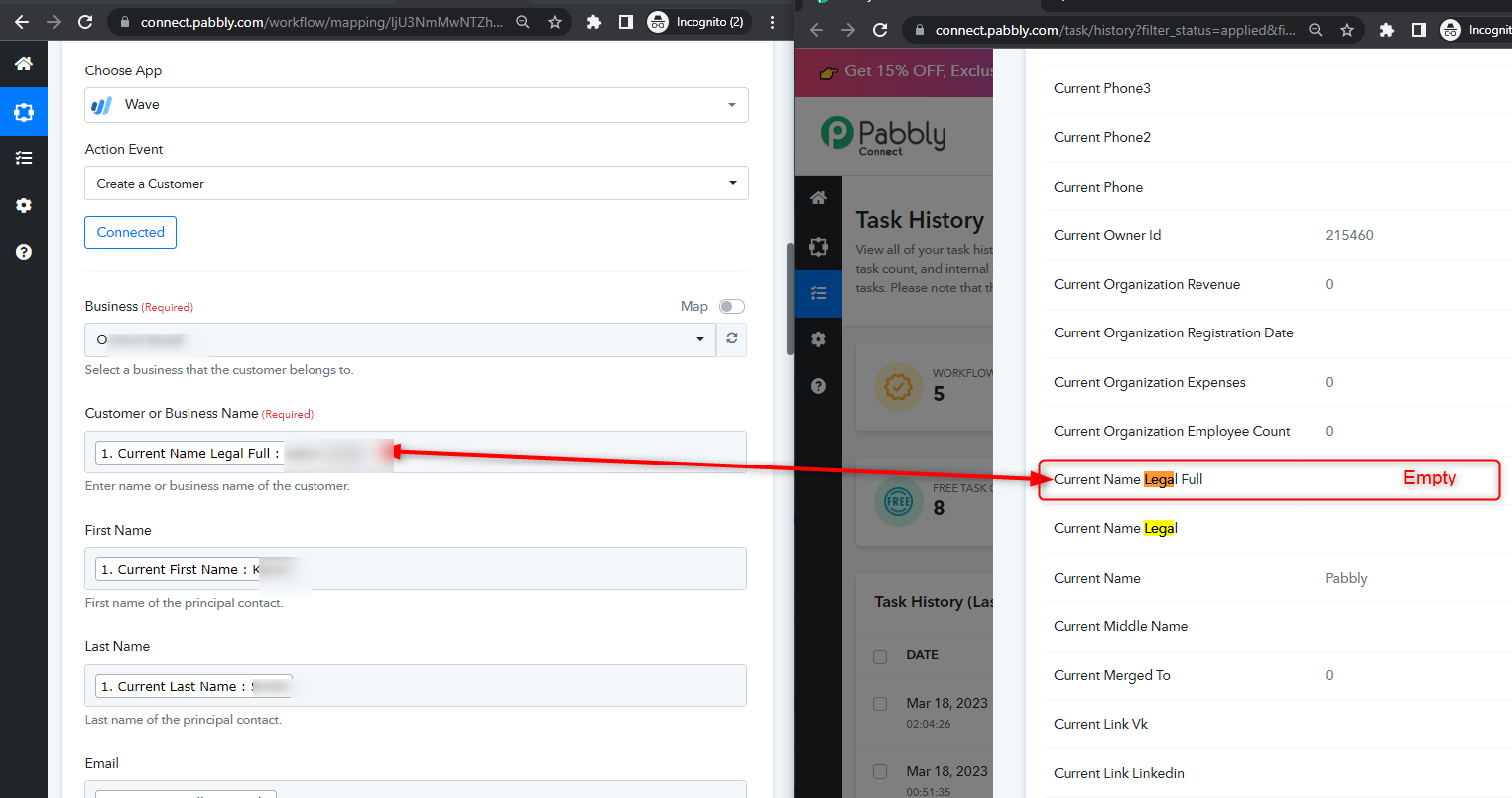
Update:
Your Workflow URL: https://connect.pabbly.com/workflow/mapping/IjU3NmMwNTZhMDYzMzA0MzY1MjZjNTUzNiI_3D_pc
Your Task History ID: IjU3NjAwNTZkMDYzNzA0Mzc1MjZiNTUzNTUxMzE1MTYxNTQzMiI_3D_pc
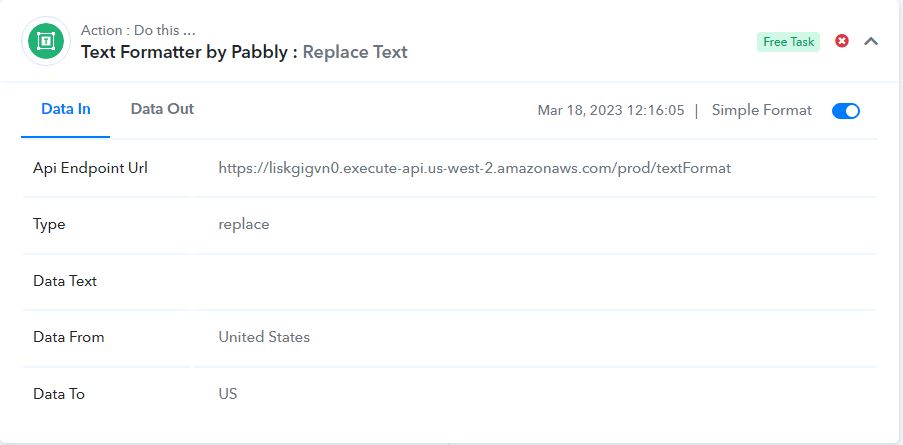
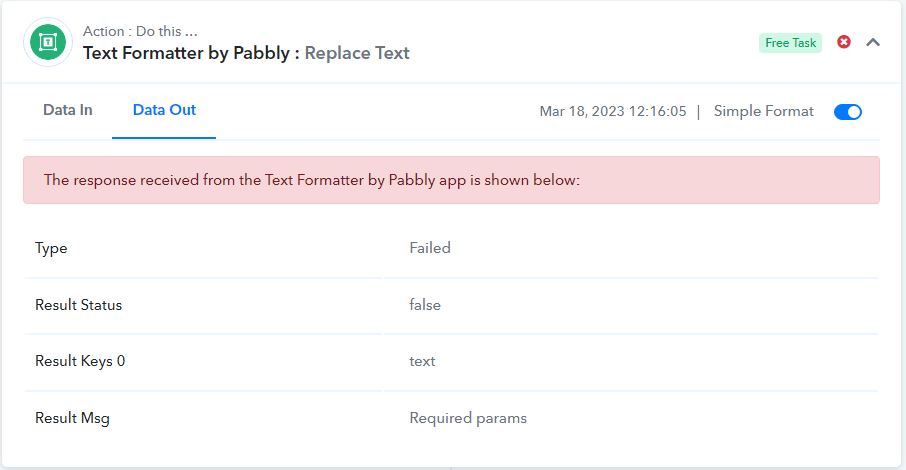
Still with error now its different.
Attachments
Hey @Glenn GIt seems that in your current workflow, the United States has been mapped twice in your "Text formatter: Replace text". This could potentially lead to an incorrect output of "USUS" instead of the intended "US".
To address this issue, I recommend you to map the Text field again in the "Text formatter: Replace text" step to ensure that the United States is only mapped once.
Once you have made the necessary changes, I suggest that you test the workflow again to confirm that the issue has been successfully resolved.
Also as I can check, it appears that you are not currently receiving the "current legal name" from Flowlu which you have mapped in Wave.
To resolve this issue, I would highly recommend that you take steps to ensure that you are receiving the "current legal name" from Flowlu before attempting to execute the workflow again.
What happens if i leave blank can that be done?? If i choose to leave a cell that is mapped on flowlu to Wave blank as shown here does this cause issues? Do i have to have a field filled with data even if not relevant to the customer -
Hey @Glenn GIt seems that in your current workflow, the United States has been mapped twice in your "Text formatter: Replace text". This could potentially lead to an incorrect output of "USUS" instead of the intended "US".
To address this issue, I recommend you to map the Text field again in the "Text formatter: Replace text" step to ensure that the United States is only mapped once.
Once you have made the necessary changes, I suggest that you test the workflow again to confirm that the issue has been successfully resolved.
Also as I can check, it appears that you are not currently receiving the "current legal name" from Flowlu which you have mapped in Wave.
To resolve this issue, I would highly recommend that you take steps to ensure that you are receiving the "current legal name" from Flowlu before attempting to execute the workflow again.
Also seems that i am still getting issues with the process. Linked: https://forum.pabbly.com/threads/variable_value.12657/post-58772 (& or scroll up)
And this is now the new error...
Task History ID - IjU3NjAwNTZkMDYzNzA0MzA1MjZlNTUzMzUxM2I1MTY3NTQzMyI_3D_pc
https://connect.pabbly.com/workflow/mapping/IjU3NmMwNTZhMDYzMzA0MzY1MjZjNTUzNiI_3D_pc
Attachments
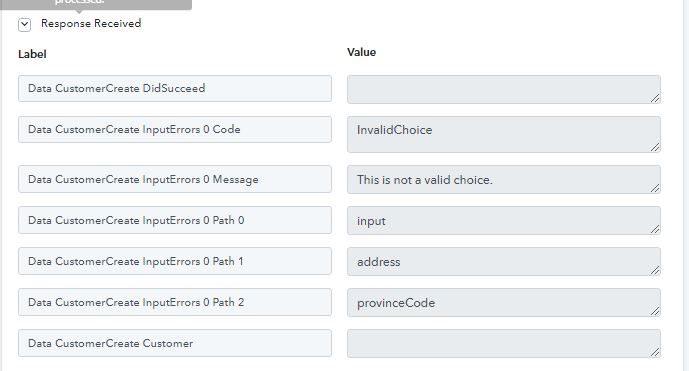
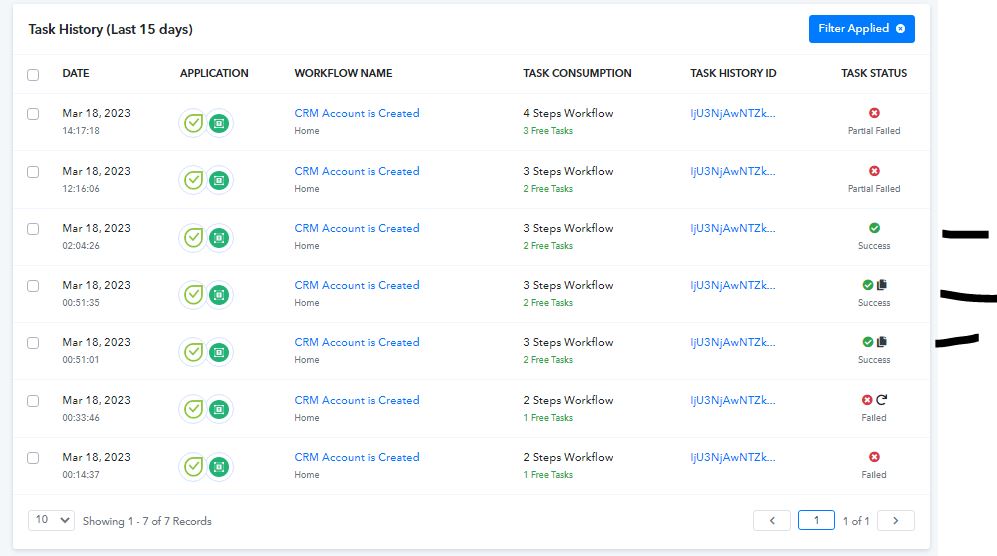
Even the successful connections was an error and would not connect
meantime im burning time and task counts and no where am i closer to connection
Attachments
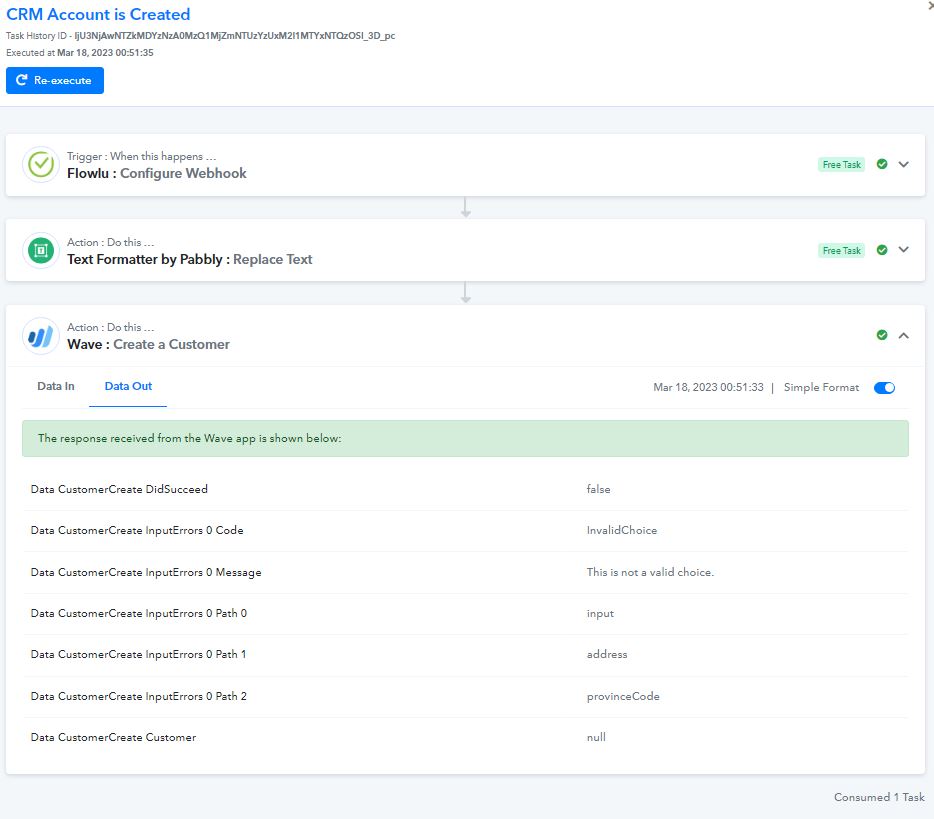
Hey @Glenn G
I kindly request you to establish a new connection with Wave and ensure that all fields are mapped correctly.
Please take care to map all fields accurately and completely, without leaving any gaps or omissions such as province code or shipping details.
It is important that you thoroughly review and verify each field to ensure that all relevant data is captured and processed accurately.
Hey @Glenn GI kindly request you to establish a new connection with Wave and ensure that all fields are mapped correctly.
Please take care to map all fields accurately and completely, without leaving any gaps or omissions such as province code or shipping details.
It is important that you thoroughly review and verify each field to ensure that all relevant data is captured and processed accurately.
Wave is handled by H&R Block Tax firm without any communication line or recourses limited help all related to tax and accounting.
I am waiting on an email back from them and doubtful they will even understand what i am doing.
How do you change the text from a State "Florida" to "FL" for all the united states?
Text Formator Process of converting? if this is correct can someone do a How-To on this step by step thanks....
How do you change the text from a State "Florida" to "FL" for all the united states?Text Formator Process of converting? if this is correct can someone do a How-To on this step by step thanks....
ProvinceCode = "FL (not: FLORIDA)"
US State and Canada Province Codes
Valid codes are as follows:
[TABLE]
[TR]
[TD]State[/TD]
[TD]Code[/TD]
[/TR]
[TR]
[TD]Alabama, US[/TD]
[TD]AL[/TD]
[/TR]
[TR]
[TD]Alaska, US[/TD]
[TD]AK[/TD]
[/TR]
[TR]
[TD]Arizona, US[/TD]
[TD]AZ[/TD]
[/TR]
[TR]
[TD]Arkansas, US[/TD]
[TD]AR[/TD]
[/TR]
[TR]
[TD]Armed Forces America[/TD]
[TD]AA[/TD]
[/TR]
[TR]
[TD]Armed Forces Europe[/TD]
[TD]AE[/TD]
[/TR]
[TR]
[TD]Armed Forces Pacific[/TD]
[TD]AP[/TD]
[/TR]
[TR]
[TD]California, US[/TD]
[TD]CA[/TD]
[/TR]
[TR]
[TD]Colorado, US[/TD]
[TD]CO[/TD]
[/TR]
[TR]
[TD]Connecticut, US[/TD]
[TD]CT[/TD]
[/TR]
[TR]
[TD]Delaware, US[/TD]
[TD]DE[/TD]
[/TR]
[TR]
[TD]District of Columbia, US[/TD]
[TD]DC[/TD]
[/TR]
[TR]
[TD]Florida, US[/TD]
[TD]FL[/TD]
[/TR]
[TR]
[TD]Georgia, US[/TD]
[TD]GA[/TD]
[/TR]
[TR]
[TD]Hawaii, US[/TD]
[TD]HI[/TD]
[/TR]
[TR]
[TD]Idaho, US[/TD]
[TD]ID[/TD]
[/TR]
[TR]
[TD]Illinois, US[/TD]
[TD]IL[/TD]
[/TR]
[TR]
[TD]Indiana, US[/TD]
[TD]IN[/TD]
[/TR]
[TR]
[TD]Iowa, US[/TD]
[TD]IA[/TD]
[/TR]
[TR]
[TD]Kansas, US[/TD]
[TD]KS[/TD]
[/TR]
[TR]
[TD]Kentucky, US[/TD]
[TD]KY[/TD]
[/TR]
[TR]
[TD]Louisiana, US[/TD]
[TD]LA[/TD]
[/TR]
[TR]
[TD]Maine, US[/TD]
[TD]ME[/TD]
[/TR]
[TR]
[TD]Maryland, US[/TD]
[TD]MD[/TD]
[/TR]
[TR]
[TD]Massachusetts, US[/TD]
[TD]MA[/TD]
[/TR]
[TR]
[TD]Michigan, US[/TD]
[TD]MI[/TD]
[/TR]
[TR]
[TD]Minnesota, US[/TD]
[TD]MN[/TD]
[/TR]
[TR]
[TD]Mississippi, US[/TD]
[TD]MS[/TD]
[/TR]
[TR]
[TD]Missouri, US[/TD]
[TD]MO[/TD]
[/TR]
[TR]
[TD]Montana, US[/TD]
[TD]MT[/TD]
[/TR]
[TR]
[TD]Nebraska, US[/TD]
[TD]NE[/TD]
[/TR]
[TR]
[TD]Nevada, US[/TD]
[TD]NV[/TD]
[/TR]
[TR]
[TD]New Hampshire, US[/TD]
[TD]NH[/TD]
[/TR]
[TR]
[TD]New Jersey, US[/TD]
[TD]NJ[/TD]
[/TR]
[TR]
[TD]New Mexico, US[/TD]
[TD]NM[/TD]
[/TR]
[TR]
[TD]New York, US[/TD]
[TD]NY[/TD]
[/TR]
[TR]
[TD]North Carolina, US[/TD]
[TD]NC[/TD]
[/TR]
[TR]
[TD]North Dakota, US[/TD]
[TD]ND[/TD]
[/TR]
[TR]
[TD]Ohio, US[/TD]
[TD]OH[/TD]
[/TR]
[TR]
[TD]Oklahoma, US[/TD]
[TD]OK[/TD]
[/TR]
[TR]
[TD]Oregon, US[/TD]
[TD]OR[/TD]
[/TR]
[TR]
[TD]Pennsylvania, US[/TD]
[TD]PA[/TD]
[/TR]
[TR]
[TD]Rhode Island, US[/TD]
[TD]RI[/TD]
[/TR]
[TR]
[TD]South Carolina, US[/TD]
[TD]SC[/TD]
[/TR]
[TR]
[TD]South Dakota, US[/TD]
[TD]SD[/TD]
[/TR]
[TR]
[TD]Tennessee, US[/TD]
[TD]TN[/TD]
[/TR]
[TR]
[TD]Texas, US[/TD]
[TD]TX[/TD]
[/TR]
[TR]
[TD]Utah, US[/TD]
[TD]UT[/TD]
[/TR]
[TR]
[TD]Vermont, US[/TD]
[TD]VT[/TD]
[/TR]
[TR]
[TD]Virginia, US[/TD]
[TD]VA[/TD]
[/TR]
[TR]
[TD]Washington, US[/TD]
[TD]WA[/TD]
[/TR]
[TR]
[TD]West Virginia, US[/TD]
[TD]WV[/TD]
[/TR]
[TR]
[TD]Wisconsin, US[/TD]
[TD]WI[/TD]
[/TR]
[TR]
[TD]Wyoming, US[/TD]
[TD]WY[/TD]
[/TR]
[/TABLE]
[TABLE]
[TR]
[TD]Province[/TD]
[TD]Code[/TD]
[/TR]
[TR]
[TD]Alberta, CA[/TD]
[TD]AB[/TD]
[/TR]
[TR]
[TD]British Columbia, CA[/TD]
[TD]BC[/TD]
[/TR]
[TR]
[TD]Manitoba, CA[/TD]
[TD]MB[/TD]
[/TR]
[TR]
[TD]New Brunswick, CA[/TD]
[TD]NB[/TD]
[/TR]
[TR]
[TD]Newfoundland and Labrador, CA[/TD]
[TD]NL[/TD]
[/TR]
[TR]
[TD]Northwest Territories, CA[/TD]
[TD]NT[/TD]
[/TR]
[TR]
[TD]Nova Scotia, CA[/TD]
[TD]NS[/TD]
[/TR]
[TR]
[TD]Nunavut, CA[/TD]
[TD]NU[/TD]
[/TR]
[TR]
[TD]Ontario, CA[/TD]
[TD]ON[/TD]
[/TR]
[TR]
[TD]Prince Edward Island, CA[/TD]
[TD]PE[/TD]
[/TR]
[TR]
[TD]Quebec, CA[/TD]
[TD]QC[/TD]
[/TR]
[TR]
[TD]Saskatchewan, CA[/TD]
[TD]SK[/TD]
[/TR]
[TR]
[TD]Yukon, CA[/TD]
[TD]YT[/TD]
[/TR]
[/TABLE]
Hello @Glenn G
How do you change the text from a State "Florida" to "FL" for all the united states?
To achieve this, I suggest you to add a "Text formatter" in the action step of your workflow and select "Replace text" as the action event to replace specific text with another text.
Ensure that the text field is mapped correctly, and then proceed to enter the text to find in the "Find" field. In your case, the text to find is "Florida". Next, enter the replacement text in the "Replace" field, which in your case is "FL".
By following these steps, the text formatter will identify the specified text in the selected field and replace it with the desired text. This will ensure that your workflow processes the correct information and executes the intended actions accordingly.
Hey @Glenn GI kindly request you to establish a new connection with Wave and ensure that all fields are mapped correctly.
Please take care to map all fields accurately and completely, without leaving any gaps or omissions such as province code or shipping details.
It is important that you thoroughly review and verify each field to ensure that all relevant data is captured and processed accurately.
paid $229.00 to have a chat with a waveapps.com accounting expert to be probably told to use Zapeir - I am likely requesting a refund of that $229.00 as Waveapps.com Accounting appears to be a bad fit for our use....
Any other Accounting Systems that I can use when I get this expectation of news they cant help. thanks in advance
please all i ask is they have tech support so to help with integration. As i am sure even if i hired an agent id be dealing with this still.
Hello @Glenn GTo achieve this, I suggest you to add a "Text formatter" in the action step of your workflow and select "Replace text" as the action event to replace specific text with another text.
Ensure that the text field is mapped correctly, and then proceed to enter the text to find in the "Find" field. In your case, the text to find is "Florida". Next, enter the replacement text in the "Replace" field, which in your case is "FL".
By following these steps, the text formatter will identify the specified text in the selected field and replace it with the desired text. This will ensure that your workflow processes the correct information and executes the intended actions accordingly.
Will this be done for all 50 states?
Hello @Glenn GTo achieve this, I suggest you to add a "Text formatter" in the action step of your workflow and select "Replace text" as the action event to replace specific text with another text.
Ensure that the text field is mapped correctly, and then proceed to enter the text to find in the "Find" field. In your case, the text to find is "Florida". Next, enter the replacement text in the "Replace" field, which in your case is "FL".
By following these steps, the text formatter will identify the specified text in the selected field and replace it with the desired text. This will ensure that your workflow processes the correct information and executes the intended actions accordingly.
My current example where Florida is the primary State I have been using in current and past data pulling. So I don't understand what is wrong?
Attachments
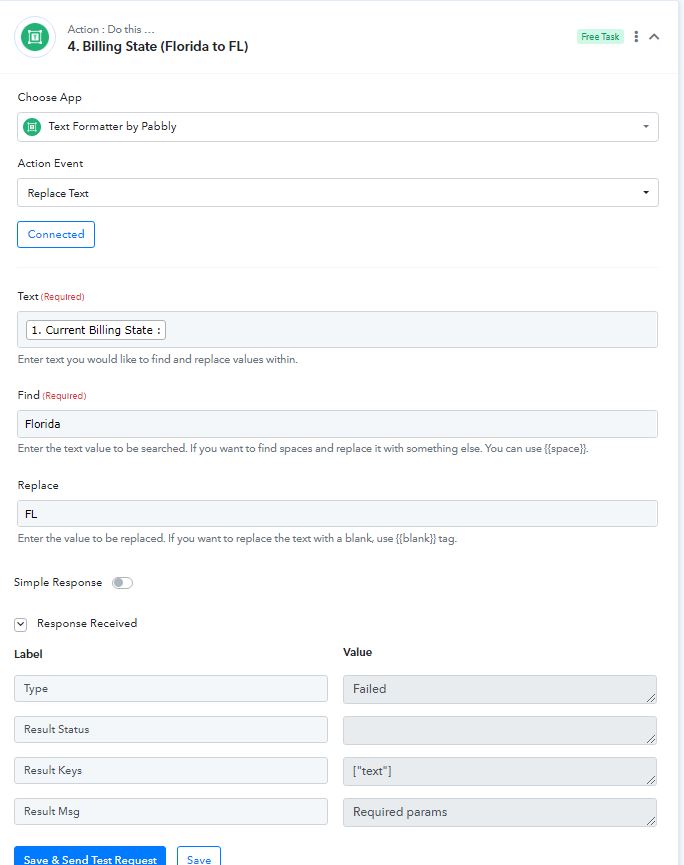
Any other Accounting Systems that I can use when I get this expectation of news they cant help. thanks in advance
In that case, you can check for the available application with us here for the accounting system- https://www.pabbly.com/connect/integrations/
Will this be done for all 50 states?
Yes, if you have 50 states and you intend to apply the same formatting that you have implemented for Florida and the United States, then you will need to select the text formatter for each individual state. This means that you will have to repeat the formatting process for all 50 states in order to ensure that the desired formatting is applied uniformly across all states.
My current example where Florida is the primary State I have been using in current and past data pulling. So I don't understand what is wrong?
As I can check, the mapping has been done correctly and accurately. As a result, your workflow is now functioning smoothly and efficiently without any issues or errors.
Hello @Glenn GTo achieve this, I suggest you to add a "Text formatter" in the action step of your workflow and select "Replace text" as the action event to replace specific text with another text.
Ensure that the text field is mapped correctly, and then proceed to enter the text to find in the "Find" field. In your case, the text to find is "Florida". Next, enter the replacement text in the "Replace" field, which in your case is "FL".
By following these steps, the text formatter will identify the specified text in the selected field and replace it with the desired text. This will ensure that your workflow processes the correct information and executes the intended actions accordingly.
Is this required for each state, country and province i expect details will be feild filled from.
If i add a "Text formatter" in the action step and only do it for Florida > FL.
Will this only be for "Florida =FL"
Same with all other places?
Hello @Glenn G
Will this only be for "Florida =FL"
Yes, you are correct. The action will only be applicable to Florida.
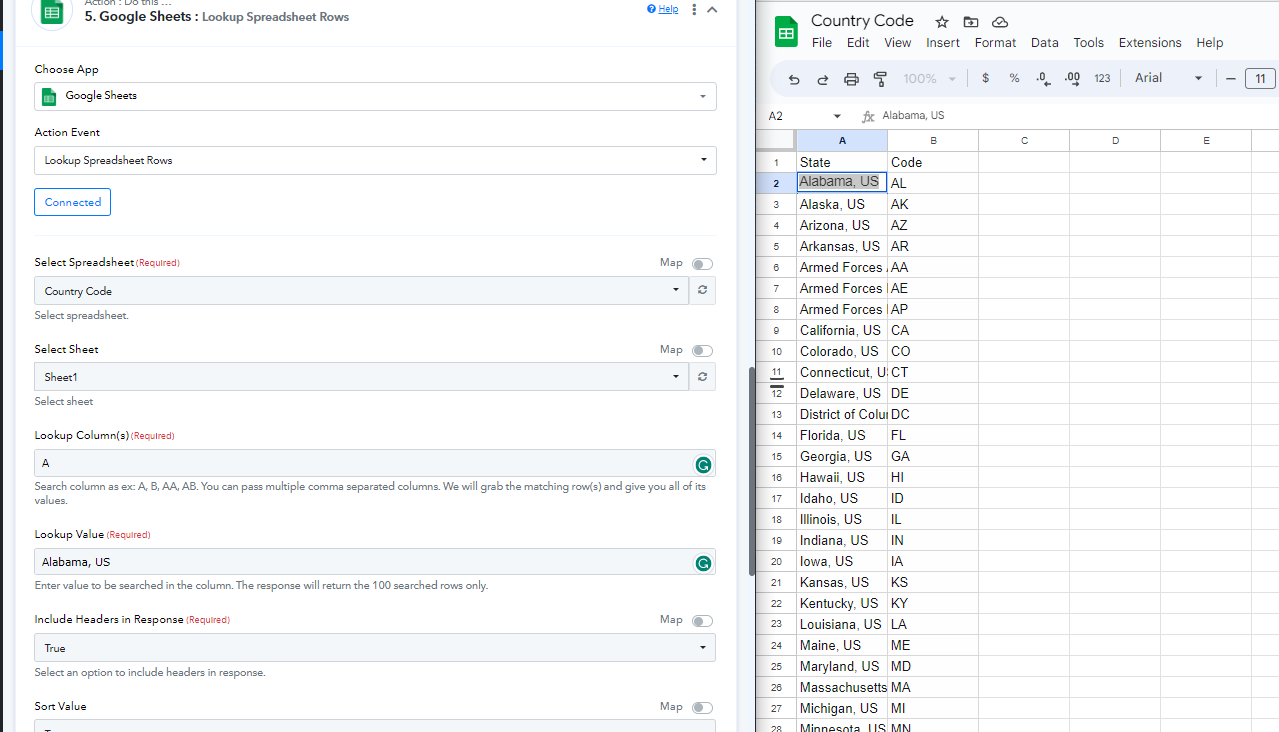
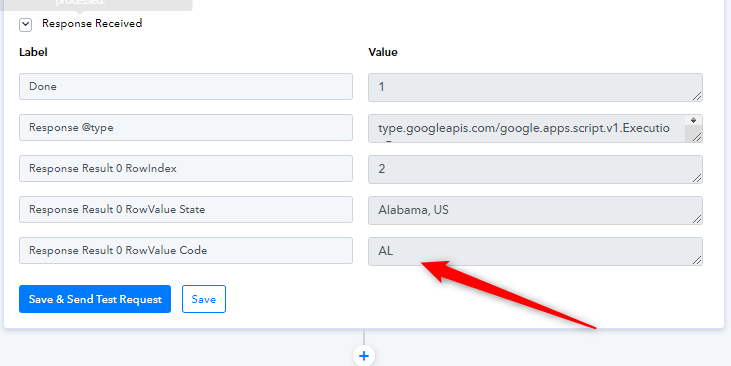
If you would like to extend the action to all other states, I kindly request you to copy and paste the names of all the countries and their respective country codes into the Google sheet. Then, add a "Lookup values" application in your action step. This will enable you to set the country code for all the countries and help streamline your workflow.
To assist you further, I am sharing a Google sheet link that contains the names of all the countries with their corresponding codes. Please take a look at the sheet and let me know if you are still experiencing any issues.
https://docs.google.com/spreadsheets/d/1bgY-rVmwQAXgkbdewGu2sZkqmUTtPX_h9vK3z79fdZc/edit?usp=sharing
Screenshot for your reference for workaround:
What about the reference of:
"Previous Fields" and "Current Fields"
when running a workflow?
if a workflow finds nothing in Current Fields because "Previous Fields" were empty.
Or a reverse of that Current Field is Filled in but no Previous Fields are empty because its a first time entry.
After the first time entry and we enter in some data but cant enter all data.
Missing a shipping address but have a billing address what can we do to prevent a loss of data being sent over?
we need to write out the data we can archive but cant not enter data but we need to have a place to start what is the process thereafter?
Attachments
I need some time to review and address your concern with our team. I will make sure to get back to you as soon as possible with an update on the matter. Thank you for your understanding.
So this is some of the details on this backend of Flowlu CRM Webhooks and details being shared with Pabbly Connect.
If someone can help me understand more on linking these to Wave Accounting.
CRM - Accounts - Create
CRM - Accounts
[TABLE]
[TR]
[TH]Name[/TH]
[TH]Description[/TH]
[/TR]
[TR]
[TD]id[/TD]
[TD]Absence's ID[/TD]
[/TR]
[TR]
[TD]type[/TD]
[TD](Required)Account type:
- Organization = 1
- Contact = 2
[/TR]
[TR]
[TD]name[/TD]
[TD]Name (title) for Organization[/TD]
[/TR]
[TR]
[TD]honorific_id[/TD]
[TD]Honorific title for Contact[/TD]
[/TR]
[TR]
[TD]first_name[/TD]
[TD]Contact first name[/TD]
[/TR]
[TR]
[TD]middle_name[/TD]
[TD]Contact middle (second) name[/TD]
[/TR]
[TR]
[TD]last_name[/TD]
[TD]Contact last name[/TD]
[/TR]
[TR]
[TD]second_name[/TD]
[TD][/TD]
[/TR]
[TR]
[TD]description[/TD]
[TD]Description[/TD]
[/TR]
[TR]
[TD]active[/TD]
[TD]If = 0, Inactive.
Default value = 1.[/TD]
[/TR]
[TR]
[TD]created_by[/TD]
[TD]User id[/TD]
[/TR]
[TR]
[TD]created_date[/TD]
[TD]Created date[/TD]
[/TR]
[TR]
[TD]created_from[/TD]
[TD][/TD]
[/TR]
[TR]
[TD]updated_by[/TD]
[TD][/TD]
[/TR]
[TR]
[TD]updated_date[/TD]
[TD]Updated date[/TD]
[/TR]
[TR]
[TD]merged_to[/TD]
[TD]Id of entry in which current account was merged[/TD]
[/TR]
[TR]
[TD]manager_id[/TD]
[TD]Assigned user id[/TD]
[/TR]
[TR]
[TD]industry_id[/TD]
[TD]id of entry in Industries table[/TD]
[/TR]
[TR]
[TD]company_type_id[/TD]
[TD]Id of entry in Account Categories table[/TD]
[/TR]
[TR]
[TD]pricelist_id[/TD]
[TD]Price list id[/TD]
[/TR]
[TR]
[TD]birth_date[/TD]
[TD][/TD]
[/TR]
[TR]
[TD]name_legal[/TD]
[TD]Legal name for Organization[/TD]
[/TR]
[TR]
[TD]name_legal_full[/TD]
[TD]Full legal name for Organization[/TD]
[/TR]
[TR]
[TD]phone[/TD]
[TD]Primary phone number[/TD]
[/TR]
[TR]
[TD]phone2[/TD]
[TD]Additional phone number[/TD]
[/TR]
[TR]
[TD]phone3[/TD]
[TD]Additional phone number[/TD]
[/TR]
[TR]
[TD]email[/TD]
[TD]Email (Deprecated) To add an E-mail, use E-mails[/TD]
[/TR]
[TR]
[TD]email_personal[/TD]
[TD]Personal email (Deprecated) To add an E-mail, use E-mails[/TD]
[/TR]
[TR]
[TD]web[/TD]
[TD]Website[/TD]
[/TR]
[TR]
[TD]icq[/TD]
[TD]ICQ id[/TD]
[/TR]
[TR]
[TD]skype[/TD]
[TD]Skype account id[/TD]
[/TR]
[TR]
[TD]link_google[/TD]
[TD]Link to Google+[/TD]
[/TR]
[TR]
[TD]link_facebook[/TD]
[TD]Link to Facebook[/TD]
[/TR]
[TR]
[TD]link_vk[/TD]
[TD]Link to Vk.com[/TD]
[/TR]
[TR]
[TD]link_linkedin[/TD]
[TD]Link to LinkedIn[/TD]
[/TR]
[TR]
[TD]link_instagram[/TD]
[TD]Link to Instagram[/TD]
[/TR]
[TR]
[TD]tax[/TD]
[TD]Account VAT (or TAX ID)[/TD]
[/TR]
[TR]
[TD]kpp[/TD]
[TD]Additional Account VAT (or TAX ID)[/TD]
[/TR]
[TR]
[TD]ogrn[/TD]
[TD]Additional Account VAT (or TAX ID)[/TD]
[/TR]
[TR]
[TD]bank[/TD]
[TD]Bank Details text[/TD]
[/TR]
[TR]
[TD]country[/TD]
[TD]Country[/TD]
[/TR]
[TR]
[TD]state[/TD]
[TD]State, Region[/TD]
[/TR]
[TR]
[TD]city[/TD]
[TD]City[/TD]
[/TR]
[TR]
[TD]postal_code[/TD]
[TD]ZIP code[/TD]
[/TR]
[TR]
[TD]address_1[/TD]
[TD]Address Line 1[/TD]
[/TR]
[TR]
[TD]address_2[/TD]
[TD]Address Line 2[/TD]
[/TR]
[TR]
[TD]address_3[/TD]
[TD]Address Line 3[/TD]
[/TR]
[TR]
[TD]shipping_country[/TD]
[TD]Country[/TD]
[/TR]
[TR]
[TD]shipping_state[/TD]
[TD]State, Region[/TD]
[/TR]
[TR]
[TD]shipping_city[/TD]
[TD]City[/TD]
[/TR]
[TR]
[TD]shipping_postal_code[/TD]
[TD]ZIP code[/TD]
[/TR]
[TR]
[TD]shipping_address_1[/TD]
[TD]Address Line 1[/TD]
[/TR]
[TR]
[TD]shipping_address_2[/TD]
[TD]Address Line 2[/TD]
[/TR]
[TR]
[TD]shipping_address_3[/TD]
[TD]Address Line 3[/TD]
[/TR]
[TR]
[TD]shipping_longitude[/TD]
[TD][/TD]
[/TR]
[TR]
[TD]shipping_latitude[/TD]
[TD][/TD]
[/TR]
[TR]
[TD]shipping_location_accuracy[/TD]
[TD][/TD]
[/TR]
[TR]
[TD]billing_country[/TD]
[TD]Country[/TD]
[/TR]
[TR]
[TD]billing_state[/TD]
[TD]State, Region[/TD]
[/TR]
[TR]
[TD]billing_city[/TD]
[TD]City[/TD]
[/TR]
[TR]
[TD]billing_postal_code[/TD]
[TD]ZIP code[/TD]
[/TR]
[TR]
[TD]billing_address_1[/TD]
[TD]Address Line 1[/TD]
[/TR]
[TR]
[TD]billing_address_2[/TD]
[TD]Address Line 2[/TD]
[/TR]
[TR]
[TD]billing_address_3[/TD]
[TD]Address Line 3[/TD]
[/TR]
[TR]
[TD]lead_id[/TD]
[TD][/TD]
[/TR]
[TR]
[TD]position[/TD]
[TD][/TD]
[/TR]
[TR]
[TD]company_id[/TD]
[TD][/TD]
[/TR]
[TR]
[TD]address[/TD]
[TD]Address[/TD]
[/TR]
[TR]
[TD]address_legal[/TD]
[TD]Legal address[/TD]
[/TR]
[TR]
[TD]currency_id[/TD]
[TD][/TD]
[/TR]
[TR]
[TD]tags[/TD]
[TD][/TD]
[/TR]
[TR]
[TD]address_sortable_id[/TD]
[TD][/TD]
[/TR]
[TR]
[TD]longitude[/TD]
[TD][/TD]
[/TR]
[TR]
[TD]latitude[/TD]
[TD][/TD]
[/TR]
[TR]
[TD]location_accuracy[/TD]
[TD][/TD]
[/TR]
[TR]
[TD]billing_longitude[/TD]
[TD][/TD]
[/TR]
[TR]
[TD]billing_latitude[/TD]
[TD][/TD]
[/TR]
[TR]
[TD]billing_location_accuracy[/TD]
[TD][/TD]
[/TR]
[TR]
[TD]old_company_id[/TD]
[TD][/TD]
[/TR]
[TR]
[TD]old_company_type[/TD]
[TD][/TD]
[/TR]
[TR]
[TD]old_contact_id[/TD]
[TD][/TD]
[/TR]
[TR]
[TD]search_content[/TD]
[TD][/TD]
[/TR]
[TR]
[TD]ref[/TD]
[TD]Name of the import source of the object (system, etc.)[/TD]
[/TR]
[TR]
[TD]ref_id[/TD]
[TD]UUID in the system from where the import was made.[/TD]
[/TR]
[TR]
[TD]guid_1c[/TD]
[TD]1c GUID[/TD]
[/TR]
[TR]
[TD]timezone[/TD]
[TD][/TD]
[/TR]
[TR]
[TD]organization_employee_count[/TD]
[TD][/TD]
[/TR]
[TR]
[TD]organization_revenue[/TD]
[TD][/TD]
[/TR]
[TR]
[TD]organization_expenses[/TD]
[TD][/TD]
[/TR]
[TR]
[TD]organization_registration_date[/TD]
[TD][/TD]
[/TR]
[TR]
[TD]last_activity_id[/TD]
[TD][/TD]
[/TR]
[TR]
[TD]last_activity_time[/TD]
[TD][/TD]
[/TR]
[TR]
[TD]last_activity_model[/TD]
[TD][/TD]
[/TR]
[/TABLE]
CRM - Accounts - Update
CRM - Accounts
[TABLE]
[TR]
[TH]Name[/TH]
[TH]Description[/TH]
[/TR]
[TR]
[TD]id[/TD]
[TD]Absence's ID[/TD]
[/TR]
[TR]
[TD]type[/TD]
[TD](Required)Account type:
- Organization = 1
- Contact = 2
[/TR]
[TR]
[TD]name[/TD]
[TD]Name (title) for Organization[/TD]
[/TR]
[TR]
[TD]honorific_id[/TD]
[TD]Honorific title for Contact[/TD]
[/TR]
[TR]
[TD]first_name[/TD]
[TD]Contact first name[/TD]
[/TR]
[TR]
[TD]middle_name[/TD]
[TD]Contact middle (second) name[/TD]
[/TR]
[TR]
[TD]last_name[/TD]
[TD]Contact last name[/TD]
[/TR]
[TR]
[TD]second_name[/TD]
[TD][/TD]
[/TR]
[TR]
[TD]description[/TD]
[TD]Description[/TD]
[/TR]
[TR]
[TD]active[/TD]
[TD]If = 0, Inactive.
Default value = 1.[/TD]
[/TR]
[TR]
[TD]created_by[/TD]
[TD]User id[/TD]
[/TR]
[TR]
[TD]created_date[/TD]
[TD]Created date[/TD]
[/TR]
[TR]
[TD]created_from[/TD]
[TD][/TD]
[/TR]
[TR]
[TD]updated_by[/TD]
[TD][/TD]
[/TR]
[TR]
[TD]updated_date[/TD]
[TD]Updated date[/TD]
[/TR]
[TR]
[TD]merged_to[/TD]
[TD]Id of entry in which current account was merged[/TD]
[/TR]
[TR]
[TD]manager_id[/TD]
[TD]Assigned user id[/TD]
[/TR]
[TR]
[TD]industry_id[/TD]
[TD]id of entry in Industries table[/TD]
[/TR]
[TR]
[TD]company_type_id[/TD]
[TD]Id of entry in Account Categories table[/TD]
[/TR]
[TR]
[TD]pricelist_id[/TD]
[TD]Price list id[/TD]
[/TR]
[TR]
[TD]birth_date[/TD]
[TD][/TD]
[/TR]
[TR]
[TD]name_legal[/TD]
[TD]Legal name for Organization[/TD]
[/TR]
[TR]
[TD]name_legal_full[/TD]
[TD]Full legal name for Organization[/TD]
[/TR]
[TR]
[TD]phone[/TD]
[TD]Primary phone number[/TD]
[/TR]
[TR]
[TD]phone2[/TD]
[TD]Additional phone number[/TD]
[/TR]
[TR]
[TD]phone3[/TD]
[TD]Additional phone number[/TD]
[/TR]
[TR]
[TD]email[/TD]
[TD]Email (Deprecated) To add an E-mail, use E-mails[/TD]
[/TR]
[TR]
[TD]email_personal[/TD]
[TD]Personal email (Deprecated) To add an E-mail, use E-mails[/TD]
[/TR]
[TR]
[TD]web[/TD]
[TD]Website[/TD]
[/TR]
[TR]
[TD]icq[/TD]
[TD]ICQ id[/TD]
[/TR]
[TR]
[TD]skype[/TD]
[TD]Skype account id[/TD]
[/TR]
[TR]
[TD]link_google[/TD]
[TD]Link to Google+[/TD]
[/TR]
[TR]
[TD]link_facebook[/TD]
[TD]Link to Facebook[/TD]
[/TR]
[TR]
[TD]link_vk[/TD]
[TD]Link to Vk.com[/TD]
[/TR]
[TR]
[TD]link_linkedin[/TD]
[TD]Link to LinkedIn[/TD]
[/TR]
[TR]
[TD]link_instagram[/TD]
[TD]Link to Instagram[/TD]
[/TR]
[TR]
[TD]tax[/TD]
[TD]Account VAT (or TAX ID)[/TD]
[/TR]
[TR]
[TD]kpp[/TD]
[TD]Additional Account VAT (or TAX ID)[/TD]
[/TR]
[TR]
[TD]ogrn[/TD]
[TD]Additional Account VAT (or TAX ID)[/TD]
[/TR]
[TR]
[TD]bank[/TD]
[TD]Bank Details text[/TD]
[/TR]
[TR]
[TD]country[/TD]
[TD]Country[/TD]
[/TR]
[TR]
[TD]state[/TD]
[TD]State, Region[/TD]
[/TR]
[TR]
[TD]city[/TD]
[TD]City[/TD]
[/TR]
[TR]
[TD]postal_code[/TD]
[TD]ZIP code[/TD]
[/TR]
[TR]
[TD]address_1[/TD]
[TD]Address Line 1[/TD]
[/TR]
[TR]
[TD]address_2[/TD]
[TD]Address Line 2[/TD]
[/TR]
[TR]
[TD]address_3[/TD]
[TD]Address Line 3[/TD]
[/TR]
[TR]
[TD]shipping_country[/TD]
[TD]Country[/TD]
[/TR]
[TR]
[TD]shipping_state[/TD]
[TD]State, Region[/TD]
[/TR]
[TR]
[TD]shipping_city[/TD]
[TD]City[/TD]
[/TR]
[TR]
[TD]shipping_postal_code[/TD]
[TD]ZIP code[/TD]
[/TR]
[TR]
[TD]shipping_address_1[/TD]
[TD]Address Line 1[/TD]
[/TR]
[TR]
[TD]shipping_address_2[/TD]
[TD]Address Line 2[/TD]
[/TR]
[TR]
[TD]shipping_address_3[/TD]
[TD]Address Line 3[/TD]
[/TR]
[TR]
[TD]shipping_longitude[/TD]
[TD][/TD]
[/TR]
[TR]
[TD]shipping_latitude[/TD]
[TD][/TD]
[/TR]
[TR]
[TD]shipping_location_accuracy[/TD]
[TD][/TD]
[/TR]
[TR]
[TD]billing_country[/TD]
[TD]Country[/TD]
[/TR]
[TR]
[TD]billing_state[/TD]
[TD]State, Region[/TD]
[/TR]
[TR]
[TD]billing_city[/TD]
[TD]City[/TD]
[/TR]
[TR]
[TD]billing_postal_code[/TD]
[TD]ZIP code[/TD]
[/TR]
[TR]
[TD]billing_address_1[/TD]
[TD]Address Line 1[/TD]
[/TR]
[TR]
[TD]billing_address_2[/TD]
[TD]Address Line 2[/TD]
[/TR]
[TR]
[TD]billing_address_3[/TD]
[TD]Address Line 3[/TD]
[/TR]
[TR]
[TD]lead_id[/TD]
[TD][/TD]
[/TR]
[TR]
[TD]position[/TD]
[TD][/TD]
[/TR]
[TR]
[TD]company_id[/TD]
[TD][/TD]
[/TR]
[TR]
[TD]address[/TD]
[TD]Address[/TD]
[/TR]
[TR]
[TD]address_legal[/TD]
[TD]Legal address[/TD]
[/TR]
[TR]
[TD]currency_id[/TD]
[TD][/TD]
[/TR]
[TR]
[TD]tags[/TD]
[TD][/TD]
[/TR]
[TR]
[TD]address_sortable_id[/TD]
[TD][/TD]
[/TR]
[TR]
[TD]longitude[/TD]
[TD][/TD]
[/TR]
[TR]
[TD]latitude[/TD]
[TD][/TD]
[/TR]
[TR]
[TD]location_accuracy[/TD]
[TD][/TD]
[/TR]
[TR]
[TD]billing_longitude[/TD]
[TD][/TD]
[/TR]
[TR]
[TD]billing_latitude[/TD]
[TD][/TD]
[/TR]
[TR]
[TD]billing_location_accuracy[/TD]
[TD][/TD]
[/TR]
[TR]
[TD]old_company_id[/TD]
[TD][/TD]
[/TR]
[TR]
[TD]old_company_type[/TD]
[TD][/TD]
[/TR]
[TR]
[TD]old_contact_id[/TD]
[TD][/TD]
[/TR]
[TR]
[TD]search_content[/TD]
[TD][/TD]
[/TR]
[TR]
[TD]ref[/TD]
[TD]Name of the import source of the object (system, etc.)[/TD]
[/TR]
[TR]
[TD]ref_id[/TD]
[TD]UUID in the system from where the import was made.[/TD]
[/TR]
[TR]
[TD]guid_1c[/TD]
[TD]1c GUID[/TD]
[/TR]
[TR]
[TD]timezone[/TD]
[TD][/TD]
[/TR]
[TR]
[TD]organization_employee_count[/TD]
[TD][/TD]
[/TR]
[TR]
[TD]organization_revenue[/TD]
[TD][/TD]
[/TR]
[TR]
[TD]organization_expenses[/TD]
[TD][/TD]
[/TR]
[TR]
[TD]organization_registration_date[/TD]
[TD][/TD]
[/TR]
[TR]
[TD]last_activity_id[/TD]
[TD][/TD]
[/TR]
[TR]
[TD]last_activity_time[/TD]
[TD][/TD]
[/TR]
[TR]
[TD]last_activity_model[/TD]
[TD][/TD]
[/TR]
[/TABLE]
Finance - Invoice - Create
Finance - Invoice
[TABLE]
[TR]
[TH]Name[/TH]
[TH]Description[/TH]
[/TR]
[TR]
[TD]id[/TD]
[TD]Absence's ID[/TD]
[/TR]
[TR]
[TD]active[/TD]
[TD]If = 0, Inactive.
Default value = 1.[/TD]
[/TR]
[TR]
[TD]invoice_number[/TD]
[TD]Invoice number[/TD]
[/TR]
[TR]
[TD]invoice_number_print[/TD]
[TD]Invoice print number[/TD]
[/TR]
[TR]
[TD]manager_id[/TD]
[TD]Assigned user id[/TD]
[/TR]
[TR]
[TD]category_id[/TD]
[TD]Category id Default- 0[/TD]
[/TR]
[TR]
[TD]company_name[/TD]
[TD]Customer name[/TD]
[/TR]
[TR]
[TD]company_legal_name[/TD]
[TD]Customer legal name[/TD]
[/TR]
[TR]
[TD]contact_person[/TD]
[TD]Contact[/TD]
[/TR]
[TR]
[TD]contact_person_position[/TD]
[TD]Contact person position[/TD]
[/TR]
[TR]
[TD]show_add_sign_string[/TD]
[TD]Show additional sigh string[/TD]
[/TR]
[TR]
[TD]contact_person2[/TD]
[TD]Secont contact[/TD]
[/TR]
[TR]
[TD]contact_person2_position[/TD]
[TD]Second contact position[/TD]
[/TR]
[TR]
[TD]date[/TD]
[TD]Invoice date[/TD]
[/TR]
[TR]
[TD]due_date[/TD]
[TD]Due date[/TD]
[/TR]
[TR]
[TD]status[/TD]
[TD]Status id:
- 5 - Empty
- 10 - New
- 12 - Need aproove
- 13 - Approved
- 20 - Partially Paid
- 30 - Overpaid
- 40 - Paid
[/TR]
[TR]
[TD]template_id[/TD]
[TD]Invoice template id[/TD]
[/TR]
[TR]
[TD]currency_id[/TD]
[TD]Currency symbol[/TD]
[/TR]
[TR]
[TD]ps_currency_id[/TD]
[TD]currency Id of estimated revenue[/TD]
[/TR]
[TR]
[TD]plan_money_id[/TD]
[TD]CONFIG.PLAN_MONEY_ID.DESC[/TD]
[/TR]
[TR]
[TD]pm_currency_id[/TD]
[TD]CONFIG.PLAN_MONEY_CURRENCY_ID.DESC[/TD]
[/TR]
[TR]
[TD]plan_money_total[/TD]
[TD]CONFIG.PLAN_MONEY_TOTAL.DESC[/TD]
[/TR]
[TR]
[TD]currency_code[/TD]
[TD]Currency code[/TD]
[/TR]
[TR]
[TD]sub_total[/TD]
[TD]Sub total[/TD]
[/TR]
[TR]
[TD]tax_total[/TD]
[TD]Tax total[/TD]
[/TR]
[TR]
[TD]total[/TD]
[TD]Total[/TD]
[/TR]
[TR]
[TD]bcy_paid_total[/TD]
[TD]Amount in the account's base currency[/TD]
[/TR]
[TR]
[TD]pscy_paid_total[/TD]
[TD]Amount in the currency of estimated revenue[/TD]
[/TR]
[TR]
[TD]shipping_charge[/TD]
[TD]Shipping charge[/TD]
[/TR]
[TR]
[TD]adjustment[/TD]
[TD]Adjustment[/TD]
[/TR]
[TR]
[TD]adjustment_description[/TD]
[TD]Adjustment description[/TD]
[/TR]
[TR]
[TD]discount[/TD]
[TD]Discount[/TD]
[/TR]
[TR]
[TD]discount_before_tax[/TD]
[TD]Discount before tax[/TD]
[/TR]
[TR]
[TD]invoice_emailed[/TD]
[TD]Email status.
- 1 - Sended
- 0 - Not sended
[/TR]
[TR]
[TD]invoice_emailed_date[/TD]
[TD]Invoice emailed date[/TD]
[/TR]
[TR]
[TD]reminders_sent[/TD]
[TD]Remainder sent[/TD]
[/TR]
[TR]
[TD]reminders_sent_date[/TD]
[TD]Sent date[/TD]
[/TR]
[TR]
[TD]payment_options[/TD]
[TD]Payment options[/TD]
[/TR]
[TR]
[TD]invoice_footer[/TD]
[TD]Custom Note[/TD]
[/TR]
[TR]
[TD]invoice_terms[/TD]
[TD]CONFIG.M.FIN.INVOICE.INVOICE_TERMS_TEXT.DESCTerms and Conditions[/TD]
[/TR]
[TR]
[TD]address1_address[/TD]
[TD]Bill from address[/TD]
[/TR]
[TR]
[TD]address1_city[/TD]
[TD]Bill from city[/TD]
[/TR]
[TR]
[TD]address1_state[/TD]
[TD]Bill from state[/TD]
[/TR]
[TR]
[TD]address1_zip[/TD]
[TD]Bill from zip[/TD]
[/TR]
[TR]
[TD]address1_country_id[/TD]
[TD]Bill from country[/TD]
[/TR]
[TR]
[TD]address2_address[/TD]
[TD]Address[/TD]
[/TR]
[TR]
[TD]address2_city[/TD]
[TD]Bill to city[/TD]
[/TR]
[TR]
[TD]address2_state[/TD]
[TD]Bill to state[/TD]
[/TR]
[TR]
[TD]address2_zip[/TD]
[TD]Bill to ZIP[/TD]
[/TR]
[TR]
[TD]address2_country_id[/TD]
[TD]Country ID[/TD]
[/TR]
[TR]
[TD]address3_address[/TD]
[TD][/TD]
[/TR]
[TR]
[TD]address3_city[/TD]
[TD][/TD]
[/TR]
[TR]
[TD]address3_state[/TD]
[TD][/TD]
[/TR]
[TR]
[TD]address3_zip[/TD]
[TD][/TD]
[/TR]
[TR]
[TD]address3_country_id[/TD]
[TD][/TD]
[/TR]
[TR]
[TD]created_by[/TD]
[TD]User id[/TD]
[/TR]
[TR]
[TD]created_date[/TD]
[TD]Created date[/TD]
[/TR]
[TR]
[TD]changed_by[/TD]
[TD]User id[/TD]
[/TR]
[TR]
[TD]changed_date[/TD]
[TD]Updated date[/TD]
[/TR]
[TR]
[TD]module[/TD]
[TD]Module[/TD]
[/TR]
[TR]
[TD]model[/TD]
[TD]Model[/TD]
[/TR]
[TR]
[TD]model_id[/TD]
[TD]Model id[/TD]
[/TR]
[TR]
[TD]group_id[/TD]
[TD]Group id[/TD]
[/TR]
[TR]
[TD]org_id[/TD]
[TD]Organization id[/TD]
[/TR]
[TR]
[TD]org_account_id[/TD]
[TD]Organization account id[/TD]
[/TR]
[TR]
[TD]ref[/TD]
[TD]Name of the import source of the object (system, etc.)[/TD]
[/TR]
[TR]
[TD]ref_id[/TD]
[TD]UUID in the system from where the import was made.[/TD]
[/TR]
[TR]
[TD]company_phone[/TD]
[TD]Phone[/TD]
[/TR]
[TR]
[TD]company_phone2[/TD]
[TD]Company second phone[/TD]
[/TR]
[TR]
[TD]company_vat[/TD]
[TD]Additional Account VAT (or TAX ID)[/TD]
[/TR]
[TR]
[TD]company_vat2[/TD]
[TD]Additional Account VAT (or TAX ID)[/TD]
[/TR]
[TR]
[TD]org_phone[/TD]
[TD]Organization phone[/TD]
[/TR]
[TR]
[TD]org_phone2[/TD]
[TD]Organization phone[/TD]
[/TR]
[TR]
[TD]org_vat[/TD]
[TD]Additional Account VAT (or TAX ID)[/TD]
[/TR]
[TR]
[TD]org_vat2[/TD]
[TD]Additional Account VAT (or TAX ID)[/TD]
[/TR]
[TR]
[TD]tax1[/TD]
[TD]Tax 1 (%)[/TD]
[/TR]
[TR]
[TD]tax2[/TD]
[TD]Tax 2 (%)[/TD]
[/TR]
[TR]
[TD]tax1_included[/TD]
[TD]
- 1 - Include in price
- 0 - Not included
[/TR]
[TR]
[TD]tax2_included[/TD]
[TD]TAX2:
- 1 - Include in price
- 0 - Not included
[/TR]
[TR]
[TD]discount_is_percent[/TD]
[TD]Is discount percent (Default - 1):
- 1 - Yes
- 0 - No
Default - 1[/TD]
[/TR]
[TR]
[TD]crm_company_id[/TD]
[TD]Customer id[/TD]
[/TR]
[TR]
[TD]uuid[/TD]
[TD]A universally unique identifier (UUID) is a 128-bit number used to identify information in computer systems[/TD]
[/TR]
[TR]
[TD]type[/TD]
[TD]Invoice type[/TD]
[/TR]
[TR]
[TD]is_template[/TD]
[TD]Is template:
- 1 - Yes
- 0 - No
[/TR]
[TR]
[TD]template_name[/TD]
[TD]Template name[/TD]
[/TR]
[TR]
[TD]pricelist_id[/TD]
[TD]Price list id[/TD]
[/TR]
[TR]
[TD]bank_id[/TD]
[TD]Bank id[/TD]
[/TR]
[TR]
[TD]bank[/TD]
[TD]Bank name[/TD]
[/TR]
[TR]
[TD]paymethod_id[/TD]
[TD]Paymethod id[/TD]
[/TR]
[TR]
[TD]estimate_id[/TD]
[TD]Estimate id[/TD]
[/TR]
[TR]
[TD]exported_1c[/TD]
[TD]Exported 1C[/TD]
[/TR]
[TR]
[TD]reference[/TD]
[TD]Name of the import source of the object (system, etc.)[/TD]
[/TR]
[TR]
[TD]paid_date[/TD]
[TD]Paid date[/TD]
[/TR]
[TR]
[TD]recurring_invoice_id[/TD]
[TD]Recurring invoice id[/TD]
[/TR]
[/TABLE]
What about the reference of:"Previous Fields" and "Current Fields"
when running a workflow?if a workflow finds nothing in Current Fields because "Previous Fields" were empty.
Or a reverse of that Current Field is Filled in but no Previous Fields are empty because its a first time entry.
After the first time entry and we enter in some data but cant enter all data.
Missing a shipping address but have a billing address what can we do to prevent a loss of data being sent over?
we need to write out the data we can archive but cant not enter data but we need to have a place to start what is the process thereafter?
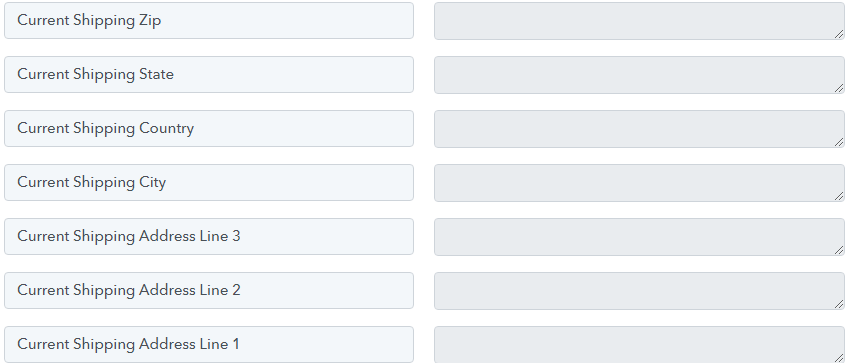
As i shared below you can see many blank spaces where details wont show as nothing is being allowed by the Flowlu.com - how do i get around this? If i must fill in all fields?
Hey @Glenn G
Can you please provide more information about the specific event you are referring to when you mention the "Current field" and "Previous field"? This will help me to understand your question better and provide you with more accurate assistance.
Also, can you let me know which event you are using within Flowlu so that I can review it and provide further guidance?
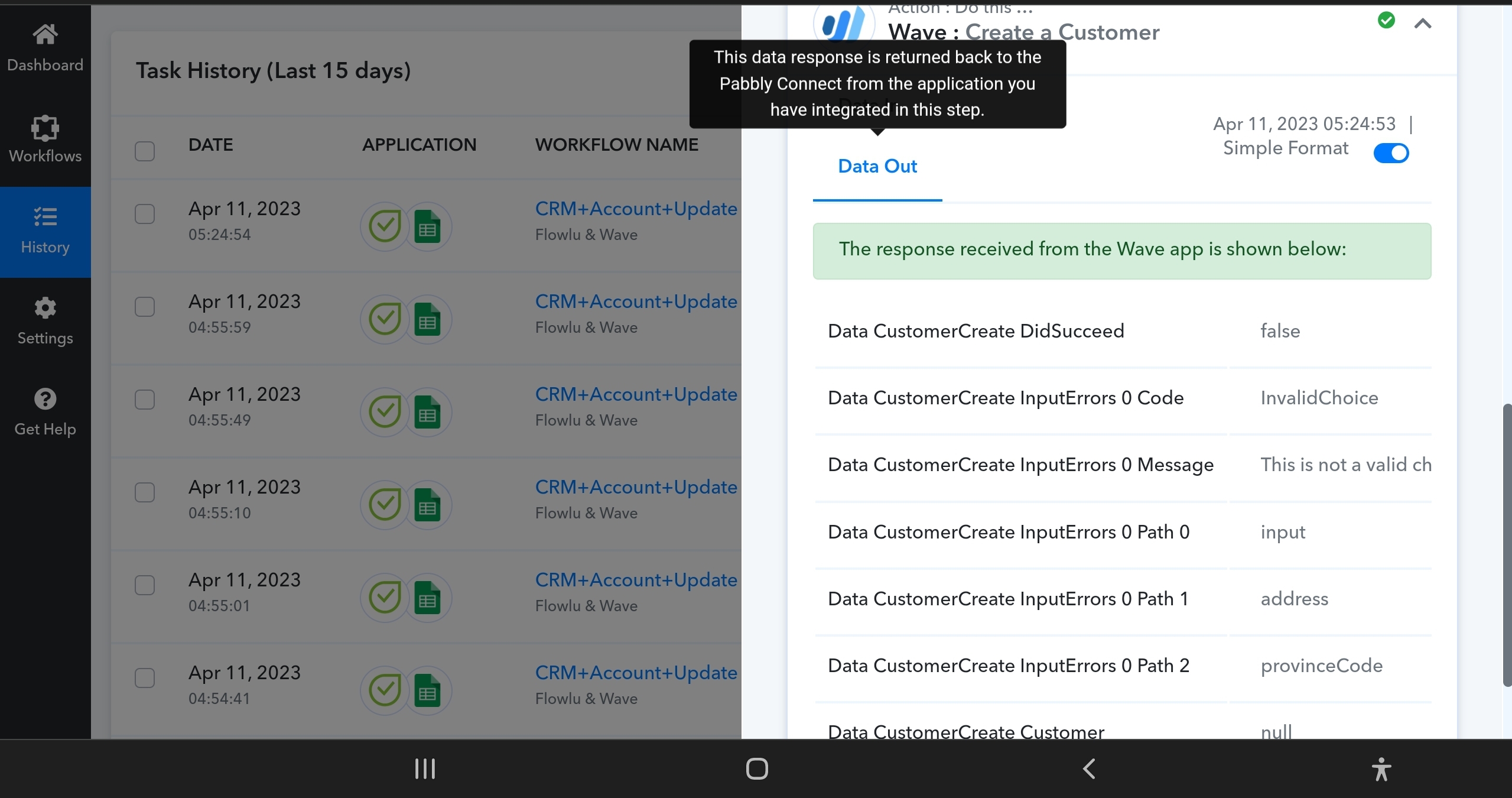
here is the cuurent error i have
from pabbly connect based on dt made above can you please update as to next course of action???
Attachments
im looking for a pabbly connect from
Flowlu CRM (www.flowlu.com) to Wave Accounting (www.wavapps.com)
● Accounts 2-ways sync
● Contacts 2-ways sync
● Invoices 2-ways sync
● Refunds 2-ways sync.
● Credits 2-ways sync.
● Payments 2-ways sync.
● A/R (Accounts Receivable) 2-ways sync
● A/P (Accounts Payable) 2-ways sync
from pabbly connect based on dt made above can you please update as to next course of action???
Based on the information you provided, it appears that there was an issue with the province code in your workflow. However, our team has mapped the province code in your workflow and after testing it, it seems to be working perfectly.
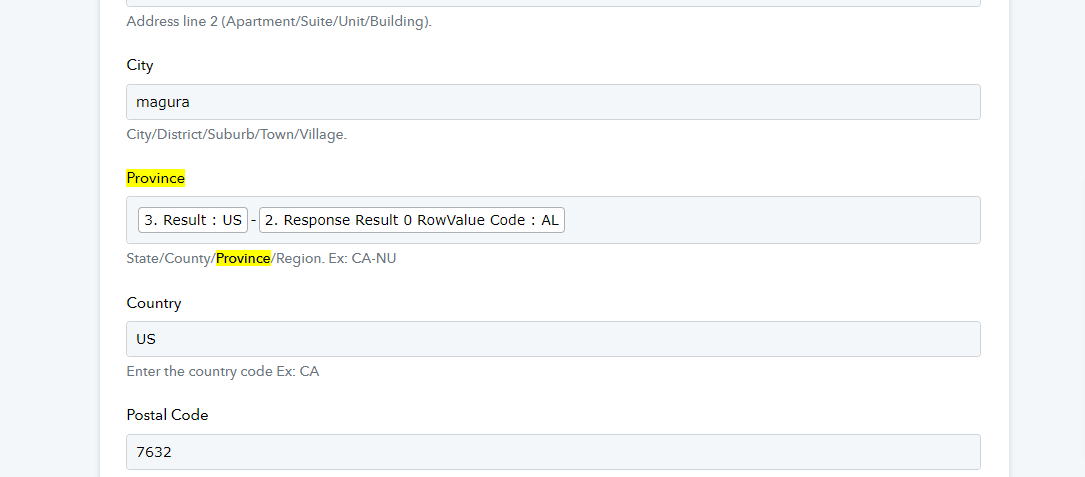
To ensure that the issue is resolved from your end too, I request you to please check the workflow and test it thoroughly. If you encounter any issues or errors, please let me know immediately so that we can further investigate and resolve the issue.
Flowlu CRM (www.flowlu.com) to Wave Accounting (www.wavapps.com)
Based on your query, I would like to inform you that currently, the following syncing options are available:
●Accounts 2-ways sync
● Contacts 2-ways sync
● Invoices 2-ways sync
Please note that any other type of sync or customization outside of these options may not be possible.
Based on the information you provided, it appears that there was an issue with the province code in your workflow. However, our team has mapped the province code in your workflow and after testing it, it seems to be working perfectly.
To ensure that the issue is resolved from your end too, I request you to please check the workflow and test it thoroughly. If you encounter any issues or errors, please let me know immediately so that we can further investigate and resolve the issue.Based on your query, I would like to inform you that currently, the following syncing options are available:
●Accounts 2-ways sync
● Contacts 2-ways sync
● Invoices 2-ways syncPlease note that any other type of sync or customization outside of these options may not be possible.
So ok will that mean there is an issue on Waveapps.com?
What about the reference of:"Previous Fields" and "Current Fields"
when running a workflow?if a workflow finds nothing in Current Fields because "Previous Fields" were empty.
Or a reverse of that Current Field is Filled in but no Previous Fields are empty because its a first time entry.
After the first time entry and we enter in some data but cant enter all data.
Missing a shipping address but have a billing address what can we do to prevent a loss of data being sent over?
we need to write out the data we can archive but cant not enter data but we need to have a place to start what is the process thereafter?
As i shared below you can see many blank spaces where details wont show as nothing is being allowed by the Flowlu.com - how do i get around this? If i must fill in all fields?
My current example where Florida is the primary State I have been using in current and past data pulling. So I don't understand what is wrong?
Cant seem to fix this still made notes above
https://connect.pabbly.com/workflow/mapping/IjU3NmQwNTZmMDYzNjA0MzE1MjZhNTUzNiI_3D_pc
Attachments
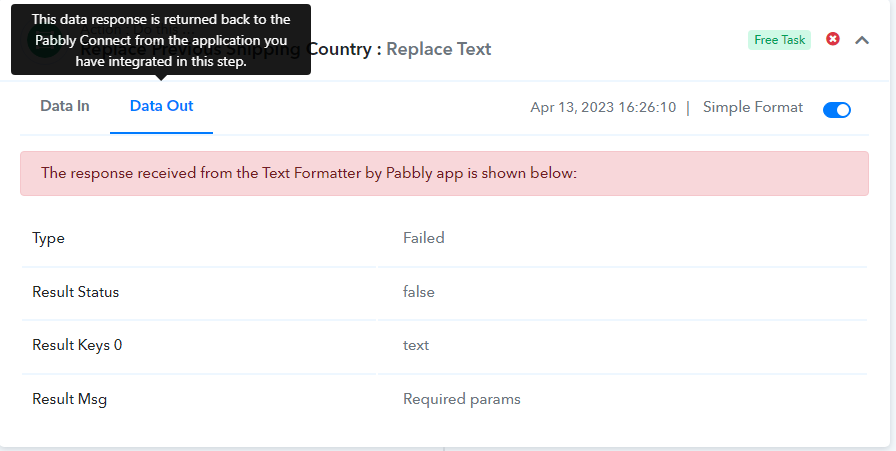
Seems all works until i check the backend....
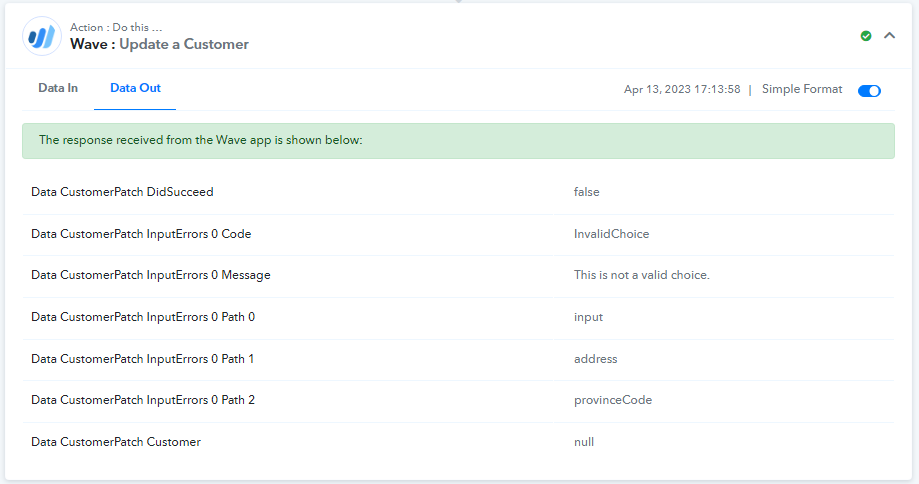
This error message keeps showing up...
Response Received:
[TABLE]
[TR]
[TD]Label[/TD]
[TD]Value[/TD]
[/TR]
[TR]
[TD]Data CustomerPatch DidSucceed[/TD]
[TD][/TD]
[/TR]
[TR]
[TD]Data CustomerPatch InputErrors 0 Code[/TD]
[TD]InvalidChoice[/TD]
[/TR]
[TR]
[TD]Data CustomerPatch InputErrors 0 Message[/TD]
[TD]This is not a valid choice.[/TD]
[/TR]
[TR]
[TD]Data CustomerPatch InputErrors 0 Path 0[/TD]
[TD]input[/TD]
[/TR]
[TR]
[TD]Data CustomerPatch InputErrors 0 Path 1[/TD]
[TD]address[/TD]
[/TR]
[TR]
[TD]Data CustomerPatch InputErrors 0 Path 2[/TD]
[TD]provinceCode[/TD]
[/TR]
[TR]
[TD]Data CustomerPatch Customer[/TD]
[TD][/TD]
[/TR]
[/TABLE]
Looking on the Wave Accounting.
No Update Shown.
Attachments
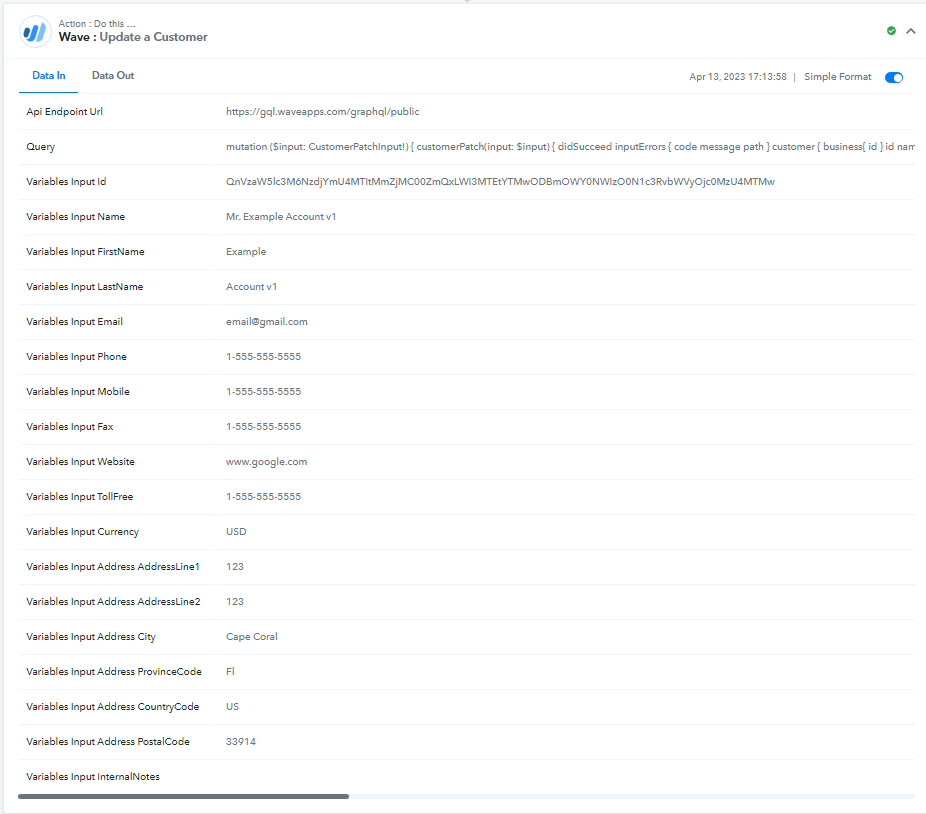
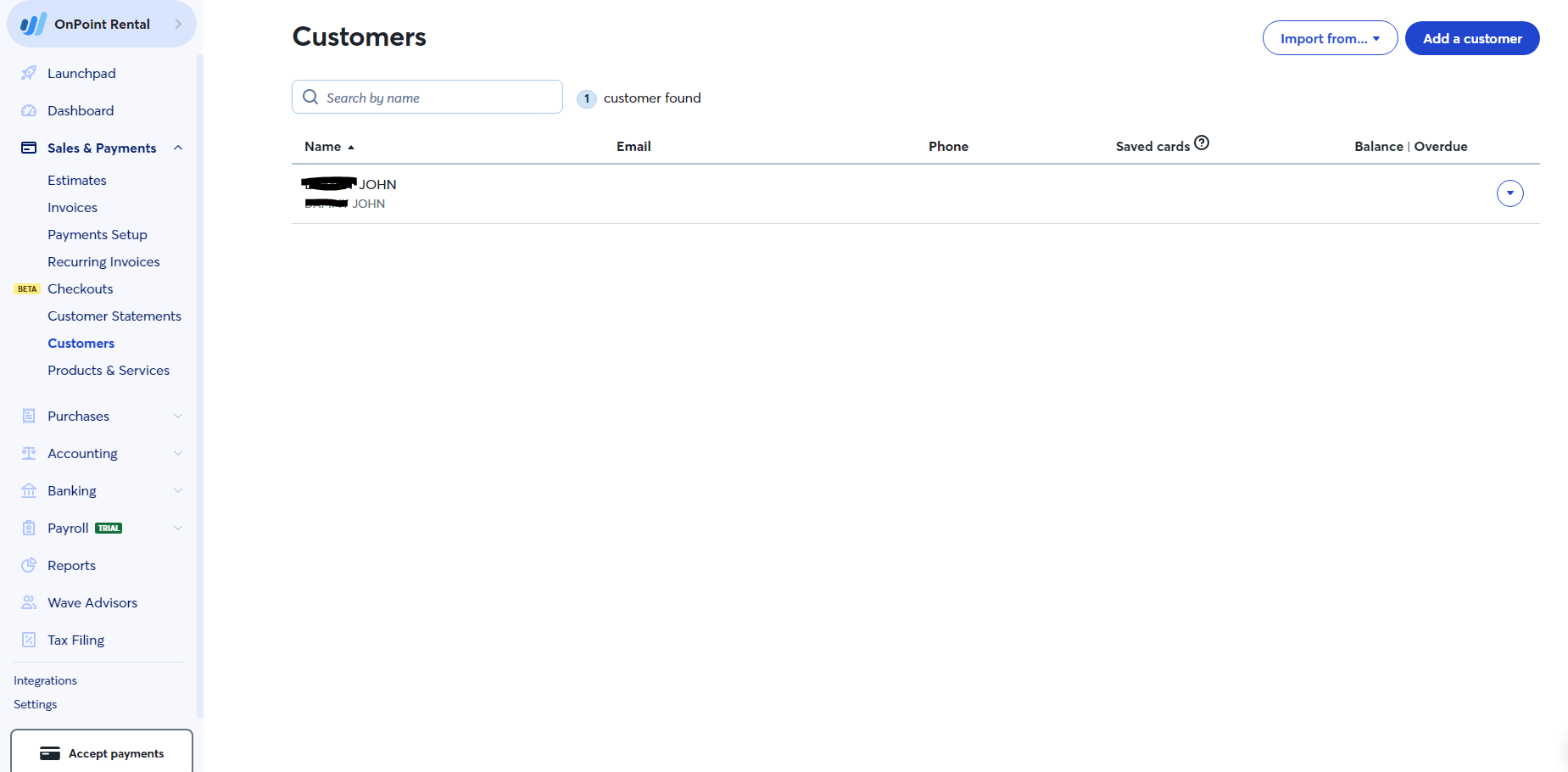
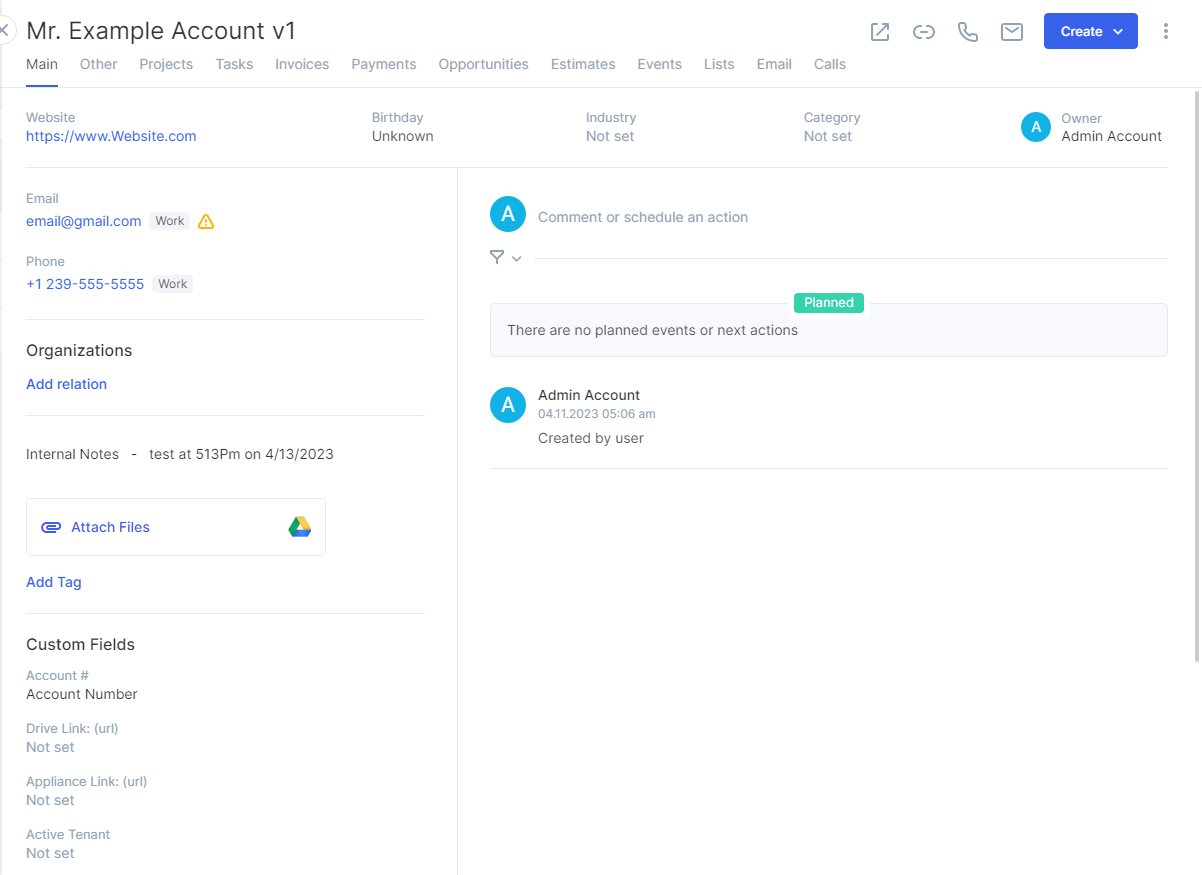
Please allow us some time, we are currently looking into it.
Hello @Glenn G
Based on the issue you're facing, I recommend the following steps to resolve it:
Firstly, I have noticed that the Province field was entered incorrectly in your workflow, which caused the issue. I have corrected it by entering the Province in the correct field in a correct manner.

However, you are now facing an error with the customer ID. To resolve this issue, I suggest adding the "Wave: Get Customer by Email" as an action step, which will retrieve the correct customer ID.
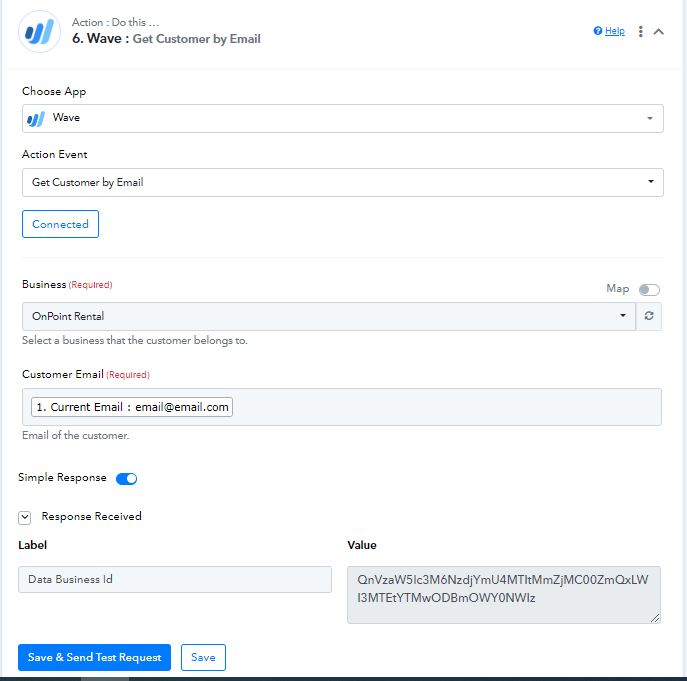
Once you have added the above step, please recapture the response from Flow Lu and remap the fields again.
To resolve this issue, you should review the request and ensure that the correct customer ID is being used. It's possible that the customer ID has been deleted or modified since the request was made. You may need to retrieve the updated customer ID and use it in your request instead.
I hope the above steps will help you to resolve the issue. If you face any further issues, please feel free to contact us.